
Detect Duplicate Shopify Orders: Why Flow Fails & 3 Rules
Learn why Shopify Flow cannot detect duplicate orders across customer histories, and discover three automated rules to prevent double fulfillment.

- NV Trends
- 16 min read
Shopify Flow cannot detect duplicate orders because its event-driven engine evaluates incoming orders in complete isolation, lacking the native capability to compare line items, quantities, or delivery details against a customer’s historical transactions. When a new order triggers a workflow, Flow inspects only that single order payload and cannot natively loop through a customer’s previous order history to determine whether the exact same items were purchased ten minutes earlier.
For ecommerce operators—especially direct-to-consumer (D2C) brands in India dealing with high order volumes, payment gateway timeouts, and Cash on Delivery (COD) traffic—this architectural blind spot creates recurring operational friction. A shopper dealing with a frozen UPI payment screen or an unconfirmed mobile checkout often taps the submit button repeatedly or submits a second order to ensure their items are secured. Without an automated gatekeeper, both orders proceed directly to warehouse pick-and-pack queues.
Left unchecked, accidental duplicate orders drain operating margins through double shipping costs, non-refundable payment gateway fees, inventory lockups, and unnecessary customer support tickets. While merchants frequently turn to basic checkout tweaks or brittle tagging hacks to mitigate the problem, preventing duplicate fulfillment reliably requires an automated rules engine designed for cross-order evaluation.
Key takeaways
- Architectural limitation: Shopify Flow operates statelessly per event, meaning it cannot natively query historical order line items or compare a new checkout against a buyer’s previous orders.
- The root causes: Payment gateway latency (especially UPI and Net Banking redirects), delayed SMS confirmations, and double-tapping checkout buttons on mobile devices drive the vast majority of accidental duplicates.
- Native workarounds are inadequate: Simple Flow “customer tagging” hacks introduce high false-positive rates by treating legitimate repeat buyers as duplicates while missing guest checkouts with slight email variations.
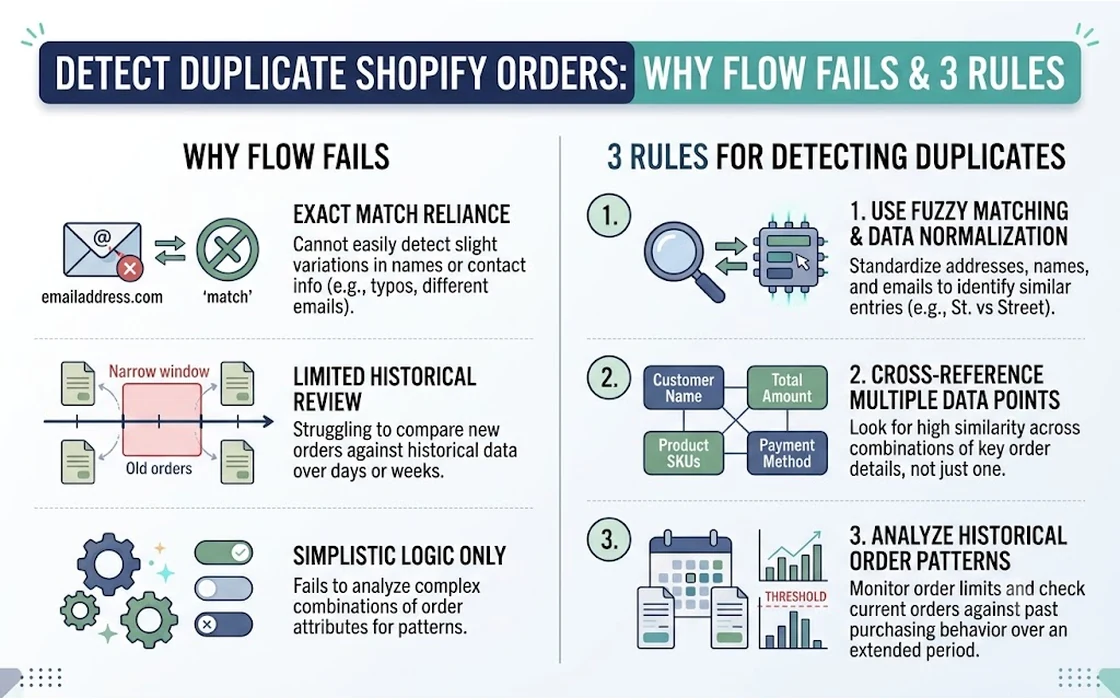
- The 3 core detection rules: Reliable screening requires evaluating (1) identical contact details and shipping address within a 24-hour window, (2) exact SKU and quantity matches across recent order history, and (3) rapid-fire order clustering within 5 to 15 minutes.
- Automate holds, not cancellations: Suspected duplicates should trigger an immediate fulfillment hold and an automated verification message rather than an outright cancellation.
The Cost of Duplicate Orders for Growing Brands
Duplicate orders might initially look like an occasional customer service inconvenience, but at scale, they represent a direct leak in bottom-line profitability. In the Indian ecommerce landscape, where average order values (AOV) often hover between Rs. 999 and Rs. 2,999, fulfilling an unintentional duplicate order triggers several non-recoverable expenses:
- Forward and Reverse Logistics Losses: Fulfilling two identical orders to the same address means paying courier charges twice (typically Rs. 60 to Rs. 100 for forward shipping per parcel via logistics partners like Delhivery or Blue Dart). When the customer realizes the error and rejects the second package at the doorstep, the store incurs Return to Origin (RTO) charges (an additional Rs. 70 to Rs. 120), wiping out the profit margin of the original sale.
- Sunk Payment Processing Fees: When a customer accidentally pays twice via UPI, credit card, or net banking, the merchant must refund the duplicate transaction. Major payment aggregators do not refund the standard 2% processing fee (plus 18% GST on the fee) when a transaction is reversed. On a Rs. 3,000 duplicate prepaid order, that equates to roughly Rs. 70 in completely unrecoverable transaction costs.
- Artificial Inventory Depletion: During high-velocity flash sales or festival promotions (such as Diwali or Republic Day sales), duplicate orders lock up limited inventory. If an item shows “Out of Stock” because five duplicate orders reserved units that will eventually be returned, legitimate paying customers are turned away.
- Warehouse Overhead: Packing, labeling, manifesting, and later unboxing and restocking returned inventory consumes manual labor hours that should be spent fulfilling unique customer demand.
For stores managing hundreds of dispatches a day, integrating proactive screening into daily operations is as vital as implementing Shopify order fraud prevention screening rules to protect margins from systemic operational leaks.
Why Shopify Flow Cannot Detect Duplicate Orders Natively
Merchants frequently assume that Shopify Flow—Shopify’s native automation platform—can solve this issue with a simple workflow. However, as highlighted in technical discussions across the Shopify Community, Flow was intentionally built with an event-driven, single-payload architecture that makes cross-order comparison structurally impossible without external tooling.
Incoming Order Placed
       │
       ▼
Shopify Flow Trigger: "Order Created"
       │
       ├── Reads: Current Order (Line Items, Shipping Address, Total)
       ├── Reads: Customer Object (ordersCount, totalSpent, tags)
       │
       ▼
Evaluation Check: "Does this order match previous order line items?"
       │
       └── ❌ CANNOT EXECUTE: Flow cannot loop through past orders
              to compare SKUs, addresses, or timestamps.
The Single-Payload Execution Model
When an order is placed, Shopify Flow triggers on the Order created event. The payload delivered to Flow contains the data attributes of that specific order along with the linked Customer resource.
Flow allows you to inspect fields such as:
order.totalPriceorder.lineItemsorder.shippingAddress.address1order.customer.ordersCount
What Flow cannot do is iterate over an array of historical orders. While order.customer.ordersCount tells you that a customer has placed 3 orders in total, Flow does not provide a mechanism to open Order #1 and Order #2, extract their respective line item SKUs, and compare them against Order #3.
The Limits of Flow’s “Send Admin API Request”
Some advanced merchants attempt to use Flow’s “Send Admin API request” action to query the Shopify GraphQL Admin API directly. While theoretically possible to query a customer’s previous orders using GraphQL, Flow provides no native way to parse the returned JSON response array, loop through individual line items, and execute conditional branching based on the returned values. The action functions essentially as a one-way webhook with no internal logic engine to process complex relational data.
Consequently, trying to force Shopify Flow to act as a historical comparison engine results in broken workflows, unhandled exceptions, and unflagged orders.
Native Workarounds and Why They Fall Short
Before turning to dedicated rules engines, many merchants experiment with UX tweaks or customer-tagging workarounds. While these approaches can address minor symptoms, each carries critical operational trade-offs.
1. Checkout UX and Submit Button Throttling
A frequent cause of duplicate orders is the user “double-tapping” the place order button on a lagging mobile connection. Most modern Shopify themes and Shopify Checkout natively disable the submit button once clicked, displaying a loading spinner.
- Why it falls short: This only prevents double clicks happening within milliseconds of each other. It does nothing if the buyer waits 30 seconds, encounters a gateway timeout, presses the browser “Back” button, and resubmits the checkout.
2. The Flow “Customer Tagging” Delay Hack
A popular community workaround involves using Shopify Flow to tag customers temporarily upon order creation:
- Trigger: Order created.
- Action: Check if the customer has the tag
Ordered_Recently. - Branch A (Tag Exists): If yes, tag the new order as
Possible Duplicateand notify customer support. - Branch B (Tag Does Not Exist): Add the tag
Ordered_Recentlyto the customer. Wait 12 hours (using Flow’s “Wait” action), then remove the tag.
Order Created
     │
     ├── Customer has tag "Ordered_Recently"?
     │         │
     │         ├── YES ──► Tag Order: "Possible Duplicate" (High False Positives)
     │         │
     │         └── NO  ──► Add tag "Ordered_Recently" ──► Wait 12h ──► Remove tag
- Why it falls short: This workaround produces a staggering rate of false positives. If an enthusiastic shopper buys a dress, navigates back to your store an hour later, and purchases a matching pair of earrings, their second purchase is incorrectly flagged as a duplicate. The tag hack evaluates timing, but it has zero visibility into whether the items or quantities actually match.
- Furthermore, if the customer uses a different email address or guest checkout, the customer tag is completely bypassed.
3. Immediate Post-Purchase Communication
Merchants sometimes try to resolve the duplicate order problem by relying on instant confirmation channels (such as automated SMS or WhatsApp order alerts). When customers immediately see a confirmation message stating their order was received, they are far less likely to place a panic re-order.
While proactive messaging significantly reduces accidental duplicate submissions, it does not catch orders that were placed simultaneously or within seconds of each other. Additionally, when a customer realizes they made a mistake, merchants must know how to edit a Shopify order after it’s placed to adjust quantities or remove items without forcing the customer through a messy cancellation and re-order cycle.
The 3 Rules That Accurately Catch Duplicate Orders
To prevent duplicate fulfillment without disrupting legitimate repeat buyers, detection must rely on multi-attribute rules. A rules engine connects to Shopify’s APIs via webhooks, queries the customer’s historical order log in real time, and evaluates specific parameters before releasing the order for fulfillment.
Here are the three rules that accurately isolate unintentional duplicates:
┌─────────────────────────────────────────────────────────────────────────────┐
│                       Incoming Order Verification                           │
└──────────────────────────────────────┬──────────────────────────────────────┘
                                       │
                ┌──────────────────────┼──────────────────────┐
                ▼                      ▼                      ▼
        ┌───────────────┐      ┌───────────────┐      ┌───────────────┐
        │    Rule 1     │      │    Rule 2     │      │    Rule 3     │
        │ Same Contact  │      │ Exact SKU &   │      │ Micro-Window  │
        │ & Address in  │      │ Quantity in   │      │ Clustering    │
        │   24 Hours    │      │ Recent Orders │      │ (<15 Minutes) │
        └───────┬───────┘      └───────┬───────┘      └───────┬───────┘
                │                      │                      │
                └──────────────────────┼──────────────────────┘
                                       │
                                       ▼
                       Condition Met on All/Key Rules?
                                       │
                         ├── YES ──► Place Fulfillment Hold
                         │           Tag: "Duplicate_Suspected"
                         │
                         └── NO  ──► Release to Warehouse
Rule 1: Same Contact and Shipping Address Within a 24-Hour Rolling Window
The baseline requirement for a duplicate order is that it is headed to the same physical recipient. Evaluating contact details alone is insufficient because buyers frequently share accounts or use different family members’ names on the same shipping destination.
- Evaluation Logic:
- Match normalized phone number OR normalized email address.
- AND match standardized shipping address (address line 1, postal/PIN code, and city).
- AND check if the previous order timestamp falls within the last 24 hours.
- Why this works: Standardizing and normalizing the address string (e.g., stripping punctuation, whitespace, and case sensitivity) prevents simple variations—such as “Flat 402, Green Heights” versus “402 Green Heights”—from escaping detection.
- Exceptions to apply: If the new order contains a completely different product category or SKU set, Rule 1 alone should not trigger a hold. It acts as the foundational filter that activates Rule 2.
Rule 2: Identical Product SKUs and Quantities in the Last 1 to 5 Orders Window
Matching identical line items across the customer’s most recent order history is the single most critical test for true duplicate detection. This is the exact step that native Shopify Flow cannot perform.
- Evaluation Logic:
- Retrieve the customer’s last 1 to 5 orders.
- Extract the array of variant IDs (or SKUs) and corresponding quantities from the new order.
- Compare the new order’s item set against the line-item sets of those recent orders.
- Trigger a flag if there is a 100% match on SKUs and quantities.
- Why this works: A customer who orders a “Navy Blue Oxford Shirt - Size L (Qty: 1)” at 2:15 PM and another “Navy Blue Oxford Shirt - Size L (Qty: 1)” at 2:22 PM has almost certainly placed an accidental duplicate. Conversely, if the second order is for “Khaki Chinos - Size 34 (Qty: 1)”, the system recognizes it as an intentional add-on purchase and allows it to pass directly to fulfillment.
- Handling Partial Duplicates: Advanced rule setups can flag “Subset Matches”—for instance, if Order #1 contains SKU A and SKU B, and Order #2 contains only SKU A placed ten minutes later. This often indicates the customer was unsure whether SKU A was included in their first cart.
Rule 3: Micro-Window Order Clustering (Under 15 Minutes)
Timing provides vital context regarding the customer’s intent. While legitimate repeat customers might return to a store hours or days later to buy an extra item, duplicate orders caused by technical confusion occur within minutes.
- Evaluation Logic:
- Check the timestamp differential between the incoming order and the immediately preceding order from that customer.
- If $\Delta t \le 15 \text{ minutes}$ AND shipping destination matches:
- Apply an automatic fulfillment hold.
- Tag the order:
Duplicate_Suspected_RapidFire.
- Why this works: Rapid-fire submissions are nearly always the result of:
- A payment gateway redirect timeout where the customer received a bank debit SMS but saw a spinning checkout screen.
- Accidental double-taps on mobile checkouts.
- Two family members ordering the same item at the same time without coordinating.
By narrowing the window to 15 minutes, you eliminate more than 90% of false positives while capturing nearly every accidental checkout glitch.
Comparing Detection Methods: Native Flow vs. Workarounds vs. Dedicated Engine
When deciding how to handle duplicate screening in your store, it helps to compare the structural capabilities of each approach across operational criteria:
| Feature / Capability | Native Shopify Flow | Customer Tag Hack (“Delay & Tag”) | Dedicated Rules Engine |
|---|---|---|---|
| Cross-Order Line Item Comparison | ❌ Not Supported | ❌ Not Supported | ✅ Compares exact SKUs & quantities |
| Address Normalization | ❌ Exact match only | ❌ Not Supported | ✅ Normalizes street, PIN code, and city |
| Precision Time Windows | ⚠️ Coarse (Hours/Days) | ⚠️ Coarse (Hours via Wait action) | ✅ Fine-grained (Seconds to Minutes) |
| False-Positive Risk | N/A (Cannot run) | 🔴 High (Flags all repeat buyers) | 🟢 Very Low (Requires multi-point match) |
| Guest Checkout Tracking | ❌ Tied to Customer ID | ❌ Fails if email differs | ✅ Matches on Phone / Address hash |
| Automated Fulfillment Hold | ⚠️ Can hold, but on blind criteria | ⚠️ Can hold, but disrupts real sales | ✅ Holds only validated duplicates |
| Maintenance Overhead | 🔴 High (Custom API scripting) | 🟡 Moderate (Brittle Flow steps) | 🟢 Low (Configured via rule parameters) |
As the comparison highlights, while native tools can perform broad actions based on single order events, distinguishing true duplicates from legitimate repeat orders requires an engine that inspects relational order history.
Implementing an Automated Screening and Hold Workflow
Once you have defined your detection rules, the next step is establishing what happens operationally the moment a duplicate is identified. Canceling orders automatically without verification is risky; if a customer genuinely wanted two identical items (for example, buying matching gifts for siblings), an unprompted cancellation leads to frustration and lost revenue.
Instead, implement a four-step hold and verification workflow:
Duplicate Detected by Rules Engine
                │
                ▼
Step 1: Apply Fulfillment Hold via Shopify Fulfillment Orders API
                │
                ▼
Step 2: Assign Operational Tags (e.g., "Duplicate_Suspected")
                │
                ▼
Step 3: Trigger Automated Customer Verification (WhatsApp / SMS)
                │
        ┌───────┴───────┐
        ▼               ▼
Customer Confirms   Customer Confirms
   "Duplicate"         "Legitimate"
        │               │
        ▼               ▼
Step 4A: Cancel     Step 4B: Release Hold
   & Refund            to Fulfillment
Step 1: Place an Immediate Fulfillment Hold
The rules engine must communicate with Shopify’s Fulfillment Orders API to place the fulfillment order on hold instantly upon creation. This prevents third-party logistics (3PL) connectors, Enterprise Resource Planning (ERP) tools, or shipping aggregators from generating an Air Waybill (AWB) or dispatching the package before screening is complete.
Step 2: Tag the Order for Visibility
Apply distinct, standardized tags such as:
Duplicate_SuspectedHold_Reason:Identical_SKUsReview_Required
These tags allow your customer care and warehouse teams to filter views inside the Shopify Admin and exclude flagged orders from bulk fulfillment batches.
Step 3: Trigger an Automated Customer Verification Message
Instead of manually calling the customer, trigger an automated notification via WhatsApp or SMS. The message should state clearly:
“Hi [Customer Name], we noticed you placed two identical orders ([Order #1001] and [Order #1002]) within a few minutes of each other. Did you mean to place both orders, or was this an accidental duplicate? Reply 1 to keep both, or 2 to cancel the duplicate.”
Because open and response rates on mobile messaging channels in India frequently exceed 80%, most shoppers respond within 15 to 30 minutes, allowing you to resolve the hold quickly.
Step 4: Resolve or Cancel
- If confirmed duplicate: Cancel the secondary order in Shopify, release the inventory, and issue an immediate refund (if prepaid). If the store uses automated tools like Order Validation & Automation, these status updates and holds can be orchestrated automatically without manual administrative intervention.
- If confirmed deliberate: Remove the fulfillment hold and let the order flow seamlessly to the warehouse floor.
Recommended Operational Checklists
To keep duplicate rates low across your store, follow these operational best practices:
What to Do:
- Normalize contact data: Strip out country codes (
+91), spaces, and leading zeros when comparing phone numbers across checkouts. - Hold the second order, not the first: Always preserve the earliest order placed, as it represents the customer’s initial intent and is more likely to have a successful payment authorization.
- Communicate clearly on checkout success: Ensure your post-purchase thank-you page clearly displays the order number and an explicit message confirming payment status so anxious buyers do not re-order.
What to Avoid:
- Avoid relying solely on order totals: Never flag an order as a duplicate simply because the total amount matches a previous order. Two completely different products can have the exact same price tag (e.g., Rs. 1,499).
- Avoid immediate auto-cancellations: Automatically voiding orders based on simple email matching alienates loyal repeat customers who place multiple back-to-back orders during promotional drops.
- Avoid leaving holds open indefinitely: Establish a 24-hour time-to-live (TTL) on fulfillment holds. If a customer does not reply to verification attempts within 24 hours, have your operations team review the order manually before releasing or canceling.
FAQ
Can Shopify Flow cancel duplicate orders automatically?
No. Shopify Flow cannot determine whether an order is a duplicate in the first place because it cannot compare line items across a customer’s order history. Even if an external webhook or tag triggers Flow, automatically canceling orders without human or algorithmic verification of line items risks canceling legitimate repeat purchases.
Why do Indian ecommerce stores experience higher rates of duplicate orders?
Indian stores see higher duplicate rates primarily due to payment friction and checkout behavior. Temporary network delays during UPI and Net Banking redirects often cause shoppers to refresh the page or assume payment failed, prompting them to place a second order (frequently as Cash on Delivery) to guarantee their purchase.
Will strict duplicate detection rules hurt my legitimate repeat buyers?
Not if your rules evaluate exact product SKUs and quantities rather than just customer identity. A rule that requires an identical SKU match, identical shipping address, and a tight time window (such as under 15 minutes) will ignore repeat customers who are returning to purchase different items or buying weeks later.
What happens to payment gateway fees when an accidental duplicate order is refunded?
In standard payment gateway processing, transaction fees (typically around 2% plus 18% GST on the fee) are not refunded to the merchant when a customer transaction is reversed. Catching and resolving duplicate orders early saves on shipping and inventory carrying costs, but the initial gateway charge on prepaid duplicates is generally a sunk operational loss.
Conclusion
Duplicate orders represent an entirely preventable operational drain on ecommerce businesses. While Shopify Flow is an effective tool for routine single-order automations—such as applying basic tags or notifying staff of high-value checkouts—its single-event architecture prevents it from acting as an effective duplicate screening mechanism.
Relying on simplistic workarounds like the Flow “customer tag delay” creates high false-positive rates that disrupt legitimate buyers while failing to catch guests or slight email variations.
Protecting your margins requires an automated rules engine capable of cross-referencing recent order histories, matching exact SKUs and quantities, and verifying shipping destinations within defined time windows. By pairing multi-attribute detection with automatic fulfillment holds and direct customer verification, merchants can eliminate accidental dispatches, protect inventory availability, and preserve operational profitability.
- Tags:
- Shopify Operations
- Order Fulfillment
- Duplicate Orders
- Shopify Flow
- Ecommerce Automation
- Order Management