
COD Orders on Shopify India: Tag & Hold Without OTP Apps
Tag, hold, and confirm high-value COD orders on Shopify India to cut RTO losses without paying for third-party OTP verification apps.

- NV Trends
- 16 min read
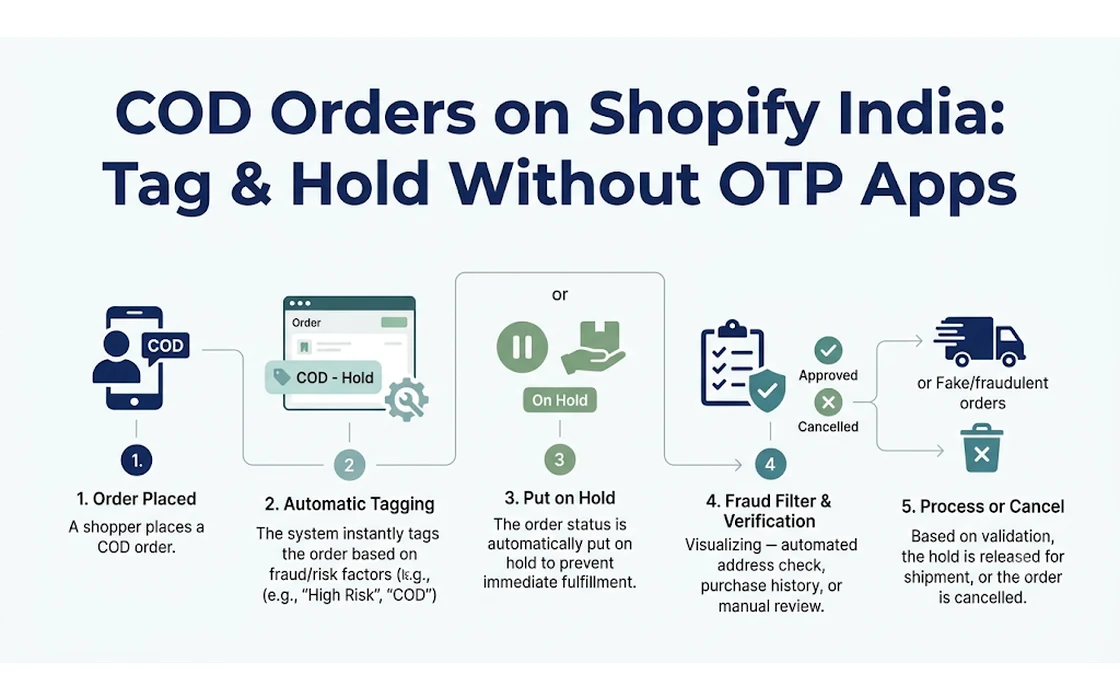
Shopify merchants in India can significantly curtail return-to-origin (RTO) losses on Cash on Delivery (COD) orders without paying for third-party OTP verification apps by implementing automated order tagging and native fulfillment holds based on specific rupee thresholds. Rather than subjecting every visitor to intrusive checkout friction, this approach isolates high-risk shipments the moment an order is created. By holding fulfillment natively in Shopify until manual or direct buyer confirmation is secured, stores protect their working capital and prevent dead freight expenses.
Cash on Delivery remains an unavoidable reality for Indian direct-to-consumer (D2C) brands, regularly accounting for 50% to over 70% of total order volume across Tier-2, Tier-3, and rural markets. However, unconfirmed COD shipments carry heavy operational vulnerabilities. When a customer rejects a package at their doorstep, inputs a fictitious address, or cancels on impulse while the parcel is in transit, the merchant pays non-refundable forward shipping, reverse logistics fees, and packaging costs. For an order valued at Rs. 1,500 to Rs. 4,000, a single return can easily erase the net profit generated by two or three successful deliveries.
Many Indian retailers turn to specialized OTP verification plugins to curb this issue, yet blanket verification popups often create more problems than they solve. High monthly app subscription tiers, recurring per-SMS charges, telecom DLT registration snarls, and checkout drop-offs can severely damage store profitability. Building a native tag-and-hold rule using Shopify’s built-in automation provides a lean, reliable alternative. It allows merchants to automatically dispatch low-value, low-risk items while pausing high-value orders for verification before a courier airway bill (AWB) is ever generated.
Key takeaways
- Establishing a rupee threshold (such as Rs. 1,500 or Rs. 2,500) allows merchants to intercept high-risk COD orders while letting lower-ticket purchases ship without operational delay.
- Native automation via Shopify Flow eliminates recurring monthly fees and per-SMS costs associated with external OTP verification services.
- Applying a native fulfillment hold stops third-party logistics (3PL) aggregators from automatically processing, packing, and dispatching unverified parcels.
- A concise manual confirmation protocol catches invalid phone numbers, fabricated addresses, and duplicate orders before inventory leaves the warehouse.
- Maintaining clean tagging structures enables customer service teams to unhold confirmed parcels rapidly or restock inventory promptly if a buyer cancels.
The True Cost of Uncontrolled COD and RTO in India
To understand why a targeted tag-and-hold mechanism is necessary, one must examine the cost breakdown of an RTO parcel under Indian logistics structures. When an order is fulfilled and handed over to a courier partner, shipping costs are incurred regardless of whether the customer accepts the package.
As of 2026, standard domestic courier rates for a 500-gram surface or air package typically range between Rs. 60 and Rs. 110 for forward shipping, depending on the delivery zone. If the shipment fails delivery after standard attempts (usually three attempts by couriers like Delhivery, Blue Dart, or Shadowfax), reverse logistics charges are applied. Reverse shipping generally costs an additional 100% to 120% of the forward freight rate, adding another Rs. 70 to Rs. 130 to the invoice.
When factoring in damaged packaging materials, labor costs for restocking, and transit wear, a single returned parcel costs an Indian merchant anywhere from Rs. 150 to Rs. 280 in pure out-of-pocket losses.
+-------------------------------------------------------------+
| Standard Financial Impact of an RTO Event (Per 500g Parcel) |
+-------------------------------------------------------------+
| Forward Logistics Fee:             Rs. 60  -  Rs. 110       |
| Reverse Logistics Fee (RTO):       Rs. 70  -  Rs. 130       |
| Bubble wrap, box, and label loss:  Rs. 20  -  Rs. 40        |
| Operational labor & restock fee:   Rs. 10  -  Rs. 20        |
+-------------------------------------------------------------+
| Total Direct Loss Per Return:      Rs. 160 -  Rs. 300       |
+-------------------------------------------------------------+
Beyond the direct cash drain, RTO causes severe inventory lockup. When a package is shipped from a warehouse in Delhi to a buyer in a non-metro district in Bihar or Tamil Nadu, the transit time can span four to six days. If the buyer is unreachable, delivery re-attempts consume another three to five days. The return transit journey takes an equal amount of time. Consequently, high-demand inventory remains frozen in transit for 12 to 18 days. For fast-moving collections or limited seasonal stock, this artificial inventory shortage directly restricts revenue from paying customers.
Why Blanket OTP Apps Often Backfire
Third-party OTP verification apps promise an automated fix by forcing customers to enter a six-digit code sent via SMS before confirming a COD order. While this stops bot orders, it introduces significant commercial drawbacks:
- Checkout Abandonment: Friction is the enemy of ecommerce conversion. Forcing a buyer who is casually purchasing a Rs. 599 t-shirt to wait for an SMS code often results in immediate drop-off, particularly in regions with spotty mobile network coverage.
- DLT and Telecom Failures: In India, the Telecom Regulatory Authority of India (TRAI) enforces strict Distributed Ledger Technology (DLT) regulations on commercial SMS traffic. Template registration issues, routing congestions, and carrier filtering frequently delay or drop OTP delivery.
- Escalating SaaS Costs: Most Shopify OTP apps charge a monthly platform fee starting around Rs. 1,000 to Rs. 4,000, combined with usage-based charges of Rs. 0.20 to Rs. 0.40 per SMS. For a merchant processing 2,000 COD orders a month, this adds substantial recurring overhead.
By implementing a rule-based tag-and-hold workflow within native Shopify tools, stores can avoid these fixed fees and friction points entirely.
Designing the Tag, Hold, and Confirm Rule Pattern
The tag, hold, and confirm strategy operates on a straightforward principle: do not treat all COD orders equally.
A customer buying a single Rs. 499 accessory carries minimal RTO financial risk. The cost of calling that customer to confirm the order often exceeds the margin benefit, making automated, immediate fulfillment the rational choice. Conversely, a customer ordering Rs. 3,500 worth of merchandise on COD poses a substantial financial threat if returned. Intercepting that high-value order before shipping is critical.
The core rule pattern requires two distinct parameters:
- Payment Gateway Identifier: The payment method equals Cash on Delivery (
manualor custom COD gateway). - Monetary Threshold: The order total meets or exceeds a defined rupee amount (e.g.,
total_price >= 1500.00).
[Customer Places Order]
           |
           v
  [Payment Method = COD?]
     /              \
   YES               NO -----> [Auto-Fulfill / Standard Flow]
    |
    v
[Order Total >= Rs. Threshold?]
     /              \
   YES               NO -----> [Auto-Fulfill / Fast-Track COD]
    |
    v
[Action 1: Add Tag "COD-HighValue-Hold"]
[Action 2: Place Native Fulfillment Hold]
    |
    v
[Manual Outreach & Verification]
    |
    +-----> Customer Confirms -----> [Release Hold & Tag "COD-Confirmed"]
    |
    +-----> Customer Cancels/No Reply -> [Cancel Order & Restock Inventory]
Determining Your Store’s Rupee Threshold
Setting the threshold requires evaluating your Average Order Value (AOV), product gross margins, and customer behavior:
- Low AOV Catalogs (Under Rs. 1,000): If your typical order consists of one or two items totaling Rs. 600 to Rs. 800, setting a hold threshold at Rs. 1,200 allows single-item purchases to bypass verification while capturing multi-item orders where fraudulent intent or impulsive cart-stacking is more common.
- Mid-to-High AOV Catalogs (Rs. 1,500 to Rs. 5,000): For apparel, footwear, or cosmetics where AOV sits near Rs. 2,000, setting the threshold between Rs. 1,499 and Rs. 1,999 provides an optimal barrier. Shippers avoid dead freight on expensive parcels without bottlenecking low-tier stock.
- First-Time vs. Returning Buyers: If supported by your workflow tools, you can add an additional condition that bypasses the hold if the customer’s total order count is greater than one and their historical fulfillment record is clean.
When evaluating incoming orders, merchants should also watch for impulse duplicates. Indian shoppers navigating slow mobile connections frequently submit the same cart multiple times. Understanding how to detect duplicate Shopify orders using dedicated rule sets helps prevent fulfillment centers from dispatching identical COD packages to the same address.
Step-by-Step Setup: Native Shopify Flow Configuration
Merchants on Shopify plans that support automated workflows can construct this architecture at zero software cost using the official Shopify Flow documentation.
Shopify Flow executes server-side logic in real time without interfering with the frontend storefront or checkout speed.
Step 1: Define the Trigger
- In your Shopify admin, navigate to Apps > Shopify Flow.
- Click Create workflow.
- Select the trigger: Order created (under the
Shopifyrepository).
Step 2: Establish the Payment Gateway Condition
Not all stores label their COD payment method identically. Some use Shopify’s default manual payment method named “Cash on Delivery (COD)”, while others use localized names like “Cash on Delivery” or third-party checkout gateways.
- Add a Condition step.
- Under the condition criteria, select
Order>paymentGatewayNames. - Set the operator to
contains. - Enter the exact string configured in your payment settings (for instance,
Cash on Delivery (COD)ormanual).
Step 3: Set the Rupee Value Criteria
Next, combine the gateway check with your financial threshold.
- Within the same condition block, click Add criteria (using the
ANDlogic). - Select
Order>totalPriceSet>shopMoney>amount. - Set the operator to
is greater than or equal to. - Enter your chosen numerical threshold (for example,
1500.00).
Step 4: Add Tags for Operational Visibility
When an incoming order satisfies both conditions, customer service and warehouse teams must immediately see its status in the admin order grid.
- Under the Then branch, click Add action.
- Select
Shopify>Add order tags. - Enter descriptive, standardized tags:
COD-Pending-Verification,COD-HighValue.
Step 5: Enforce a Native Fulfillment Hold
Applying tags alone will not prevent an automated warehouse integration from printing shipping labels. You must formally lock the fulfillment process. According to Shopify’s order fulfillment holds, placing a hold pauses fulfillment operations and communicates this locked state across the API to logistics aggregators.
- Add a second action under the Then branch.
- Select
Shopify>Hold fulfillment order. - Set the Reason to
Awaiting paymentorHigh risk of fraud. - In the Reason notes field, provide operational context for your team:
"High-value COD order held for manual confirmation."
Save and activate the workflow. From this point forward, every qualifying high-value COD purchase is instantly tagged and frozen in your admin.
+-----------------------------------------------------------------------------------------+
|                                Shopify Flow Logic Summary                               |
+-----------------------------------------------------------------------------------------+
| TRIGGER:   Order created                                                                |
|                                                                                         |
| CONDITION: order.paymentGatewayNames CONTAINS "Cash on Delivery (COD)"                  |
|            AND                                                                          |
|            order.totalPriceSet.shopMoney.amount >= 1500.00                              |
|                                                                                         |
| ACTIONS:   1. Add Order Tags: "COD-Pending-Verification", "COD-HighValue"               |
|            2. Hold Fulfillment Order (Reason: "Awaiting payment")                       |
+-----------------------------------------------------------------------------------------+
The Verification Workflow: From Held Order to Dispatch
Automating the hold is only half the battle; having a disciplined operational protocol to clear those holds is what preserves delivery speed. In ecommerce logistics, excessive dispatch delays can induce buyer remorse, paradoxically increasing RTO rates. Therefore, verification must follow a structured, rapid schedule.
The 4-Hour Outreach Protocol
Customer service teams should review the COD-Pending-Verification filter during standard business operating hours. Contact should be initiated within two to four hours of order placement:
- Morning Sweep (10:00 AM): Review all high-value COD orders placed overnight (between 8:00 PM and 9:30 AM).
- Afternoon Sweep (2:30 PM): Review morning orders to ensure same-day or next-morning dispatch.
- Evening Sweep (6:00 PM): Process afternoon orders so confirmed shipments can be staged for early courier pickup.
What to Verify During the Call
Verification calls should be concise, professional, and courteous. The customer support representative must confirm three critical data points:
- Product Intent: Confirm the customer knowingly ordered the specific item, color, and size. Many returns occur because buyers accidentally clicked a direct checkout link or selected the wrong variant.
- Address Completeness: Incomplete addresses represent one of the leading causes of delivery failures in Tier-3 and Tier-4 locations. The representative must confirm a physical house, flat, or shop number, a street or landmark, and the correct 6-digit postal PIN code.
- Payment Readiness: Remind the customer that the exact cash amount (or UPI payment upon delivery, if supported by the courier) will be collected at the door.
A short phone call remains the most reliable verification method for high-value orders, though automated or semi-manual WhatsApp messages provide an equally practical confirmation channel for customers who do not pick up unknown phone calls.
When examining the shipping details, staff should also check for discrepancies between customer contact details and destination locations. Reviewing guidelines on Shopify billing vs shipping address mismatch provides additional criteria for identifying suspect orders before authorizing dispatch.
+----------------------------------------------------------------------+
|                     Sample Staff Verification Script                 |
+----------------------------------------------------------------------+
| "Namaste [Customer Name], this is calling from [Store Name] regarding|
| your recent Cash on Delivery order for [Product Name] totaling       |
| Rs. [Amount].                                                        |
|                                                                      |
| We are preparing your parcel for dispatch and wanted to verify your  |
| shipping address: [Read street, landmark, and PIN code].             |
|                                                                      |
| Will someone be available at this address over the next 3-4 days to  |
| receive the shipment and pay Rs. [Amount] via cash or UPI?"          |
+----------------------------------------------------------------------+
Releasing the Hold
Once the customer explicitly confirms the order:
- Open the order in the Shopify Admin.
- In the tags section, remove
COD-Pending-Verificationand addCOD-Confirmed. - In the fulfillment card, click Release fulfillment hold.
Releasing the hold signals your warehouse management system or courier integration (such as Shiprocket, Delhivery, or Pickrr) that the parcel is cleared for label generation and packaging.
If you are running promotions or managing large tagging taxonomies across your inventory, maintaining order and product tags in bulk can become complex. While real-time order rules handle incoming transactions, tools like NV Bulk Price & Tag Scheduler are often utilized by growing merchants to update product tags and schedule promotional pricing across extensive catalogs without manual CSV updates.
Comparison: Native Tag-and-Hold vs. Third-Party OTP Apps
Before deciding which architecture fits your business, review the operational differences between native workflow controls and dedicated OTP verification plugins.
| Dimension | Native Shopify Flow Tag & Hold | Third-Party OTP Verification App |
|---|---|---|
| Direct Software Cost | Zero (Included in supported Shopify plans) | Rs. 1,000 to Rs. 5,000+ per month plus per-SMS fees |
| Impact on Conversion | Zero checkout friction; all buyers complete purchase smoothly | Introduces 5% to 15% drop-off at checkout during code entry |
| Telecom/DLT Reliability | 100% immune to SMS gateway outages and carrier filtering | Vulnerable to DLT template blocks and delayed SMS delivery |
| Granular Rule Control | Highly customizable based on cart value, items, and tags | Generally binary (verifies either all COD or no COD) |
| Address Quality Verification | High; human outreach catches vague landmarks and PIN typos | Low; OTP only verifies phone ownership, not address accuracy |
| Operational Labor | Requires customer support team to make calls or send manual chats | Low manual effort; automated software handles the check |
| Best Suited Store Scale | 20 to 500 orders/day; stores prioritizing margin & AOV | 1,000+ orders/day with standardized low-ticket items |
As demonstrated in the comparison, high-volume automated verification apps save manual labor for massive enterprise operations, but they offer zero assistance in catching incomplete addresses or verifying customer availability. For emerging and scaling D2C brands, native tag-and-hold offers superior fraud detection and address validation while protecting checkout conversion rates.
Handling Non-Responsive Buyers and Cancellation Rules
A major concern among merchants adopting this strategy is how to handle customers who fail to answer confirmation calls. If an order sits on hold indefinitely, working capital remains stagnant. Establishing a firm 24-hour expiration rule prevents backlog buildup.
[Day 0: Order Placed on Hold]
             |
             v
   [Attempt 1: Phone Call within 4 Hours]
      /                              \
   Answered?                       Unanswered
     /                                \
[Confirm & Dispatch]           [Send SMS/Message Notice]
                                      |
                                      v
                        [Day 1 (20 Hours): Attempt 2 Call]
                           /                      \
                        Answered?               Unanswered
                          /                        \
                     [Confirm]              [Final Warning Notice]
                                                   |
                                                   v
                                     [Hour 24: Cancel & Restock]
The 24-Hour Expiration Schedule
- First Contact Attempt (Hour 0 to 4): Initiate a direct phone call. If unanswered, send a polite message detailing that the high-value order requires confirmation before warehouse dispatch.
- Second Contact Attempt (Hour 18 to 20): Place a follow-up call during a different time block (for instance, late afternoon if the first attempt was morning).
- Final Warning & Cancellation (Hour 24): If the buyer remains completely unreachable after 24 hours, update the order:
- Add the tag
COD-Unresponsive-Cancelled. - Cancel the order in Shopify, ensuring the Restock inventory checkbox is checked.
- Send an automated cancellation notification: “We were unable to verify your order details via phone or message. Your Cash on Delivery order has been cancelled, and inventory has been released. If this was a mistake, please place a new order using online payment.”
- Add the tag
A customer who ignores two phone calls and a message within a 24-hour window represents an almost certain RTO candidate if the package were shipped blind. Cancelling these orders immediately protects your courier billing account from dead freight.
Common Operational Pitfalls to Avoid
When implementing an automated tag-and-hold rule, avoid these standard implementation mistakes:
1. Forgetting to Test 3PL API Synchronization
Placing an order on hold inside Shopify only works if your shipping aggregator actively monitors fulfillment hold statuses. While leading Indian logistics aggregators support Shopify’s Fulfillment Orders API, legacy integrations may simply pull every unfulfilled order regardless of hold states.
Before launching the workflow live, place a test COD order exceeding your rupee threshold, confirm that the hold is applied in Shopify, and verify that your shipping portal does not automatically generate an AWB or assign a courier.
2. Setting the Rupee Threshold Too Low
If your store receives 300 orders a day with a median order value of Rs. 800, setting your hold threshold at Rs. 600 will dump over 200 orders onto your customer service team daily. Unless you operate a dedicated call center, this creates a severe fulfillment backlog. Set your threshold at a level where staff only handles the top 10% to 20% highest-risk orders by value.
3. Inconsistent Tagging Conventions
Shopify tags are case-sensitive in many reporting tools and filters. Mixing tags such as cod-verified, COD-Verified, and Cod_Confirmed will confuse warehouse staff and break downstream reporting dashboards. Establish a strict, documented tagging taxonomy across all internal standard operating procedures (SOPs).
4. Failing to Track Historical Offenders
When a customer confirms a COD order over the phone but still refuses delivery when the courier arrives at their doorstep, that customer profile must be permanently documented. Add a customer-level tag such as COD-Blacklist or High-RTO-History. You can then configure a secondary Shopify Flow rule that automatically cancels or restricts COD for any customer carrying that tag in the future.
FAQ
Can I use Shopify Flow for COD holds on standard Shopify plans in 2026?
Yes. Shopify Flow is available to merchants on the Basic, Shopify, Advanced, and Plus plans. You do not need an enterprise tier to create automated tagging rules and fulfillment holds for your store.
What is a safe rupee threshold for holding COD orders in India?
For most Indian apparel and lifestyle brands, a threshold between Rs. 1,500 and Rs. 2,500 offers the best balance between risk mitigation and operational workload. Setting the threshold within this range typically captures higher-risk multi-item orders while allowing quick, single-item purchases to dispatch without delay.
Will placing high-value COD orders on hold hurt my store’s conversion rate?
No. Because the rule triggers server-side only after the checkout is completed, the customer experiences zero friction, verification popups, or SMS delays while shopping. As long as your support team conducts confirmation outreach within two to four business hours, overall delivery timelines remain virtually unaffected.
How do shipping aggregators like Shiprocket handle Shopify fulfillment holds?
Modern logistics aggregators integrate with Shopify’s Fulfillment Orders API, which explicitly recognizes fulfillment holds. When an order is placed on hold in Shopify, the order is flagged as paused in the aggregator dashboard, preventing automated AWB generation until the hold is released.
Can I convert a held COD order into a prepaid order during verification?
Yes. During the confirmation phone call or message exchange, support staff can offer a small incentive—such as a 5% discount or complimentary express shipping—if the customer settles the payment immediately via a direct UPI payment link. Converting held COD orders to prepaid completely eliminates the risk of RTO before shipping.
Conclusion
Controlling RTO losses in Indian ecommerce does not require paying for bloated third-party software subscriptions or penalizing honest shoppers with intrusive checkout barriers. By pairing Shopify’s native Flow automation with strategic fulfillment holds, merchants can build a robust, cost-free defensive moat against fraudulent and impulsive COD purchases.
Focusing your manual confirmation efforts on orders that genuinely threaten your profit margins allows your business to maintain smooth fulfillment operations, safeguard working capital, and foster higher customer trust across India’s vibrant digital marketplace.
- Tags:
- Shopify India
- Cash on Delivery
- Rto Reduction
- Shopify Flow
- Order Management
- Ecommerce Operations