
VRAM Needed to Run Local LLMs: 7B to 70B Guide
Calculate the exact VRAM needed to run 7B, 14B, 32B, and 70B local LLMs smoothly with optimal quantization and avoid costly GPU purchasing mistakes.

- NV Trends
- 17 min read
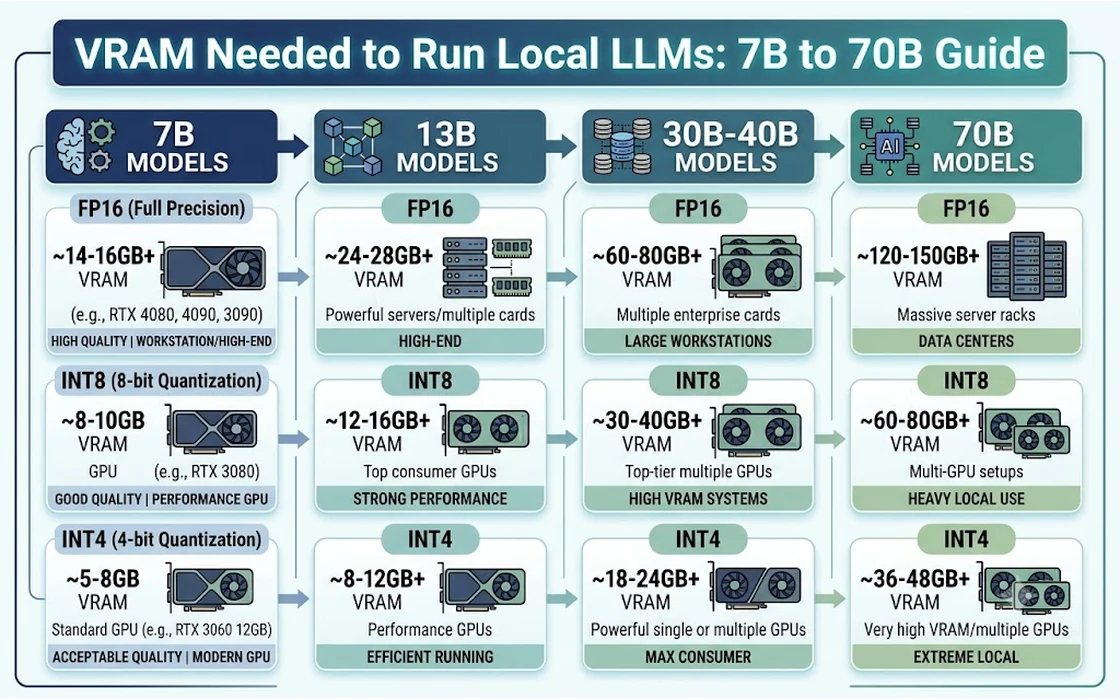
To run a local large language model (LLM) comfortably on your own hardware, you need between 6 GB of VRAM for an entry-level 7B or 8B model up to 48 GB of VRAM for a flagship 70B model at standard 4-bit quantization. Memory capacity is the single most critical bottleneck in local AI: if a model exceeds your dedicated video memory, inference either crashes with an Out of Memory (OOM) error or offloads partially to system RAM, causing generation speed to collapse by 80% to 95%.
Determining your exact VRAM requirement is not just a matter of checking model parameter counts. Memory consumption during inference is divided between static weights (governed by model size and quantization precision) and dynamic runtime memory (dominated by the Key-Value cache, context length, and CUDA workspace buffers). A setup that runs an 8B model smoothly at a 4,000-token context can easily run out of memory when pushed to a 32,000-token document analysis task.
For developers and enthusiasts in India evaluating hardware investments—where GPU prices carry significant import duties and retail markups—choosing the wrong memory configuration can lead to expensive regret. Understanding the mathematical relationship between parameters, quantization levels, and context windows ensures you purchase hardware capable of running the models you actually need.
Key takeaways
- Base memory targets: 8 GB VRAM runs 7B/8B models at 4-bit quantization; 12 GB to 16 GB unlocks 14B models; 24 GB runs 32B models; and 48 GB (or unified memory equivalents) is required for 70B models.
- The KV Cache variable: Doubling your active context window from 8k to 32k tokens can consume an additional 2 GB to 8 GB of VRAM depending on the model’s attention architecture.
- Quantization sweet spot: 4-bit medium quantization (Q4_K_M or AWQ) delivers roughly 95% of full 16-bit model performance while slashing memory footprint by approximately 70%.
- Hardware purchasing traps: An 8 GB graphics card (such as an RTX 4060) severely limits local AI growth despite high compute power, whereas an older 12 GB card (such as an RTX 3060) provides far greater headroom for larger parameter classes.
The VRAM Formula: How LLMs Consume Memory
Running an LLM locally requires video memory for three distinct components: model weights, runtime activations, and the Key-Value (KV) cache.
Total VRAM Required = Model Weight Footprint + KV Cache Footprint + CUDA Runtime Overhead (~1.0–1.5 GB)
1. Model Weights
Model weights represent the static parameters stored in memory. In full precision (16-bit floating point, or FP16), each parameter requires 2 bytes (16 bits) of storage. In an 8-billion parameter model:
$$\text{Weight Footprint (FP16)} = 8 \times 10^9 \text{ parameters} \times 2 \text{ bytes} \approx 16 \text{ GB}$$
Through quantization—a technique that compresses model weights into lower-bit representations—each parameter can be reduced to 8-bit (1 byte), 4-bit (0.5 bytes), or even lower bit depths. At 4-bit quantization (Q4), the static weights of that same 8B model shrink to roughly 4.5 GB to 5.0 GB once quantization metadata is included.
2. The Key-Value (KV) Cache
The KV cache stores the attention keys and values calculated for every previous token in a conversation. Without caching, the transformer would have to recompute every preceding token for every new token generated, degrading speed exponentially.
The memory occupied by the KV cache depends on:
- Number of layers ($L$)
- Number of Key-Value attention heads ($H_{kv}$)
- Dimension per head ($D_h$)
- Active context window length ($C$)
- Numerical precision ($P$, typically 2 bytes for FP16)
Modern architectures utilize Grouped Query Attention (GQA), which shares key-value heads across multiple query heads, significantly reducing KV cache overhead compared to older architectures. For instance, Llama 3.1 8B uses 32 layers and 8 KV heads with a head dimension of 128. At an 8,192-token context length using standard 16-bit precision, the KV cache calculation is:
$$\text{KV Cache} = 2 \times 32 \times 8 \times 128 \times 8192 \times 2 \text{ bytes} \approx 1.07 \text{ GB}$$
However, expand that context to 32,768 tokens, and the KV cache alone demands roughly 4.3 GB of VRAM. At 128,000 tokens, the KV cache reaches approximately 17.1 GB—far exceeding the memory required for the model weights themselves.
3. CUDA Runtime and Context Overhead
The inference engine (such as llama.cpp, vLLM, or Ollama) requires memory for CUDA kernels, scratch buffers, tensor parallel communications, and compute activations. On modern NVIDIA drivers, simply initializing a CUDA context consumes between 600 MB and 1.2 GB of VRAM before loading any model tensors. Failing to account for this baseline buffer is the leading cause of unexpected memory crashes.
Comprehensive VRAM Requirement Matrix (7B to 70B)
The following matrix details the minimum and recommended VRAM allocations required across model tiers at various quantization formats, assuming an 8,192-token context window with Grouped Query Attention:
| Model Parameter Tier | Quantization Level | Weight Size (GB) | Recommended VRAM (8k Context) | Recommended VRAM (32k Context) | Minimum Viable GPU Setup |
|---|---|---|---|---|---|
| 7B – 8B (e.g., Llama 3.1 8B, Qwen 2.5 7B) | Q4_K_M (4-bit) | ~4.8 GB | 8 GB | 12 GB | RTX 3060 12GB / RTX 4060 8GB |
| Q8_0 (8-bit) | ~8.5 GB | 12 GB | 16 GB | RTX 3060 12GB / RTX 4070 12GB | |
| FP16 (16-bit) | ~16.0 GB | 20 GB | 24 GB | RTX 3090 24GB / RTX 4090 24GB | |
| 14B (e.g., Qwen 2.5 14B, DeepSeek-R1-14B) | Q4_K_M (4-bit) | ~9.0 GB | 12 GB | 16 GB | RTX 3060 12GB / RTX 4070 12GB |
| Q8_0 (8-bit) | ~15.2 GB | 20 GB | 24 GB | RTX 3090 24GB / RTX 4090 24GB | |
| FP16 (16-bit) | ~29.0 GB | 36 GB | 44 GB | 2x RTX 3090 / Mac Studio (64GB) | |
| 32B – 35B (e.g., Qwen 2.5 32B, Command-R 35B) | Q4_K_M (4-bit) | ~19.5 GB | 24 GB | 28 GB | RTX 3090 24GB / RTX 4090 24GB |
| Q8_0 (8-bit) | ~34.0 GB | 40 GB | 48 GB | 2x RTX 3090 24GB / Mac Studio | |
| FP16 (16-bit) | ~65.0 GB | 72 GB | 80 GB | 4x RTX 3090 / Mac Studio (128GB) | |
| 70B – 72B (e.g., Llama 3.1 70B, Qwen 2.5 72B) | Q4_K_M (4-bit) | ~42.5 GB | 48 GB | 56 GB | 2x RTX 3090/4090 / Mac Studio |
| Q8_0 (8-bit) | ~75.0 GB | 84 GB | 96 GB | 4x RTX 3090 / Mac Studio (128GB) | |
| FP16 (16-bit) | ~142.0 GB | 160 GB | 176 GB | Enterprise Server (A100/H100) |
Note: Estimates include runtime CUDA buffers and assume standard FP16 KV caching. Utilizing 8-bit or 4-bit KV cache quantization can reduce context memory consumption by 50% to 75%.
Tier-by-Tier Analysis: From 7B to 70B
7B to 8B Tier: The Accessible Baseline
Models in the 7B to 8B class—such as Meta’s Llama 3.1 8B, Qwen 2.5 7B, and Mistral 7B—represent the entry point for capable local inference. As explored in our analysis of running local AI models, these architectures have matured to handle everyday text synthesis, summarization, and lightweight coding tasks effectively.
- VRAM Required: 6 GB to 8 GB for Q4_K_M; 12 GB for Q8.
- Hardware Profile: Accessible on budget consumer hardware. An 8 GB graphics card handles standard conversational context (2k–4k tokens) without issue. However, running an 8B model with an extended context window (16k+ tokens) or alongside a local desktop UI requires a 12 GB card to prevent OOM errors.
- Use Cases: General writing, basic question answering, local document queries, and simple classification.
14B Tier: The Developer’s Sweet Spot
The 14B parameter class (popularized by models such as Qwen 2.5 14B and reasoning derivatives like DeepSeek-R1-Distill-Qwen-14B) offers a major leap in instruction-following, mathematical reasoning, and programming syntax over 8B models. For professionals building local AI for coding workflows, the 14B tier provides an optimal balance between reasoning capability and hardware practicality.
- VRAM Required: 11 GB to 12 GB for Q4_K_M; 16 GB for Q5_K_M or Q6_K.
- Hardware Profile: This tier can fit entirely within a single 12 GB card (like an RTX 3060 12GB or RTX 4070 12GB) at 4-bit quantization, provided context lengths remain moderate (under 8k tokens). If you plan to feed entire source code files into context, a 16 GB GPU (such as an RTX 4070 Ti Super 16GB or RTX 4080) is strongly recommended.
- Use Cases: Complex code generation, technical document drafting, and agentic workflows requiring multi-step reasoning.
32B Tier: Near-Frontier Intelligence
The 32B tier (notably Qwen 2.5 32B) bridges the gap between mid-range models and massive 70B models. Technical evaluations published by the open-source community indicate that modern 32B models frequently approach or match the benchmark accuracy of previous-generation 70B models while consuming less than half the compute and memory.
- VRAM Required: 20 GB to 22 GB for Q4_K_M; 36 GB+ for Q8.
- Hardware Profile: This model marks the boundary of single-GPU consumer hardware. To run a 32B model at 4-bit quantization with an 8k context, you must have a 24 GB GPU—specifically an NVIDIA RTX 3090 or RTX 4090. A 16 GB GPU cannot load this model without heavy CPU offloading or severe quantization degradation (such as Q2 or Q3), which introduces noticeable perplexity penalties.
- Use Cases: High-accuracy coding, complex agent loops, deep technical extraction, and multi-document synthesis.
70B Tier: Frontier-Grade Open Weights
The 70B parameter tier (including Llama 3.1 70B and Qwen 2.5 72B) delivers enterprise-grade reasoning, high nuance, and strong factual recall. However, hosting these models locally requires specialized, high-end hardware.
- VRAM Required: 42 GB to 48 GB for Q4_K_M; 80 GB to 90 GB for Q8.
- Hardware Profile: No single consumer graphics card on the market possesses sufficient VRAM to load a 70B model at practical quantization levels. Running 70B locally requires either:
- A multi-GPU workstation containing at least two 24 GB graphics cards (e.g., 2x NVIDIA RTX 3090 or 2x RTX 4090) utilizing tensor parallelism or layer splitting.
- An Apple Silicon workstation (such as a Mac Studio or MacBook Pro) equipped with 64 GB or 128 GB of unified memory.
- Use Cases: Production deployments, complex synthetic data generation, deep research analysis, and autonomous agent systems where failure tolerances are minimal.
The Context Window Trap: Why 8k vs 128k Changes Everything
Many modern open-weight models advertise massive context windows—such as 32k, 64k, or 128k tokens. However, having architectural support for long context does not mean your hardware can run it.
+-------------------------------------------------------------+
| Typical 8B Model Memory Split (24 GB Card, Q4_K_M)          |
|                                                             |
| [ Weights: ~5 GB ] [ CUDA: ~1 GB ] [ Free: ~18 GB ]         |
|  -> At 8k context:  KV Cache consumes ~1.1 GB (Plenty safe) |
|  -> At 32k context: KV Cache consumes ~4.3 GB (Comfortable) |
|  -> At 128k context:KV Cache consumes ~17.1 GB (Near OOM)   |
+-------------------------------------------------------------+
When you load a model via Ollama or llama.cpp, the software allocates VRAM for the base weights upfront, but the KV cache grows dynamically as the conversation lengthens unless pre-allocated. If you attempt a “needle-in-a-haystack” search over a 100,000-token document using a 12 GB GPU, the model weights may fit initially, but the system will crash mid-generation as the KV cache expands.
Techniques to Mitigate Context VRAM Overhead
To counter this, inference engines provide memory-saving optimizations documented across repositories on GitHub:
- Quantized KV Cache (
--cache-type-k,--cache-type-v): Modern versions of llama.cpp allow quantizing the KV cache to 8-bit (FP8) or 4-bit (Q4_0). Quantizing the cache to 4-bit reduces context VRAM usage by nearly 70% with negligible loss in retrieval fidelity. - FlashAttention: By reordering attention matrix computations and utilizing fast SRAM caches on NVIDIA GPUs (Ampere architecture and newer), FlashAttention eliminates intermediate quadratic memory allocations, stabilizing memory requirements at extended context lengths.
- Context Truncation: Explicitly capping the context window (e.g., restricting context to 8,192 tokens in your
Modelfileor CLI flags) ensures that stray background tasks or long inputs do not trigger an unrecoverable system crash.
Quantization Breakdown: Quality vs. Footprint
Quantization converts high-precision floating-point numbers into compact integer representations. Research papers hosted on arXiv indicate that while aggressive quantization degrades performance, moderate quantization preserves nearly all model capabilities.
FP16 (Original, 16-bit) -> 100% Quality, 100% Memory
Q8_0 (8-bit)            -> ~99.5% Quality, ~52% Memory
Q6_K (6-bit)            -> ~98.5% Quality, ~42% Memory
Q4_K_M (4-bit Medium)   -> ~95.0% Quality, ~32% Memory  <-- Industry Sweet Spot
Q3_K_M (3-bit Medium)   -> ~88.0% Quality, ~25% Memory
Q2_K (2-bit)            -> Perplexity degrades sharply; avoid for production tasks
- Q4_K_M (4-bit k-quant medium): The universally recommended default for local inference. It applies 4-bit quantization to less sensitive layers while preserving higher precision on critical attention and feed-forward tensors. Perplexity tests confirm that Q4_K_M provides virtually identical conversational outputs to FP16 in standard testing.
- Q5_K_M / Q6_K: Ideal if you have surplus VRAM (e.g., running an 8B model on a 12 GB card or a 14B model on a 16 GB card). These formats recover subtle reasoning nuances and complex coding syntax.
- Q3 and Below: Only recommended as an absolute last resort to fit an oversized model into constrained hardware. At 3-bit and 2-bit quantization, models frequently experience reasoning collapse, hallucinations, and repetitive generation loops.
Hardware Buying Guide for India: GPUs vs. Apple Silicon
When budgeting for local AI in India, consumers must navigate specific local market realities, including import tariffs and limited secondary market warranties. For detailed comparisons of mobile hardware, consult our guide on the best laptops for running local LLMs in India.
                  +-----------------------------------+
                  |   Local LLM Hardware Landscape    |
                  +-----------------------------------+
                                    |
          +-------------------------+-------------------------+
          |                                                   |
[ NVIDIA Discrete GPUs ]                            [ Apple Unified Memory ]
  - RTX 3060 12GB (~Rs. 26,000)                       - Mac Mini / Studio
  - RTX 4070 Ti Super 16GB (~Rs. 78,000)              - Shared CPU/GPU pool
  - Used RTX 3090 24GB (~Rs. 55,000 - 65,000)         - High capacity (up to 128GB+)
  - Highest tokens/second                             - Lower memory bandwidth than
  - Strict VRAM limits per card                         dedicated GDDR6X on consumer tiers
The 8 GB GPU Trap: RTX 4060 vs. RTX 3060 12GB
A common mistake among Indian PC builders is purchasing an 8 GB card—such as the newer NVIDIA GeForce RTX 4060 (typically priced around Rs. 28,000 to Rs. 32,000 as of 2026)—over the older RTX 3060 12GB (available between Rs. 25,000 and Rs. 28,000).
While the RTX 4060 features faster Ada Lovelace architecture and better rasterization performance in gaming, its 8 GB VRAM ceiling sharply limits its utility for AI. The RTX 3060 12GB, despite lower raw compute throughput, can comfortably run 14B models at Q4_K_M or 8B models at full Q8 precision with extended context windows. For local AI workloads, memory capacity always takes precedence over core compute speed.
The 24 GB Value Option: Secondary Market RTX 3090
For builders seeking 24 GB of VRAM without paying the steep Rs. 1,75,000+ price tag of a new RTX 4090, the previous-generation RTX 3090 remains popular on Indian enthusiast marketplaces (such as Zoukart, Techenclave, or physical markets like Nehru Place in Delhi and SP Road in Bengaluru).
Refurbished or pre-owned RTX 3090 24GB units typically trade between Rs. 55,000 and Rs. 68,000 as of 2026. A 24 GB buffer unlocks the entire 32B model tier and allows two cards to be linked for running 70B models. However, prospective buyers should verify thermal performance and VRAM junction temperatures carefully, as Ampere cards generate substantial heat and feature memory chips on both sides of the printed circuit board.
Apple Silicon: The High-Capacity Unified Memory Alternative
Apple Mac Studio and MacBook Pro systems utilize a unified memory architecture (UMA) where the CPU, GPU, and Neural Engine share a single high-bandwidth memory bus. Official hardware specifications published by Apple show memory bandwidth ranging from 150 GB/s on base Pro chips to over 800 GB/s on Max and Ultra variants.
- The Advantage: You can allocate up to 75% (or over 85% with system tweaks) of total system RAM directly as VRAM. A Mac Studio with 64 GB of unified memory (starting above Rs. 2,00,000 in India) can load a 70B model at Q4_K_M entirely in memory—a task that requires a dual-GPU PC workstation costing significantly more.
- The Trade-off: Token generation speeds on Apple Silicon are constrained by unified memory bandwidth. While an RTX 4090 generates 100+ tokens per second on an 8B model, a Mac running a 70B model on unified memory may generate 8 to 15 tokens per second. While slow, it runs reliably without out-of-memory crashes.
What Happens When VRAM Spills Over?
When your model and context exceed dedicated video memory, inference behavior depends on your software backend:
VRAM Exceeded -> Offload to System RAM via PCIe -> Memory Bandwidth Drops from ~1000 GB/s to ~50 GB/s -> Token Speed Collapses
- Partial Layer Offloading (Hybrid Inference): Engines like llama.cpp allow you to split a model: 20 layers on the GPU and 12 layers on system RAM. While functional, the generation speed is bottlenecked by your PCIe bus interface. System DDR4 or DDR5 RAM operates at bandwidths of roughly 40 GB/s to 80 GB/s, whereas GPU GDDR6X operates at 500 GB/s to 1,008 GB/s. As a result, tokens per second typically plummet from 45 t/s down to 2–4 t/s.
- Unified Paging (Crash or Freeze): Systems using standard PyTorch or vLLM run into a hard CUDA Out of Memory (OOM) error, immediately terminating the inference process. If system swap memory is engaged, your operating system may become completely unresponsive as pages thrash across your SSD.
What to Do and What to Avoid
What to Do
- Calculate before downloading: Always multiply parameter count by byte precision and add a 25% safety buffer for context and CUDA runtime before pulling a large model file.
- Prioritize 12 GB+ cards: If buying an entry-level GPU specifically for local AI in India, opt for at least 12 GB of VRAM (e.g., RTX 3060 12GB or RTX 4070 12GB).
- Use GQA-enabled models: Choose modern architectures (Llama 3.1, Qwen 2.5, Mistral) that implement Grouped Query Attention to minimize KV cache expansion during long conversations.
- Enable KV Cache Quantization: When working with documents over 16k tokens, configure your inference engine to store the KV cache in 8-bit or 4-bit precision to protect remaining VRAM.
What to Avoid
- Avoid 6 GB and 8 GB GPUs for new builds: Do not purchase 8 GB graphics cards expecting to run models beyond basic 8B at Q4. You will hit a hard wall the moment you expand context or attempt to run reasoning-distilled models.
- Avoid running unquantized FP16 models locally: Running an 8B model in full FP16 consumes 16 GB of VRAM without offering any noticeable quality advantage over an 8.5 GB Q8 or a 5 GB Q5 quantization.
- Avoid relying on CPU offloading for interactive chat: Splitting layers across system RAM creates high latency that makes real-time conversational agents frustratingly sluggish.
- Avoid ignoring system OS overhead: Remember that your display monitor, desktop environment, and browser hardware acceleration consume 500 MB to 1.5 GB of GPU VRAM before your inference engine launches.
FAQ
Can I run a 70B model on an RTX 4090 24GB?
No, you cannot run a 70B model entirely on a single 24 GB GPU at usable precision. At standard 4-bit quantization (Q4_K_M), a 70B model requires approximately 42 GB to 48 GB of total VRAM once runtime buffers and context are included. Running a 70B model on a single 24 GB card requires severe 2-bit quantization or offloading roughly half the layers to system RAM, which either degrades output quality or reduces generation speed to around 1 to 3 tokens per second.
Is 16 GB VRAM enough for local AI in 2026?
Yes, 16 GB of VRAM represents a highly capable mid-tier baseline for local inference. It allows you to run 8B models at maximum precision (Q8 or FP16) with large context windows, and comfortably hosts 14B models at standard 4-bit and 5-bit quantization. However, 16 GB cannot fit 32B or 70B parameter models without substantial quantization compromise or system memory offloading.
Does system RAM help if my GPU runs out of VRAM?
System RAM acts as a fallback through layer offloading in software like llama.cpp, but it introduces a severe performance penalty. Because system RAM (DDR4/DDR5) has only a fraction of the memory bandwidth of dedicated graphics memory (GDDR6/GDDR6X), generation speeds drop by 80% to 95% when layers are split across the PCIe bus. System RAM prevents out-of-memory crashes, but it is not a direct substitute for true dedicated VRAM.
Which is better for local LLMs: an Apple Silicon Mac or an NVIDIA PC?
The choice depends on whether you prioritize model size or token generation speed. An Apple Silicon Mac (such as a Mac Studio with 64 GB or 128 GB of unified memory) is the most cost-effective platform for running massive 70B models because unified memory is substantially cheaper than multi-GPU workstation setups. Conversely, an NVIDIA-based PC offers significantly faster generation speeds on models up to 32B parameters and provides broader compatibility with fine-tuning, training, and specialized CUDA-accelerated software libraries.
Conclusion
Determining how much VRAM you need comes down to matching your intended model parameter class with realistic context requirements. For users exploring local AI for general tasks, an 8 GB or 12 GB GPU running modern 8B models provides an accessible, high-speed starting point. For developers requiring advanced reasoning, coding, and multi-step execution, the 14B and 32B tiers running on 16 GB to 24 GB of VRAM represent the current gold standard of local performance.
Before investing in hardware, calculate your true memory footprint using the combined sum of model weights, KV cache, and runtime overhead. Prioritizing VRAM capacity over raw clock speeds ensures your local system remains capable, responsive, and adaptable as open-source models continue to evolve.
- Tags:
- Local Llm
- Vram
- Gpu
- Ai Hardware
- Quantization
- Llama 3