
Best Laptops for Running Local LLMs in 2026 (India)
Compare the top laptops for running local LLMs in India in 2026, breaking down VRAM needs, Apple Unified Memory, RTX GPUs, and realistic retail prices.

- NV Trends
- 17 min read
- Updated

The single most capable laptop for running local large language models (LLMs) in India as of 2026 is an Apple MacBook Pro configured with at least 36GB to 48GB of Unified Memory, while for CUDA-based Windows workflows the previous-generation RTX 4080/4090 (12GB-16GB VRAM) remains the widely available, well-supported sweet spot — though it is no longer the top of the Windows market (see the correction below). For software engineers, researchers, and privacy-conscious professionals working with modern open-weights architectures such as Llama 3.1, Qwen 2.5, and DeepSeek-R1-Distill, traditional metrics like raw CPU clock speeds and solid-state storage have taken a back seat to two critical hardware bottlenecks: total addressable memory pool size and memory bandwidth.
Correction (2026-09-21): an earlier version of this guide stated that Windows laptops “cap out at 16GB of VRAM.” That’s no longer accurate. NVIDIA’s RTX 50-series (Blackwell) mobile GPUs shipped in 2025, and the flagship RTX 5090 laptop GPU carries 24GB of GDDR7 — the largest VRAM pool ever shipped in a laptop GPU. Separately, AMD’s Strix Halo platform (shipping in machines like the HP ZBook Ultra G1a) brings unified memory to Windows, with configurations up to 96GB shared between CPU and GPU — directly competing with Apple’s approach described below. The RTX 4060-4090 picks in this guide are still accurate, well-priced options at their tier; they’re just no longer the ceiling of what’s available.
Selecting hardware for local generative AI is fundamentally different from buying a laptop for gaming or video editing. An ultra-powerful graphics card with insufficient video memory (VRAM) will completely fail to load a medium-sized 32-billion parameter model, forcing execution into painfully slow system RAM. Conversely, a machine with vast system RAM but narrow bus bandwidth will read weights at a crawl, yielding generation speeds well below conversational reading speed.
In the Indian consumer market, where import duties, fluctuating electronics tariffs, and local retail margins heavily penalize top-tier memory configurations, making the wrong choice can cost tens of thousands of rupees without improving inference throughput. Understanding precisely how model weights, quantization levels, and context windows consume memory is essential before committing capital to a portable workstation.
Key takeaways
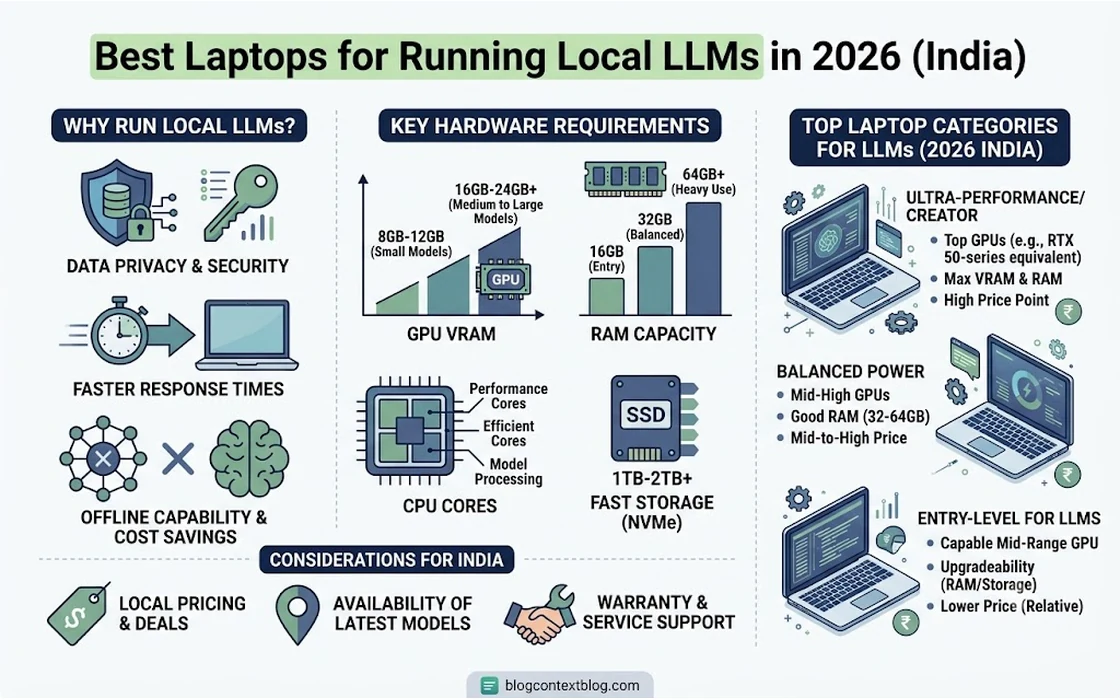
- Unified Memory vs. Dedicated VRAM: Apple Silicon allows up to 75–80% of its shared system memory to act as VRAM at bandwidths reaching 150–400 GB/s, enabling 32B and 70B models to run on a battery-powered device. Windows laptops built around the widely available RTX 4080/4090 top out at 12-16GB of dedicated VRAM, but the frontier has moved: RTX 5090 Blackwell laptops now ship with 24GB, and Strix Halo-based Windows machines offer up to 96GB of unified memory.
- The Minimum Viable Threshold: To comfortably run modern 14B models or 32B quantized models with practical 8k to 32k context windows, 32GB of RAM (Windows) or 36GB of Unified Memory (macOS) represents the realistic baseline in 2026.
- Beware of NPU Marketing: While Neural Processing Units (NPUs) on Intel Core Ultra and AMD Ryzen AI processors handle background webcam filters and OS-level transcription, local LLM runtimes such as llama.cpp and Ollama still run primarily on dedicated GPUs or unified Metal pipelines.
- Indian Market Value Curve: Budget buyers can achieve respectable 7B–8B model inference with 8GB RTX 4060 laptops starting around Rs. 85,000, while high-capacity 32B/70B local deployment requires investing between Rs. 2,20,000 and Rs. 3,50,000 for Apple Silicon or flagship RTX hardware.
The Core Physics of Local LLM Hardware
To understand why specific laptops succeed or choke on local AI models, one must understand the math governing autoregressive generation. When an LLM generates text, it reads all model parameters from memory once for every single token it outputs.
The theoretical upper limit of inference speed (tokens per second) is dictated by a simple formula:
$$\text{Maximum Tokens/Second} \approx \frac{\text{Memory Bandwidth (GB/s)}}{\text{Model Size in Memory (GB)}}$$
If an unquantized or quantized model occupies 16GB of memory, and your hardware delivers 150 GB/s of effective memory bandwidth, your maximum possible generation speed will be roughly 9 to 10 tokens per second, regardless of how many CPU cores you possess.
+-------------------------------------------------------------------+
|                   Memory Architecture vs. LLMs                   |
+-------------------------------------------------------------------+
| Apple Unified Memory (M3/M4 Pro & Max):                          |
| [ CPU / Metal GPU / Neural Engine ] <==== 150 - 400 GB/s ====> [ 36GB - 128GB Pool ]
| Result: Giant models fit entirely inside fast shared memory.     |
+-------------------------------------------------------------------+
| Traditional Windows Gaming Laptop:                               |
| [ NVIDIA RTX GPU ] <==== 500+ GB/s ====> [ 8GB - 16GB VRAM ]     |
|         |                                                         |
|    PCIe Bus (~16-32 GB/s Bottleneck)                             |
|         |                                                         |
|   [ CPU ] <==== 60 - 90 GB/s ====> [ 16GB - 64GB DDR5 RAM ]      |
| Result: Ultra-fast when model fits in VRAM; crawls if offloaded.  |
+-------------------------------------------------------------------+
Dedicated VRAM vs. System DDR5
On a conventional Windows laptop, the graphics card has its own dedicated GDDR6 memory (typically 6GB, 8GB, 12GB, or 16GB). This memory is extraordinarily fast, frequently surpassing 500 GB/s on high-end GPUs. When an entire model fits inside this VRAM, inference is lightning-fast, often exceeding 40 to 80 tokens per second.
However, if a model requires 18GB of space and your GPU only has 16GB, the runtime must split the layers: 14GB stays in VRAM, while the remaining 4GB spills over into system DDR5 RAM across the PCIe bus. Because dual-channel laptop DDR5 memory operates at roughly 60 to 88 GB/s, and PCIe lane communication introduces additional latency, performance collapses instantly. The entire generation cycle slows down to match the speed of the slowest memory pool.
Apple Silicon’s Unified Memory Architecture (UMA)
Apple takes a radically different path. In M-series architectures, the CPU, GPU cores, and memory controllers sit on a single System-on-Chip (SoC) sharing a massive, wide bus directly to the onboard LPDDR5X modules.
According to architectural specifications documented by Apple, M-series Pro chips deliver 150 to 200 GB/s of bandwidth, while Max chips deliver 300 to 400+ GB/s. More importantly, macOS allows the GPU (via Apple’s Metal framework) to allocate up to 75% to 80% of total system memory as VRAM dynamically. A MacBook Pro with 64GB or 128GB of RAM can load massive 70-billion parameter models entirely into unified graphics-accessible memory—something impossible on any single portable Windows machine without enterprise external GPU enclosures.
For developers tracking industry trends, this architectural pivot is part of the broader reason why running local AI models is finally good now, unlocking practical offline workflows previously restricted to cloud-hosted APIs.
Model Sizes, Quantization, and Memory Consumption
Before shopping for a laptop in India, you must calculate the parameter footprint you intend to run. Model weights are typically distributed in 16-bit floating point format (FP16), where each parameter consumes 2 bytes of storage. To run on consumer hardware, open-source developers use quantization techniques (like GGUF, AWQ, or EXL2) to compress weights into 8-bit, 4-bit, or even 3-bit representations.
+-----------------------------------------------------------------------+
|  Quantization Footprint Guide (Weights + 8k Context Overhead)         |
+-------------------+----------------+----------------+-----------------+
| Parameter Count   | 4-bit (Q4_K_M) | 8-bit (Q8_0)   | Unquantized FP16|
+-------------------+----------------+----------------+-----------------+
| 7B - 8B Params    | ~5.5 GB        | ~9.2 GB        | ~16.5 GB        |
| 14B Params        | ~9.8 GB        | ~16.1 GB       | ~30.0 GB        |
| 32B Params        | ~20.5 GB       | ~35.0 GB       | ~66.0 GB        |
| 70B Params        | ~43.0 GB       | ~74.0 GB       | ~145.0 GB       |
+-------------------+----------------+----------------+-----------------+
The Invisible Footprint: Context Windows and KV Cache
Many buyers forget to account for the Key-Value (KV) cache. When using an LLM for coding or large document analysis, you might expand your prompt context from standard 2,048 tokens to 32,768 or 64,000 tokens.
The memory consumed by this KV cache grows linearly with context length and model layer count. On a 32B model, running an active 32k context window can easily consume an extra 4GB to 8GB of memory above and beyond the model weights. If your laptop sits right on the edge of capacity, opening a large code file will push the system into out-of-memory (OOM) crashes.
Best Laptops for Local LLMs in 2026: Comprehensive Comparison
The following table compares the top portable systems available in the Indian retail market as of 2026, outlining their realistic capabilities and verified hardware constraints.
| Laptop Model | Processor & Graphics | Memory Pool & Bandwidth | Max Comfortable Model Tier | Est. India Retail Price (2026) | Best Suited For |
|---|---|---|---|---|---|
| Apple MacBook Pro 16" (M3/M4 Max) | 14–16 Core CPU, 30–40 Core Metal GPU | 48GB–64GB Unified (~300–400 GB/s) | 70B (Q4_K_M) / 32B (Q8) | Rs. 3,19,900 – Rs. 3,99,900 | Serious researchers, data privacy consultants, and deep reasoning models |
| Lenovo Legion Pro 7i / Asus ROG Strix SCAR 16 | Intel Core i9 / AMD Ryzen 9 + RTX 4080 (175W TGP) | 12GB GDDR6 VRAM (~460 GB/s) + 32GB DDR5 | 14B (Q8) / 32B (Q4 with minor offload) | Rs. 2,35,000 – Rs. 2,75,000 | Developers wanting ultra-fast token output for 8B–14B models & CUDA toolchains |
| Apple MacBook Pro 14" / 16" (M3/M4 Pro) | 12–14 Core CPU, 18–20 Core Metal GPU | 36GB Unified (~150–200 GB/s) | 32B (Q4_K_M) / 14B (Q8) | Rs. 2,19,900 – Rs. 2,49,900 | Mobile software engineers, autonomous agent orchestration |
| HP Omen 16 / Asus ROG Zephyrus G16 | AMD Ryzen 9 / Intel Core Ultra 7 + RTX 4070 | 8GB GDDR6 VRAM (~256 GB/s) + 32GB DDR5 | 8B (Q8) / 14B (Q4 partial offload) | Rs. 1,45,000 – Rs. 1,75,000 | Mid-range developers balancing productivity, light gaming, and 8B assistants |
| Acer Predator Helios 16 / Lenovo LOQ 15 | Intel Core i7 / AMD Ryzen 7 + RTX 4060 (115–140W) | 8GB GDDR6 VRAM (~256 GB/s) + 16/32GB DDR5 | 8B (Q4_K_M / Q5_K_M) | Rs. 84,990 – Rs. 1,09,990 | Students, hobbyists, and local code-completion setups on a budget |
In-Depth Analysis: The Top Hardware Categories
1. The Large-Model Champion: Apple MacBook Pro 16" (M3/M4 Max, 64GB+ Unified Memory)
For users who want to run heavy 32B or 70B parameter models without renting cloud compute, nothing in the laptop market touches a high-memory Apple Silicon system.
                               MacBook Pro 16" (Max Series)
                      +------------------------------------------+
                      | - Up to 400 GB/s Unified Memory Bandwidth |
                      | - 48GB to 128GB Unified Memory Pools     |
                      | - Exceptional Thermal Efficiency on Lap  |
                      | - Runs 70B Q4 Models at ~8-12 tokens/sec |
                      +------------------------------------------+
Because macOS treats Unified Memory as a shared surface across CPU and GPU cores, an M3 or M4 Max machine with 64GB of RAM can assign nearly 50GB directly to llama.cpp or Ollama. This permits loading a 70B parameter model at Q4_K_M quantization (roughly 43GB) entirely into memory.
Generation speeds sit comfortably around 8 to 12 tokens per second. While 10 tokens per second is slower than a desktop cluster of two RTX 3090s, it is completely usable for reading, automated summarization, and offline coding workflows. Moreover, the MacBook runs whisper-quiet with minimal thermal throttling on Indian summer days, delivering hours of inference even when unplugged from wall power.
The principal drawback is Indian pricing. Apple’s memory upgrades in India carry massive premiums. When upgrading from base configurations, every bump in unified memory adds tens of thousands of rupees to the invoice. This issue has intensified as industry analysts report that Apple prices may rise due to global memory chip costs, making older refurbished or distributor-discounted M3 Max models potentially more cost-effective purchases than newly launched flagships.
2. The Widely Available Choice: Windows RTX 4080 / 4090 Laptops (12-16GB VRAM)
If your primary workflow involves smaller models (8B to 14B parameters) or fine-tuning pipelines using PyTorch, a high-TGP (Total Graphics Power) Windows machine built around these still-current, widely stocked GPUs is a strong, well-supported choice — though not the newest option (see below).
                           Lenovo Legion / Asus ROG (RTX 4080/4090)
                      +------------------------------------------+
                      | - Raw CUDA Ecosystem Integration         |
                      | - Ultra-fast Generation (50-90 tok/sec)  |
                      | - Native Support for FlashAttention-2    |
                      | - 12GB to 16GB VRAM; RTX 5090 (24GB) and |
                      |   Strix Halo (up to 96GB) go higher      |
                      +------------------------------------------+
Modern high-tier gaming and workstation laptops like the Lenovo Legion Pro 7i and Asus ROG Strix SCAR house mobile RTX 4080 (12GB VRAM) or RTX 4090 (16GB VRAM) GPUs. According to published specifications from NVIDIA, these chips operate with GDDR6 memory buses pushing between 460 and 570 GB/s. NVIDIA’s newer RTX 50-series (Blackwell) laptop GPUs go further still — the RTX 5090 laptop ships with 24GB of GDDR7 — if you want the current frontier rather than this tier’s price-to-performance sweet spot.
When running an 8B model (such as Llama 3.1 8B or Qwen 2.5 7B) at 8-bit quantization or a 14B model at 4-bit quantization, the entire model fits cleanly into the 16GB VRAM buffer with ample space left for a 16k context window. Under these conditions, the machine outputs an astonishing 50 to 90 tokens per second—far faster than human reading speed.
Furthermore, the native CUDA environment means software compatibility is flawless. While Mac users frequently navigate Metal-specific compiler patches, Windows users can immediately execute any research repository from the llama.cpp community on GitHub, Hugging Face, vLLM, or TensorRT-LLM without friction.
The Trade-Offs in India:
- Power and Battery: Inference requires drawing 140W to 175W from the wall. On battery, performance is throttled by up to 70%, rendering portable use impractical without a bulky 300W power brick.
- Thermal Management: Indian ambient temperatures (often 30°C to 40°C in non-air-conditioned spaces) cause aggressive thermal throttling under continuous inference or local batch processing. Investing in an elevated laptop stand or active cooler is virtually mandatory.
3. The Balanced Sweet Spot: MacBook Pro 14" (M3/M4 Pro, 36GB Unified Memory)
Retailing between Rs. 2,19,000 and Rs. 2,49,000 in India, the 36GB Unified Memory configuration of the MacBook Pro represents the ideal convergence of capability, battery longevity, and cost for modern developers.
A 36GB memory pool provides around 27GB to 28GB of addressable graphics memory. This is the exact capacity required to run state-of-the-art 32-billion parameter models (such as Qwen 2.5 32B Coder) at 4-bit quantization (Q4_K_M) with an 8k context window.
For developers building autonomous software agents, running local code-completion models alongside local IDE agents provides zero-latency coding without recurring subscription costs. Engineers configuring these tools often refer to hands-on setups like our guide to setup GLM-5.2 with Aider on macOS, where 36GB of unified memory allows the code agent and context index to live side-by-side in RAM.
4. The Budget Entry Point: 8GB RTX 4060 Laptops (Rs. 80,000 to Rs. 1,05,000)
For college students, junior programmers, and curious tech enthusiasts in India working with an sub-one-lakh rupee budget, laptops like the Acer Predator Helios Neo 16, Lenovo LOQ, or HP Victus with an NVIDIA RTX 4060 (8GB VRAM) provide an accessible on-ramp.
                              Budget Setup: RTX 4060 Laptop
                      +------------------------------------------+
                      | - Accessible Sub-Rs. 1,00,000 Price Point|
                      | - 8GB VRAM Handles 7B/8B Q4 Models Easily |
                      | - Fast Code Completion (40+ tokens/sec)  |
                      | - Hard Wall at 14B Parameter Models      |
                      +------------------------------------------+
An 8GB VRAM card cannot load 14B or 32B models without severe degradation. However, it runs 7B and 8B models (e.g., Llama 3.1 8B, Gemma 2 9B at Q4) at a blistering 40 to 60 tokens per second using Ollama or LM Studio.
If you choose this route, ensure you buy a model that allows upgrading the system RAM to at least 32GB DDR5. While system RAM won’t run models at GPU speeds, it ensures your operating system, web browser, and developer toolchains don’t starve for resources while your GPU is fully committed to holding model weights.
Critical Traps to Avoid When Buying in India
Navigating the laptop marketplace in 2026 requires looking past deceptive marketing claims on e-commerce storefronts like Amazon India and Flipkart.
Trap 1: The “AI PC” and NPU Illusion
Both Intel (Core Ultra series) and AMD (Ryzen AI series) promote their integrated Neural Processing Units (NPUs), boasting 40 to 50 TOPS (Tera Operations Per Second) of INT8 performance to meet Microsoft Copilot+ PC requirements.
Do not purchase a laptop relying on an NPU for running local LLMs. As of 2026, consumer LLM execution engines (such as llama.cpp, Ollama, and vLLM) primarily target GPU compute and wide memory channels. Current laptop NPUs have limited memory bus access and lack open software driver support for general tensor offloading. They are engineered for low-power background operations like microphone noise reduction, gaze correction, and studio blur—not for running a 14B reasoning model.
Trap 2: The 16GB Unified Memory Trap on MacBooks
Apple still sells base configurations of the MacBook Pro with 16GB or 18GB of unified memory at prices hovering around Rs. 1,69,000 to Rs. 1,99,000.
For ordinary office tasks, 16GB is adequate. For local LLM deployment, it is a severe bottleneck. Once macOS reserves 4GB to 6GB for the display server, applications, and operating system overhead, you are left with barely 10GB to 12GB of addressable memory. You will be restricted strictly to 7B or 8B models at Q4 quantization. Spending nearly two lakh rupees for hardware that cannot run 14B or 32B models is an inefficient use of capital. If budget is constrained, a Windows machine with an RTX 4070/4080 provides significantly better inference flexibility than a base-memory Mac.
Trap 3: Low-Wattage (TGP) Mobile GPUs
On Windows machines, an “RTX 4070” is not a uniform specification. Manufacturers configure mobile GPUs with varying Total Graphics Power (TGP) levels ranging from 45W up to 140W. A thin, ultra-portable laptop running an RTX 4070 capped at 60W will perform dramatically slower and throttle memory controllers much faster than a slightly thicker chassis running the same GPU at 115W or 140W. Always verify the manufacturer’s TGP rating on the spec sheet before purchasing.
Practical Deployment: Setting Up Your Environment
Once you acquire your hardware, running models locally no longer requires compiling C++ libraries from source. Several production-ready software tools make deployment instantaneous across both Windows and macOS:
- Ollama: The de facto command-line standard. It automatically detects Metal on Apple Silicon or CUDA on Windows, downloads pre-quantized GGUF models from its registry, and serves an OpenAI-compatible local API endpoint (
http://localhost:11434). - LM Studio: A clean, user-friendly desktop application featuring integrated model searching (direct from Hugging Face), system hardware utilization graphs, GPU layer offload sliders, and chat interfaces.
- vLLM (WSL2 on Windows): For practitioners requiring high-throughput batching, vLLM leverages PagedAttention to minimize KV cache waste, making it the premier choice for running local evaluation servers.
For a realistic assessment of how these local models perform against frontier cloud engines during day-to-day software development, evaluate our analysis on whether local AI can replace Claude and GPT for coding.
FAQ
Can an 8GB VRAM laptop run local LLMs effectively in 2026?
Yes, an 8GB VRAM laptop can run 7-billion and 8-billion parameter models (such as Llama 3.1 8B or Mistral 7B) quantized to 4-bit or 5-bit precision at rapid speeds of 40 to 60 tokens per second. However, it lacks the memory capacity to run 14B or 32B models without heavily offloading layers to slow system RAM, which severely reduces performance.
Why are Apple MacBooks preferred over Windows laptops for running 70B models?
MacBooks utilize a Unified Memory Architecture where the GPU shares up to 80% of the system RAM over an ultra-wide bus. A 64GB or 128GB MacBook Pro can hold an entire 43GB (Q4) 70B parameter model inside high-speed unified memory. Most Windows laptops built around the widely available RTX 4080/4090 top out at 12-16GB of dedicated VRAM, though this is no longer the ceiling for Windows: RTX 5090 (Blackwell) laptops now offer 24GB of dedicated VRAM, and Strix Halo-based Windows machines bring unified memory up to 96GB, closing much of the gap with Apple’s approach.
Is an Intel Core Ultra or AMD Ryzen AI NPU useful for local LLMs?
Currently, NPUs in consumer laptops are primarily designed for lightweight, low-power background OS features like webcam effects, audio isolation, and basic speech recognition. Major open-source LLM runtimes like llama.cpp and Ollama rely almost entirely on GPUs and high memory bandwidth, meaning an NPU will not accelerate local LLM inference.
What is the absolute minimum memory recommended for local AI in 2026?
The absolute minimum practical configuration is 32GB of system RAM on a Windows machine paired with an 8GB dedicated GPU, or 36GB of Unified Memory on an Apple Silicon Mac. Configurations below this threshold (such as 16GB total RAM) can only run small models and will quickly run out of memory when processing extended context windows.
Conclusion
Choosing the best laptop for running local LLMs in 2026 comes down to a clear technical choice: capacity versus raw token speed.
If your objective is to run large, highly capable reasoning models (32B to 70B parameters) completely offline with ample context windows for document analysis and privacy-sensitive codebases, the Apple MacBook Pro with 36GB, 48GB, or 64GB of Unified Memory stands alone in the mobile computing landscape. Its unified memory architecture bypasses the strict VRAM ceilings that limit traditional mobile gaming machines.
If your priority is running 8B to 14B models at lightning-fast speeds for interactive development, real-time code completion, and native CUDA experimentation within a standard Linux or Windows workflow, an RTX 4080 (12GB) or RTX 4090 (16GB) Windows workstation like the Lenovo Legion Pro 7i or Asus ROG Strix SCAR offers better price-to-performance within that specific model tier — and if you specifically want to match or beat the MacBook Pro’s capacity on Windows, RTX 5090 (24GB) laptops and Strix Halo unified-memory machines (up to 96GB) are now real options worth pricing out.
For students and engineers on a strict budget, an RTX 4060 laptop paired with 32GB of upgradable DDR5 RAM priced around Rs. 90,000 provides the most pragmatic entry point into local AI development. Match your purchase to the parameter size of the models you actually need, prioritize memory bandwidth over CPU clock speeds, and avoid paying extra for marketing buzzwords like NPUs that offer zero leverage for local LLM inference.
- Tags:
- Local Llms
- Ai Laptops
- Laptops India
- Hardware
- Machine Learning
- Apple Silicon