
Shopify Compare-at vs Discount Code: Which to Use?
Compare Shopify compare-at prices, auto discounts, and promo codes to select the right promotion method that protects margins and lifts conversion rates.

- NV Trends
- 15 min read
The best discount mechanism on Shopify depends on whether your commercial goal is immediate storefront visual urgency, zero checkout friction, or targeted customer segmentation. While compare-at prices modify variant data to display instant strikethrough pricing across product and collection pages, automatic discounts apply promotional rules directly in the cart without user intervention, and manual discount codes require shoppers to enter an alphanumeric string at checkout. Selecting the wrong method can erode gross margins, increase cart abandonment, or create chaotic inventory rollbacks.
For online retail brands in India—where price sensitivity is high and shoppers frequently compare catalog offerings against major marketplaces—the presentation of promotional pricing directly influences consumer trust and purchase completion. Misconfigured promotional rules often lead to unintended discount stacking, distorted tax calculations on Goods and Services Tax (GST) invoices, or lost revenue from coupon-scraping browser extensions.
Choosing between a catalog-level price adjustment and a checkout-level discount engine requires understanding how Shopify processes each mechanism under the hood. By evaluating each option across storefront visibility, technical setup, operational maintenance, and point-of-sale (POS) integration, merchants can deploy the exact pricing structure that optimizes both conversion rates and profitability.
Key takeaways
- Compare-at pricing delivers the highest visual conversion impact by displaying slashed prices and percentage-off badges directly on collection and product pages.
- Automatic discounts eliminate checkout friction for threshold-based offers (such as “Buy 2, Get 1 Free” or “Spend Rs. 2,500, get 15% off”) without exposing promo codes to public scrapers.
- Discount codes remain the industry standard for tracked influencer partnerships, private customer segments, and targeted retention campaigns.
- The traditional operational risk of compare-at sales—forgetting to manually revert prices after a sale ends—is completely eliminated through scheduled automation apps with auto-revert capabilities.
- Stacking rules must be audited carefully in Shopify admin to prevent checkout-level discounts from combining unexpectedly with already reduced compare-at catalog prices.
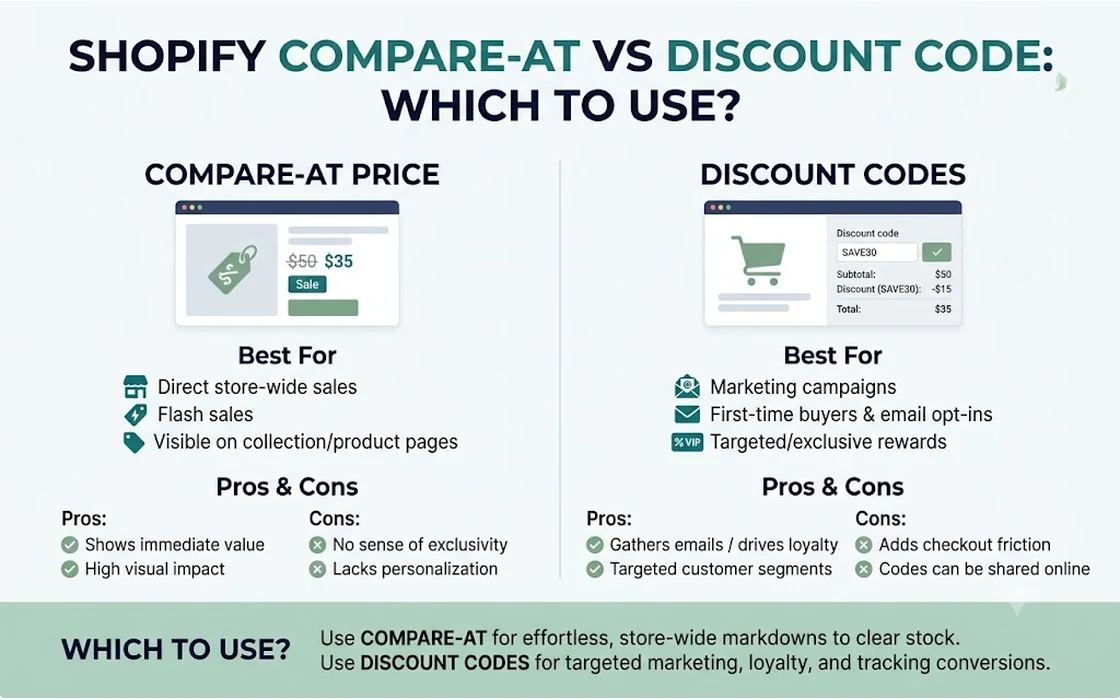
Understanding the Three Promotional Mechanisms on Shopify
Every promotional campaign on Shopify relies on one of three foundational structures. While they can achieve similar bottom-line price reductions, their underlying architecture differs significantly.
1. Compare-at Sale Price (Catalog-Level Discounting)
Compare-at pricing is not technically a “discount” in Shopify’s checkout logic; it is a direct adjustment of variant price attributes within the product database. Every Shopify product variant contains two primary price fields: Price (the amount the customer pays) and Compare-at price (the original manufacturer’s suggested retail price or previous baseline price).
When a merchant populates the Compare-at price field with a value higher than the current Price (for example, setting the compare-at price to Rs. 2,499 and the actual price to Rs. 1,799), Shopify themes automatically trigger visual cues:
- The original price (Rs. 2,499) appears with a visible strikethrough.
- The active sale price (Rs. 1,799) is displayed prominently alongside it.
- Theme badges such as “Sale” or “28% OFF” appear on collection cards and search grids.
Because this change exists at the product database level, it synchronizes across marketing integrations, including Google Merchant Center feeds and Meta product catalogs. The shopper sees the discounted price from the moment they land on your home page, requiring no calculations or promo code inputs.
2. Shopify Automatic Discounts (Cart & Checkout Level)
Automatic discounts are rule-based promotions configured in Shopify Admin that apply to a customer’s cart as soon as specific eligibility requirements are met. These rules can include:
- Percentage or fixed-amount order reductions (e.g., Rs. 500 off orders over Rs. 3,000).
- Tiered quantity discounts (e.g., Buy 3 items, get 20% off).
- Product-specific incentives (e.g., Buy product X, get product Y free).
- Free shipping thresholds.
The core advantage of an automatic discount is zero user friction. Customers do not need to memorize or paste a code. However, standard Shopify themes do not alter collection-grid pricing for automatic discounts; the price drop only reveals itself once the customer adds eligible items to the cart or navigates to the checkout screen.
3. Manual Discount Codes (Input-Driven Exclusivity)
Discount codes are alphanumeric strings that customers must manually submit during checkout. Merchants can configure these codes with granular restrictions, including:
- Usage limits (e.g., single-use per customer or first 100 redemptions).
- Customer eligibility (e.g., restricted to specific customer segments or tagged VIP accounts).
- Minimum order value (e.g., valid only on orders exceeding Rs. 1,999).
- Exclusions on specific collections or clearance items.
Discount codes provide marketing attribution. When collaborating with creators or running private email win-back campaigns, unique codes allow marketing teams to isolate exact revenue generated by each channel.
Feature-by-Feature Decision Matrix
To evaluate which promotional engine fits your promotional calendar, review the operational and technical characteristics summarized below.
| Feature / Criteria | Compare-at Sale Price | Automatic Discount | Manual Discount Code |
|---|---|---|---|
| Visible Strikethrough on Storefront | Yes (catalog-wide, collection cards, product pages) | No (standard themes only show discounts in cart/checkout) | No (price remains standard until code is submitted) |
| Checkout Friction | Zero (discount is already baked into item price) | Zero (applies automatically when rules match) | Moderate (shopper must copy, paste, and validate code) |
| Native Scheduled Start & End | Limited (requires manual CSV/bulk edits on standard plans) | Yes (native start and end dates in Shopify admin) | Yes (native start, end, and expiration dates) |
| Automated Price Reversion | Requires third-party automation apps on standard plans | Built-in (deactivates automatically at end date) | Built-in (expires automatically at end date) |
| Shopify POS Compatibility | Native (registers scan the variant sale price directly) | Native (evaluates cart rules inside Shopify POS app) | Native (staff must manually enter or scan code barcode) |
| Ad Feed Synchronization | Updates sale_price in Google Shopping & Meta feeds | Feeds display standard catalog price without discount | Feeds display standard catalog price without discount |
| Susceptibility to Coupon Scrapers | Immune (no coupon string exists to leak) | Immune (no code required) | High (extensions like Honey and Coupert scrape codes) |
| Stacking Potential | Stacks with checkout-level discounts unless restricted | Controlled via Shopify discount combination rules | Controlled via Shopify discount combination rules |
| Primary Use Case | Sitewide clearance, Diwali & festive catalog sales | Basket-building thresholds (“Spend more, save more”) | Influencer attribution, VIP clubs, email recovery |
For detailed documentation on configuring checkout promotions and combinations, refer to the Shopify Help Center documentation on discounts.
Addressing the Big Objection: The Compare-at Reversion Myth
A longstanding piece of advice frequently circulated among ecommerce operators is: “Never use compare-at prices for a time-limited sale because you have to manually revert them when the sale ends.”
This hesitation stems from legitimate operational nightmares that merchants faced in earlier iterations of Shopify. Historically, launching a 48-hour weekend flash sale across 1,500 SKUs using compare-at pricing meant:
- Exporting a massive CSV spreadsheet of all store products on Friday evening.
- Manually calculating and editing
PriceandCompare-at pricecolumns in Excel. - Importing the CSV back into Shopify, hoping no formatting errors corrupted product handles or variant configurations.
- Setting a midnight alarm on Sunday to repeat the entire CSV export/import process to restore original baseline prices.
If a merchant made a clerical error or forgot to execute the rollback, products remained at clearance rates indefinitely, damaging margins. Consequently, many store managers default to automatic discounts or coupon codes simply to avoid the manual reversion headache.
Traditional Manual Workflow (High Risk):
[Export CSV] -> [Edit Prices in Excel] -> [Re-import] -> [Flash Sale Runs] -> [Alarm at Midnight] -> [Re-import Original CSV] (Prone to errors)

Modern Automated Workflow (Zero Risk):
[Select Collection] -> [Schedule Sale & Auto-Revert] -> [App Applies Changes] -> [App Restores Baseline Automatically]
Why Scheduled Auto-Revert Removes the Risk
Today, that objection is obsolete. By utilizing specialized automation tools designed for catalog management, merchants can schedule both the launch and the reversion of compare-at prices with exact precision.
Instead of manual spreadsheet manipulation, modern store workflows leverage dedicated tools like the NV Bulk Price & Tag Scheduler - bulk pricing and scheduled sales for Shopify. These tools allow merchants to:
- Target specific collections, vendors, or product tags.
- Apply a percentage reduction (e.g., flat 20% off) or fixed rupee discount across thousands of SKUs simultaneously.
- Establish an exact rollback timestamp (e.g., Sunday at 11:59 PM IST).
- Automatically re-map original prices back into the active
Pricefield while clearing theCompare-at pricefield once the event ends.
Merchants who want to explore setting up this workflow step-by-step can read this blog’s detailed guide on how to Schedule a Shopify Collection Sale With Auto-Revert. If your catalog management requires broader batch updates or manual adjustments, review the guide on Bulk Edit Prices on Shopify: Native, CSV & Apps.
Once the fear of manual reversion is eliminated, the decision shifts from an operational burden to a pure conversion strategy.
Conversion Psychology: Strikethrough Pricing vs. Cart Discounts
Consumer behavior during online shopping sessions reveals distinct psychological responses to visual strikethrough pricing versus back-end discount codes.
The Power of Immediate Perceived Value
Indian online shoppers exhibit strong price awareness. When browsing category pages or Instagram ads, a customer evaluating an apparel product expects immediate clarity regarding value.
Consider two competing merchant presentations for an identical kurta set:
- Store A (Using Compare-at Pricing): The product card clearly displays a slashed price of
Rs. 2,499alongside an active price of Rs. 1,699, accompanied by an eye-catching “32% OFF” badge. - Store B (Using a Promo Code or Auto Discount): The product card displays a flat price of Rs. 2,499 with a top announcement banner stating “Use code FESTIVE32 for 32% off at checkout.”
In Store B, the shopper is forced to perform mental arithmetic to determine the final payable amount. More critically, if the customer is browsing casually on a mobile device, they may miss the announcement bar entirely and conclude that Store B is substantially more expensive than Store A. By displaying strikethroughs on product grids, compare-at pricing anchors a higher perceived value immediately, improving click-through rates from category pages to product detail pages.
Eliminating Coupon Box Abandonment
The coupon entry field at checkout is a notorious conversion leak. When a prospective buyer arrives at the payment stage and sees an empty “Discount code” box, a predictable behavioral pattern occurs:
- The shopper pauses the checkout flow.
- They open a new browser tab or mobile search engine to search for “Store Name coupon code 2026”.
- They get sidetracked by coupon aggregator sites, encounter expired codes, or get lured away by competitor ads.
- The cart is abandoned.
Automatic discounts and compare-at prices bypass this leakage entirely. With compare-at pricing, the savings are already finalized; with automatic discounts, the cart subtotal updates seamlessly without demanding any code lookup.
Margins, Stacking Risks, and Coupon Leakage
Deploying promotional strategies without strict guardrails can quickly undermine gross margins. Merchants must account for discount stacking and digital coupon scrapers before initiating public promotions.
Illustrative Margin Erosion Scenario (Rs.):
------------------------------------------------------
Original Product Price:                      Rs. 2,000
1. Compare-at Sale Price (25% off):          Rs. 1,500
2. Unchecked Auto Discount (10% site-wide):  Rs. 1,350
3. Leaked Creator Promo Code (15% off):      Rs. 1,147.50
------------------------------------------------------
Total Realized Discount: 42.6% (Unintended margin collapse)
Managing Discount Combinations
Historically, Shopify enforced an either/or approach to discounts: a cart could only accept one discount at a time. In recent years, Shopify introduced granular Discount Combinations, allowing merchants to specify whether:
- Product discounts can combine with Order discounts.
- Product discounts can combine with Shipping discounts.
- Order discounts can combine with Shipping discounts.
However, compare-at pricing exists outside of this combination engine. Because Shopify treats a compare-at price as the item’s actual base selling price, any active automatic discount or discount code will apply on top of the already reduced compare-at price unless explicitly configured otherwise.
For example, if you reduce a leather jacket from Rs. 5,000 to a compare-at sale price of Rs. 3,500, and simultaneously run an automatic promotion giving 20% off all orders, a customer purchasing that jacket will receive 20% off Rs. 3,500—bringing the final price to Rs. 2,800. Ensure you audit your active discount rules before launching a catalog-wide compare-at event to prevent compounding discounts.
Preventing Coupon Code Hijacking
Browser extensions such as Honey, Coupert, and CashKaro automatically scrape, store, and test discount codes submitted by shoppers. If you create a 20% discount code intended exclusively for an abandoned-cart email recovery flow, a single shopper utilizing a coupon extension can upload that code to a public database. Within hours, organic buyers who intended to pay full price receive that 20% discount automatically.
To insulate your store from coupon leakage:
- Use single-use dynamic codes for email and SMS retention sequences.
- Set minimum purchase requirements (e.g., valid only on carts exceeding Rs. 2,000) on all public codes.
- Rely on compare-at prices or automatic discounts for broad promotional campaigns, as extensions have no code to scrape.
Furthermore, sudden influxes of discounted orders—especially under Cash on Delivery (COD) payment terms common in the Indian market—can increase return-to-origin (RTO) rates. To protect cash flow, merchants should implement screening tools such as Order Validation & Automation - automatic order screening for Shopify to verify customer contact information and screen risky orders before fulfillment.
Operational Trade-Offs: Omni-Channel and POS Compatibility
For brands running both an online Shopify store and physical retail locations using Shopify POS, the choice of promotional mechanism directly impacts frontline retail operations.
Retail Staff Workflow on Shopify POS
At a physical retail counter, speed and checkout accuracy are vital:
- Compare-at Prices on POS: When a barcode is scanned at the register, Shopify POS reads the current variant
Price. If the product has a compare-at price of Rs. 1,999 and an active price of Rs. 1,499, the receipt and the POS screen automatically register Rs. 1,499. Retail staff do not need to perform manual overrides or remember promotion names. - Automatic Discounts on POS: Automatic discounts configured in Shopify Admin sync with the Shopify POS app. When the customer’s physical basket satisfies the threshold conditions, the discount is calculated automatically on the POS screen.
- Discount Codes on POS: Manual coupon codes introduce physical friction. Staff must either type the code into the register manually or scan a specialized promotional barcode from a flyer or customer’s phone. This delays checkout queues during peak shopping hours.
Tax and GST Invoice Implications
In India, Goods and Services Tax (GST) compliance mandates accurate reporting of taxable values on tax invoices.
When you apply a catalog-level compare-at price, the invoice simply reflects the transaction price (e.g., Rs. 1,499) as the taxable value, calculating 5%, 12%, or 18% GST on that exact amount.
When using order-level discount codes (e.g., Rs. 500 off the total order), the discount must be apportioned proportionally across each individual item in the order according to standard accounting standards. While Shopify’s checkout engine handles proportional tax recalculation automatically, third-party ERP integrations and custom GST invoicing apps can occasionally experience synchronization discrepancies if order-level discounts are not formatted properly.
Practical Scenarios: Which Promotion Method to Pick
To streamline your promotional planning, consider these four standard operational scenarios and their optimal discount mechanisms.
Scenario A: Sitewide Festive Sale (Diwali, Independence Day, Black Friday)
- Recommended Mechanism: Compare-at Sale Price (with Scheduled Auto-Revert)
- Why: You need maximum visual impact across collection grids, product detail pages, and dynamic retargeting ads. Slashed prices communicate immediate urgency to browsing shoppers. Utilizing an automated scheduler ensures your catalog returns to full retail pricing at midnight without manual intervention.
Scenario B: Average Order Value (AOV) Expansion
- Recommended Mechanism: Automatic Discounts
- Why: The objective is basket building—incentivizing customers to add more items to unlock a perk. A tiered automatic discount structure (e.g., “Buy 2 items, get 10% off; Buy 3 items, get 20% off”) dynamically updates inside the cart as shoppers add products, driving higher unit-per-transaction (UPT) metrics without requiring code entry.
Scenario C: Influencer Marketing and Affiliate Tracking
- Recommended Mechanism: Manual Discount Codes
- Why: You must isolate revenue generated by specific creator partnerships. Assigning distinct codes (e.g.,
PRIYA10orROHIT15) provides accurate attribution, allowing your team to calculate return on ad spend (ROAS) and pay out creator commissions accurately.
Scenario D: VIP Customer Retention & Win-Back Sequences
- Recommended Mechanism: Segmented Discount Codes
- Why: Offering margin-heavy incentives (such as 25% off) should be restricted exclusively to inactive customers or high-lifetime-value VIPs. Configuring codes restricted to specific customer email lists ensures unauthorized shoppers cannot exploit the offer.
FAQ
Can I use an automatic discount and a discount code at the same time on Shopify?
Yes, but only if both promotions are explicitly configured to allow combinations. In your Shopify Admin discount settings, you must check the “Combinations” box allowing the discount to combine with either product discounts, order discounts, or shipping discounts; otherwise, Shopify’s checkout engine will prioritize whichever single discount provides the customer with the greater financial savings.
Does compare-at pricing hurt my Google Shopping product feed?
No, compare-at pricing actually enhances Google Shopping and Meta catalog performance. When configured properly, Shopify maps your Compare-at price to the high_price or regular_price attribute and your active Price to the sale_price attribute, allowing ad networks to display official “Sale” badges and strikethroughs directly within search results.
How do compare-at prices affect GST calculations for Indian Shopify stores?
Compare-at prices simplify GST compliance because the active selling price becomes the baseline transaction value. The tax rate (e.g., 5%, 12%, or 18% GST) is calculated directly on the actual selling price paid by the customer, avoiding the proportional line-item distribution complexities that can sometimes occur with order-level checkout discount codes.
Why do Indian D2C brands prefer compare-at pricing during major sales?
Indian consumers frequently compare direct-to-consumer store prices against multi-brand marketplaces where strikethrough pricing is universal. Strikethrough badges remove cognitive friction, reassure shoppers of immediate savings without manual code entry, and prevent cart abandonment caused by empty coupon code fields.
Conclusion
Neither compare-at prices, automatic discounts, nor discount codes represent a one-size-fits-all solution; each serves a distinct operational purpose within a mature Shopify promotional strategy. Compare-at pricing remains the undisputed choice for broad, visual catalog sales where storefront strikethroughs maximize conversion rates. Automatic discounts provide the smoothest user experience for threshold-based basket building, while discount codes provide essential attribution and containment for targeted marketing initiatives.
Rather than defaulting to coupon codes out of fear that catalog pricing is too difficult to revert, implement automated scheduling tools to handle the operational heavy lifting. By aligning each promotion mechanism with its specific psychological and commercial strength, you can design high-converting sales events that scale your revenue while safeguarding your store’s bottom line.