
Card-Testing Bots on Shopify: Stop Rs 1 Orders
Learn how to spot card-testing bots on Shopify, use native fraud controls, and block Rs 1 test orders before payment gateway fees damage your business.

- NV Trends
- 15 min read
Card-testing bots on Shopify are automated scripts deployed by cybercriminals to validate stolen credit and debit card numbers by submitting rapid bursts of low-value micro-transactions—frequently targeting amounts between Rs 1 and Rs 50. When an online store is targeted, bots can fire hundreds or thousands of checkout attempts within minutes to verify which stolen card numbers are active before using them for larger fraudulent purchases elsewhere. For an Indian ecommerce merchant, this sudden surge does not represent real revenue; it leaves behind a wake of payment gateway authorization fees, chargeback liability, and potential processor account suspensions.
The vulnerability often stems from subtle configuration oversights in the store catalog or checkout pipeline. Fraudsters specifically seek out Shopify stores that offer low-ticket digital downloads, sample kits, open donation fields, or development “test products” accidentally left published at Rs 1. While domestic card payments in India operate under strict Additional Factor of Authentication (AFA) mandates enforced by the Reserve Bank of India, international card rails and certain global payment gateways do not always enforce one-time passwords (OTP) for low-value transactions, creating an attractive opening for automated credential stuffing and card churning.
Mitigating this threat does not require jumping immediately into expensive third-party enterprise security suites. Shopify provides native checkout preferences, fraud filters, and payment authorization settings that serve as an effective first perimeter of defense. By understanding how card-testing attacks operate, configuring native spam shields, and implementing targeted order-screening rules, merchants can neutralize automated checkout attacks before their gateway health is compromised.
Key takeaways
- Automated validation, not genuine orders: Card-testing bots exploit low-value products (like Rs 1 test items) solely to verify stolen credit card data, leaving merchants with gateway fees and dispute risks.
- Native controls first: Shopify Admin includes built-in Google reCAPTCHA v3, checkout bot protections, and manual payment capture settings that mitigate exposure without requiring extra software.
- Critical rule patterns: Implementing velocity rules (canceling more than N orders from the same email or phone within 24 hours) and value-threshold screening stops bot runs automatically.
- Manual capture buffer: Switching payment capture from automatic to manual prevents settling fraudulent charges, saving authorization dispute fees while suspicious orders are inspected.
What Is a Card-Testing Attack and How Does It Target Shopify?
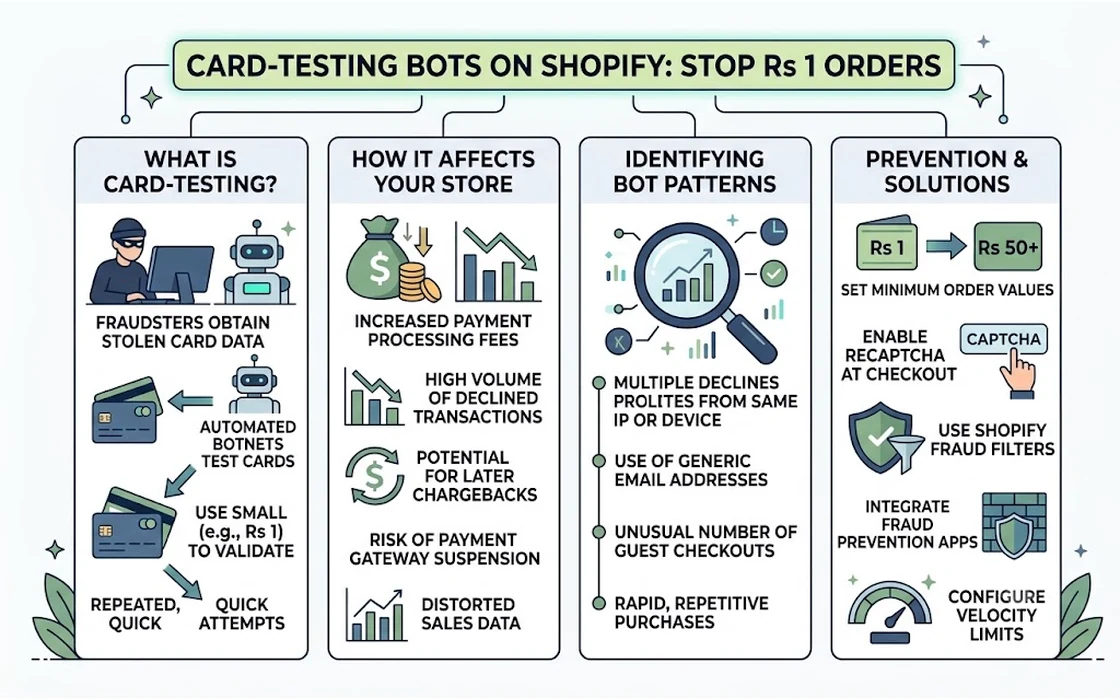
Card testing—also referred to as “carding” or “card churning”—is a mechanized fraud technique. Attackers acquire large databases containing thousands of compromised credit or debit card primary account numbers (PANs), expiration dates, and CVVs from dark web marketplaces or phishing operations. Because banks routinely cancel compromised cards, fraudsters must determine which cards in their batch remain active and have available credit limits.
Manually entering card details across consumer websites is too slow. Instead, attackers use automated botnets, headless browsers, or API scripts to automate the checkout flow on ecommerce platforms. When targeting a Shopify store, the script executes a predictable sequence:
- Product discovery: The bot scans the store catalog via collection pages or search queries for the lowest-priced SKU available (often looking for keywords like “test”, “sample”, “demo”, or items sorted by price low-to-high).
- Automated carting: The script pushes the product to the cart and navigates directly to the checkout endpoint.
- Identity fabrication: The bot populates the checkout form with randomly generated buyer names, disposable email addresses (frequently using patterns like
randomstring@tempmail.com), and synthetic or real physical addresses. - Rapid-fire submission: The script attempts payment using one card credential from its list. If the transaction is declined due to an invalid CVV or closed account, the bot immediately discards the credential and attempts the next card in line. If the transaction succeeds, the credential is saved into a “validated” list and sold at a premium or used for high-ticket fraud.
[Stolen Card Database]
          │
          ▼
   [Card-Testing Bot]
          │
          ▼
[Shopify Store Checkout] ──► [Attempts Rs 1 / Micro-Order]
          │
    ┌─────┴────────────────────────┐
    ▼                              ▼
[Bank Declines]              [Bank Approves]
(Card Marked Dead)           (Card Marked Valid)
                             Merchant incurs:
                             - Gateway API / processing fee
                             - Potential chargeback fine
                             - Manual cleanup overhead
In India, domestic card-not-present (CNP) transactions require mandatory two-factor authentication (SMS OTP or app-based approval). However, card-testing bots often bypass this hurdle by utilizing cards issued outside India, or by attacking stores that process international payments through gateways like Stripe, Shopify Payments, or international-enabled Razorpay accounts where 3D Secure (3DS) is either dynamically applied or absent for non-enrolled foreign cards.
The Financial Fallout for Indian Merchants
Many store operators assume that an order declined by the payment gateway has zero financial impact on the business. This is a costly misconception. Card-testing attacks inflict severe direct and indirect damage:
1. Cumulative Gateway and Authorization Fees
Payment gateways incur processing overhead with card networks (Visa, Mastercard, RuPay) for every authorization request submitted, regardless of whether the transaction settles, fails, or is declined. While pricing models vary, gateways typically levy a fixed authorization fee or decline charge (often between Rs 5 to Rs 15 per API call, plus applicable GST). If a bot executes 3,000 card checks over a six-hour period, a merchant can face thousands of rupees in unrecoverable gateway fees for orders that generated zero revenue.
2. Chargeback and Retrieval Penalties
For the fraction of card tests that successfully clear authorization, the legitimate cardholders will eventually notice unauthorized micro-charges on their bank statements. Even a charge of Rs 1 or Rs 75 will prompt an alert customer to file a fraud dispute with their bank. In cross-border ecommerce, international chargeback handling fees charged by processors typically range between $15 and $20 (approximately Rs 1,200 to Rs 1,700) per incident. Fifty successful Rs 1 bot orders can easily translate into over Rs 60,000 in dispute penalties.
3. Payment Gateway Suspension and Rolling Reserves
Acquiring banks and payment aggregators monitor decline ratios and dispute metrics closely. If your store’s authorization decline rate spikes from a normal 5–10% up to 70% or 80% during a card-testing blitz, automated risk systems at gateways like Razorpay, Cashfree, or Stripe will flag the merchant ID. Consequences include:
- Immediate holding of daily payouts.
- Imposition of a rolling reserve (where 10% to 25% of your sales volume is frozen for 90 to 180 days).
- Outright account termination for high-risk transaction processing.
4. Inventory Lockout and Operational Distortion
If the bot targets an inventory-tracked physical product, each checkout attempt reserves or depletes stock. Real customers visiting your storefront encounter “Out of Stock” notices on popular items, hurting genuine conversion rates. Simultaneously, fulfillment teams waste hours manually voiding orders, untangling inventory logs, and checking fulfillment queues.
First Line of Defense: Native Shopify Admin Configurations
Before installing external applications, merchants should exhaust the native protective levers built directly into the Shopify ecosystem. Shopify includes several configuration settings that restrict automated card-testing scripts at zero additional cost.
1. Enable Native Checkout Protection and reCAPTCHA
Shopify maintains built-in integration with Google reCAPTCHA v3 to detect automated browsing behavior without degrading user experience for genuine shoppers.
To verify and tighten this protection:
- Log in to your Shopify Admin.
- Navigate to Online Store > Preferences.
- Scroll down to the Spam protection section.
- Ensure the checkboxes for Enable Google reCAPTCHA on checkout and Enable Google reCAPTCHA on contact and comment forms are active.
Under Shopify’s native checkout architecture, reCAPTCHA v3 operates in the background, analyzing user telemetry (mouse movements, keystroke timings, session duration). When a headless script triggers checkout without authentic human interaction, the checkout engine challenges the session or blocks form submission.
2. Purge or Restrict Low-Value and Development Products
Card testing thrives on micro-denominations. Inspect your active catalog for:
- Development SKUs created during theme setup (e.g., “Rs 1 Test Item” used to verify gateway webhooks).
- Digital downloads or PDF samples priced at nominal fees (Rs 5, Rs 10).
- Free sample items with zero or nominal shipping charges.
If you must offer sample products or digital previews, configure them behind customer account logins or enforce a realistic storewide minimum cart threshold (for example, setting the minimum total payable amount to at least Rs 199). If you frequently modify product catalogs or run promotional campaigns, use tools like NV Bulk Price & Tag Scheduler to schedule price restorations and prevent discounted clearance items from remaining at rock-bottom prices indefinitely.
3. Switch to Manual Payment Capture
By default, most Shopify stores are configured to capture payments automatically upon checkout. In this mode, authorization and settlement occur simultaneously, meaning the customer’s card is debited immediately, and transaction fees are locked in.
Switching to Manual Capture provides a critical buffer:
- Go to Settings > Payments.
- In the Payment capture method area, select Manually capture payment for orders.
- Set an authorization expiry window (typically 7 days, depending on your gateway terms).
[Automatic Capture]
Checkout ──► Authorization + Settlement ──► Gateway Fees Locked ──► Harder to Void

[Manual Capture]
Checkout ──► Authorization Only ──► Inspection Window ──► Void Authorization (Zero Settlement Fees)
With manual capture enabled, when a bot wave hits, transactions are merely authorized by the issuing bank. The funds are not captured. This allows you to identify the fraudulent batch, cancel the orders, and void the authorizations. Voiding an unauthorized transaction prior to capture drastically reduces dispute risks and prevents the transaction from turning into a formal chargeback.
Establishing Automated Screening Rules
Once native settings are hardened, the next layer involves implementing rules that detect and neutralize bot patterns in real time. While Shopify’s built-in fraud analysis highlights high-risk orders with red flags, it does not always block them automatically out of the box unless paired with automated workflows.
Pattern 1: Velocity Thresholds on Buyer Identity
Card-testing scripts cycle card numbers rapidly, but they often reuse or dynamically increment a small pool of identifiers—such as using the same telephone number, identical IP subnets, or emails derived from a single domain.
A robust operational velocity rule follows this logic:
Rule: If N or more orders are received from the same customer email address, IP address, or phone number within a rolling 24-hour window, automatically hold fulfillment, tag the order with
bot_suspect, and send an alert notification.
If you are already screening for multi-order patterns, review the architecture discussed in our guide on how to Detect Duplicate Shopify Orders: Why Flow Fails & 3 Rules to understand how timing race conditions can allow bot waves to bypass standard sequence checks.
Pattern 2: Micro-Value Order Interception
Because bots avoid high-ticket purchases that could trigger aggressive bank fraud checks, establishing an order-value floor is an effective screening filter:
Rule: If an order total is less than Rs 100 AND the payment method is an international credit/debit card, immediately tag the order for manual review and hold payment capture.
This pattern isolates test transactions while allowing higher-value domestic orders (protected by Indian bank OTP verification) to flow naturally to your fulfillment team.
Pattern 3: Address and Geolocation Inconsistencies
Card-testing bots frequently generate synthetic street addresses paired with mismatched postal codes, or combine an Indian shipping address with a billing address originating from a disparate foreign country. Evaluating these discrepancies helps isolate fraudulent activity before dispatch. To configure safe parameters around these mismatches, refer to the best practices detailed in Shopify Billing vs Shipping Address Mismatch: Safe Rules.
For stores managing hundreds of daily orders where manual review is impractical, implementing automated order evaluation tools such as Order Validation & Automation allows merchants to automatically cancel, tag, or hold orders matching specific risk criteria, preventing bot-generated orders from reaching your warehouse or triggering automated fulfillment webhooks.
Defensive Strategies Compared
Evaluating your security options requires balancing mitigation effectiveness against checkout friction and financial costs. The following table contrasts the primary mechanisms available to Shopify merchants:
| Defensive Layer | Implementation Mechanism | Setup Complexity | False Positive Risk | Primary Protection Scope | Cost Implications |
|---|---|---|---|---|---|
| Native Spam Protection | Shopify Preferences (reCAPTCHA v3) | Low (Toggle in Admin) | Very Low | Broad bot filtering at checkout form submission | Included free with all Shopify plans |
| Manual Payment Capture | Shopify Payments / Gateway Settings | Low (Configuration change) | Zero (Applies to all checkouts) | Prevents immediate settlement of test charges; allows voiding | Free; requires manual capture workflow for legitimate orders |
| Catalog Price Floor | Product pricing & theme cart validation | Medium (Remove Rs 1 SKUs; set min. cart value) | Low (If set under typical lowest product price) | Eliminates low-value targets favored by card-testing scripts | Free; may limit low-cost sample distribution |
| Velocity & Screening Rules | Shopify Flow or Automated Rules Engine | Medium (Rule definition and tagging logic) | Low to Medium (Depends on threshold strictness) | Automatically intercepts rapid repeat submissions from single identities | Free via native Flow (on supported plans) or app-based |
| Gateway 3D Secure / Radar | Payment Gateway Dashboard (Razorpay, Stripe) | Medium to High (Gateway rule builder) | Medium (Strict 3DS rules may cause friction for foreign buyers) | Blocks card authorizations at the banking network layer before order creation | Standard gateway transaction fee structures apply |
Handling an Ongoing Attack: Emergency Triage Playbook
If you open your Shopify Admin and find dozens of pending, unfulfilled orders for Rs 1 or Rs 10 created over the past hour, your store is likely under an active card-testing run. Execute this emergency response sequence immediately:
[Active Attack Detected]
          │
          ├─► Step 1: Unpublish / Draft the targeted SKU immediately
          │
          ├─► Step 2: Switch Payment Capture to "Manual" in Settings
          │
          ├─► Step 3: Contact Payment Gateway Support to tighten velocity limits
          │
          ├─► Step 4: Void unauthorized transactions (Do NOT click Refund)
          │
          └─► Step 5: Export order logs and identify common IP / email patterns
Step 1: Unpublish the Targeted Product
Quickly identify which item is appearing across the bot-generated orders. Open that product in your Shopify Admin and set its status to Draft, or remove it from your Online Store sales channel. Without an active target SKU, the bot’s checkout script will receive a 404 or out-of-stock error and abort its automated loop.
Step 2: Switch Payment Capture to Manual
Navigate to Settings > Payments and switch your capture setting to manual. This immediately stops incoming test orders from settling funds. Any subsequent attempts that slip through will only place a temporary hold on the card, which can be voided without incurring processing fees.
Step 3: Notify Your Payment Gateway
Contact your account manager or technical support at your payment gateway (e.g., Razorpay, Stripe, Cashfree). Request that they check the merchant account for velocity spikes and temporarily elevate the risk sensitivity on card-not-present authorizations. Most gateways possess network-level firewalls that can block the offending IP blocks or issuing bank country codes before the traffic reaches your Shopify checkout.
Step 4: Void Authorizations Instead of Refunding
When clearing out fraudulent orders from your admin:
- If payment capture was manual and the order is only authorized, click Cancel Order and select Void authorization. This terminates the authorization without processing fees.
- Avoid issuing standard refunds on settled micro-charges if possible: Refunding a captured payment still incurs the original non-refundable gateway processing fee, and some processors charge an additional refund processing levy. Voiding avoids these downstream costs.
Step 5: Audit and Archive Order Logs
Export the CSV of the affected orders from Shopify. Examine the customer details, IP addresses, shipping addresses, and user-agent strings. Archive these records; if your payment gateway questions the spike in decline rates later, providing documented evidence that you proactively contained an automated card-testing attack will help protect your merchant standing.
Common Mistakes to Avoid
When hardening a Shopify store against card testing, merchants sometimes overreact, inadvertently damaging customer experience and legitimate sales. Avoid these critical mistakes:
- Do not block entire geographic regions indiscriminately: If your store has a significant Non-Resident Indian (NRI) customer base in the United States, United Kingdom, or UAE purchasing gifts for family in India, blanket-blocking all foreign IP addresses or international cards will stifle genuine high-ticket revenue. Instead, rely on value thresholds and velocity rules.
- Do not assume CAPTCHA solves 100% of bot attacks: Modern cybercrime syndicates utilize automated CAPTCHA-solving services and human-emulation browser drivers (such as Puppeteer-Stealth). While reCAPTCHA stops rudimentary scripts, it must be paired with back-end velocity rules and payment capture controls.
- Do not leave abandoned development products online: A frequent culprit is an unlisted Rs 1 product created months earlier to test a checkout hook, left active because the merchant assumed “no one knows the URL.” Bots do not need public links; they scrape sitemaps (
yourstore.com/sitemap_products_1.xml) and index every published product handle automatically. - Do not ship micro-value orders without verification: If a customer unexpectedly orders a single Rs 10 sticker or promotional bookmark with an overseas billing address, do not mark it fulfilled simply because the amount is trivial. If an order seems anomalous, reach out to the customer via direct communication channels like NV WhatsApp Chat to confirm their intent before packing and shipping.
FAQ
Why do card testers make Rs 1 or micro-value transactions on Shopify?
Card-testing bots use Rs 1 or micro-value amounts to verify whether stolen card credentials are valid without triggering the cardholder’s spending alerts or the issuing bank’s automated fraud detection thresholds. A tiny transaction minimizes the risk of immediate card freezing while confirming that the card number, expiry date, and CVV are active.
Does 3D Secure (OTP) completely stop card-testing attacks in India?
While mandatory two-factor authentication (AFA) via SMS OTP stops domestic Indian cards from being processed by automated bots, it does not fully prevent card testing involving international cards. If your store accepts cross-border payments via international credit cards or non-3DS payment rails, bots can still test foreign card databases on your checkout.
Can native Shopify features stop card testing without third-party apps?
Yes. Enabling Google reCAPTCHA v3 under Online Store > Preferences, switching payment capture from automatic to manual in Settings > Payments, and setting strict catalog price floors provide substantial native protection. Adding basic Shopify Flow rules for order velocity and tagging further hardens defenses without requiring external paid software.
What is the difference between voiding and refunding a bot order?
Voiding cancels an authorized transaction before the funds are captured and settled through the banking network, which generally prevents gateway transaction fees and eliminates chargeback risks. Refunding occurs after the payment has been settled, meaning the merchant has already incurred non-refundable processing fees and remains exposed to refund administrative fees.
Conclusion
Card-testing attacks represent an automated, persistent threat to ecommerce merchants, but they do not require complex or expensive solutions to control. By understanding that these attacks exploit low-value catalogue loopholes and high-velocity automation, Shopify merchants can build a resilient defense using the platform’s native capabilities.
Start by auditing your catalog to eliminate any lingering Rs 1 or development test items. Ensure Shopify’s native spam protections and reCAPTCHA settings are active, and evaluate switching to manual payment capture if your store handles international traffic. Layering these baseline administrative practices with velocity screening rules protects your merchant account, keeps payment gateway fees under control, and ensures your store remains focused on servicing genuine customers.
- Tags:
- Shopify Fraud
- Card Testing
- Shopify Security
- Payment Gateways
- Ecommerce Fraud
- Bot Protection