
npm v12 Breaking Changes: A Complete Guide for Developers
Master the breaking changes in npm v12, from Lockfile v4 to strict peer dependencies, with this comprehensive migration guide for modern engineering teams.

- NV Trends
- 12 min read
- Updated
The release of npm v12 introduces critical breaking changes centered on dropping legacy Node.js runtimes prior to v20, enforcing a leaner Lockfile Version 4, making peer dependency resolution strictly blocking by default, deprecating legacy fallback flags, mandating package build provenance, and standardizing on ECMAScript Modules (ESM).
Across India’s fast-expanding tech corridors—from enterprise engineering teams in Bengaluru and Hyderabad to agile product startups in Pune, Chennai, and Gurgaon—npm sits at the center of modern JavaScript infrastructure. Indian development teams maintain thousands of microservices and customer-facing web apps that handle millions of daily Unified Payments Interface (UPI) transactions and digital commerce operations. Because package management forms the baseline of application security, build reproducibility, and developer velocity, an uncoordinated transition to a new major npm release can trigger broken deployment pipelines, erratic build failures, and severe technical friction.
As of 2026, modern software engineering demands stronger supply-chain integrity and faster dependency resolution. Major versions of the Node Package Manager historically coincide with the Long-Term Support (LTS) lifecycle of Node.js. With npm v12, the maintainers have addressed accumulated technical debt by retiring outdated compatibility shims. Upgrading your development workflows and enterprise build servers requires a clear understanding of what has changed, how dependency resolution is enforced, and how to migrate your projects without stalling sprint cycles or incurring costly downtime.
Key takeaways:
- Node.js Baseline Enforced: npm v12 officially drops support for all Node.js releases prior to Node.js v20 LTS, blocking installations on legacy runtimes.
- Lockfile Version 4: Introduces an optimized, structurally leaner lockfile format that reduces disk and clone overhead by an estimated 30–40%, but creates backward-incompatibility issues with npm v10 and older clients.
- Strict Peer Dependencies by Default: The resolver halts on dependency version conflicts; the long-abused
--legacy-peer-depsflag is deprecated in favor of explicitoverridesinpackage.json. - Mandatory Supply Chain Provenance: Packages published through automated CI environments now require cryptographic build provenance attestations on the npm registry, flagging unverified dependencies.
- ESM-First Execution: Tooling, global bin scripts, and module resolution prioritize ECMAScript Modules, surfacing warnings for dual-package hazards and unmapped internal exports.
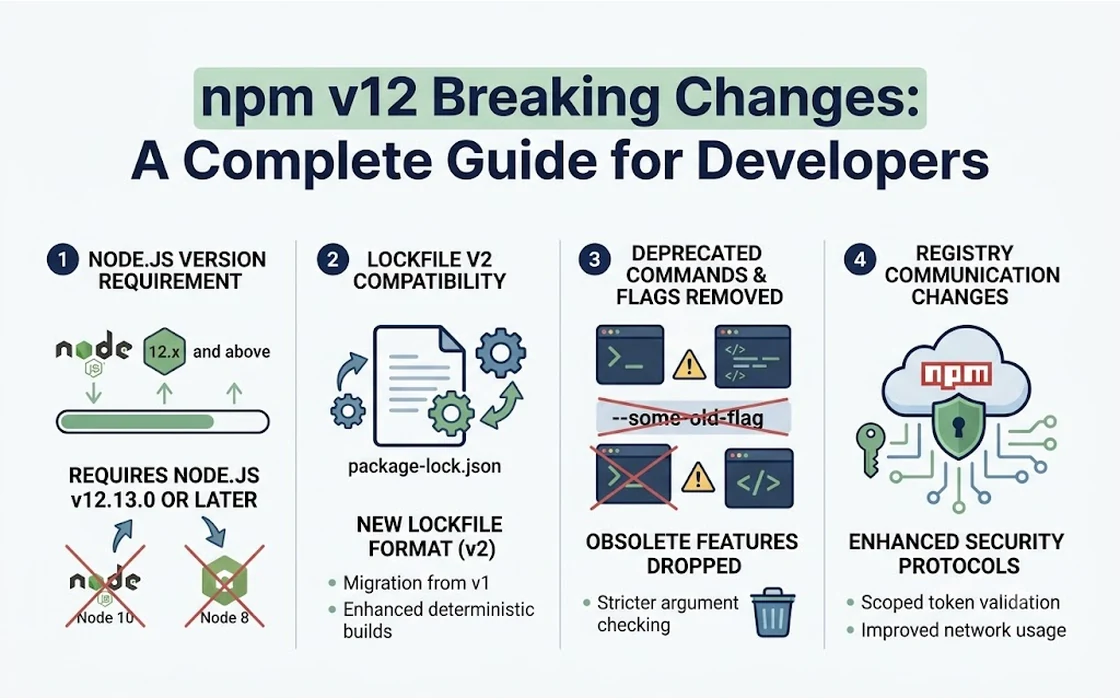
Dropped Support for Legacy Node.js Versions (< v20)
The most consequential change in npm v12 is the removal of support for Node.js versions older than Node.js v20. Older runtimes—including Node.js 14, 16, and 18—have reached the end of their official lifecycle. According to published project documentation, maintaining compatibility across defunct V8 engines and deprecated internal APIs placed an unsustainable burden on CLI maintenance.
In many Indian IT service companies and enterprise development centers, legacy client applications often linger on Node.js 16 or 18 due to strict change-management protocols. For these codebases, running an automated update to npm v12 will abruptly fail. Attempting to install or run npm v12 on an unsupported runtime triggers immediate engine mismatch errors, halting CI/CD jobs.
To inspect the active Node.js and npm versions on your development workstation or container runner, execute:
node -v
npm -v
If your environment reports anything below Node.js v20.x.x, you must upgrade your underlying Node.js runtime before introducing npm v12. Development teams managing multiple concurrent projects across different customer environments can avoid configuration clashes by standardizing on version management utilities like nvm (Node Version Manager) or containerized micro-environments. If your team relies on containerized local workflows on Apple hardware, utilizing modern virtualization platforms like those explored in our guide to macOS container machines can help isolate legacy services from modern Node.js v20+ pipelines.
Teams upgrading workstation toolchains on macOS can also streamline their environment updates through package managers; review our breakdown of Homebrew 6.0.0 to ensure system-level dependencies and compiler toolchains remain in sync.
Lockfile Version 4: Leaner Architecture and Backward Incompatibilities
The package-lock.json file guarantees deterministic builds by recording the exact version, resolution path, and integrity hash of every installed dependency. npm v12 introduces Lockfile Version 4, a structural overhaul that alters how dependencies are mapped.
Based on published release data, Lockfile v4 eliminates duplicated hoist declarations, compresses dependency mapping trees, and modernizes hash integrity checks to counter dependency confusion risks. In large-scale monorepos common in fintech and enterprise architectures—where lockfiles often exceed 15 to 20 megabytes—Lockfile v4 reduces file sizes by approximately 30% to 40%. This size reduction accelerates Git operations, minimizes clone times on constrained networks, and lowers bandwidth overhead across high-frequency CI pipelines.
{
  "name": "enterprise-fintech-core",
  "version": "2.4.0",
  "lockfileVersion": 4,
  "packages": {
    "": {
      "name": "enterprise-fintech-core",
      "version": "2.4.0",
      "dependencies": {
        "express": "^4.21.0"
      }
    }
  }
}
The Incompatibility Risk for Distributed Teams
While npm v12 can read and automatically upgrade Lockfile Version 2 and Version 3 formats, the process is not reversibly compatible:
- Destructive Rewrites: When a developer using npm v12 executes
npm install, the lockfile updates tolockfileVersion: 4. - Older Client Breakage: If another team member or an automated CI pipeline still runs npm v10 or v9, the older CLI cannot correctly parse v4 metadata. The older client will either overwrite the file back to v3 format (polluting Git commits) or fail with JSON schema parsing errors.
- Merge Conflict Overhead: Having developers on the same project using mixed npm versions leads to chronic, massive merge conflicts in
package-lock.json, costing engineering hours and risking accidental dependency drift.
To prevent this disruption, teams must coordinate their transition. When adopting Lockfile v4, update all developer environments and CI deployment runners simultaneously.
Strict Peer Dependency Enforcement: Deprecating --legacy-peer-deps
Historically, missing or conflicting peer dependencies generated non-blocking warning banners in the terminal. When stricter resolution algorithms were introduced in npm v7, many developers adopted the --legacy-peer-deps CLI flag to bypass resolution errors during tight release cycles. This allowed projects to compile even when two packages required conflicting versions of shared singletons like React or GraphQL.
In npm v12, tolerance for peer dependency mismatches is completely removed. Peer dependency resolution is strictly blocking by default. If your dependency graph contains incompatible peer specifications, npm halts with an ERESOLVE error:
npm error code ERESOLVE
npm error ERESOLVE could not resolve
npm error While resolving: @enterprise/ui-components@3.1.0
npm error Found: react@19.0.0
npm error Could not resolve dependency:
npm error peer react@"^18.2.0" from @enterprise/ui-components@3.1.0
The --legacy-peer-deps flag is officially deprecated. Continuing to rely on it in npm v12 emits prominent deprecation notices and may be disabled in subsequent minor revisions.
Resolving Peer Conflicts the Right Way: Using overrides
Instead of bypassing resolver checks with legacy flags, npm v12 requires developers to resolve conflicts explicitly using the overrides field in package.json. This signals to the package manager that you have reviewed the upstream package compatibility and explicitly chosen an overarching version for the shared dependency.
{
  "name": "corporate-portal",
  "version": "1.0.0",
  "dependencies": {
    "react": "^19.0.0",
    "react-dom": "^19.0.0",
    "@enterprise/ui-components": "^3.1.0"
  },
  "overrides": {
    "@enterprise/ui-components": {
      "react": "$react"
    }
  }
}
By binding @enterprise/ui-components to your root $react version, npm v12 safely satisfies the dependency tree without masking genuine version incompatibilities.
Architectural Comparison: npm v10 vs v11 vs v12
To evaluate how npm v12 compares with earlier versions across critical development vectors, review the specifications below:
| Feature / Metric | npm v10 | npm v11 | npm v12 |
|---|---|---|---|
| Minimum Node.js Runtime | Node.js v18.17.0 | Node.js v20.0.0 | Node.js v20.10.0+ |
| Default Lockfile Format | Lockfile v3 | Lockfile v3 | Lockfile v4 |
| Peer Dependency Enforcement | Warn / Strict (configurable) | Strict with fallback | Strict blocking (ERESOLVE) |
--legacy-peer-deps Support | Fully supported | Deprecation warning | Formally deprecated / Restricted |
| Build Provenance Verification | Opt-in / Informational | Recommended | Enforced / Warns on missing |
| Execution Default | Mixed CommonJS / ESM | Transition mode | ESM-first execution |
| Lockfile Size vs Baseline | Baseline (100%) | Baseline (100%) | Reduced (60%–70% of v3) |
Mandatory Build Provenance and Supply Chain Safeguards
Software supply-chain integrity has become an urgent priority for enterprise engineering teams. Malicious packages, account takeovers, and compromised build systems have increasingly targeted open-source registries. Security threats targeting software developers—such as deceptive campaigns detailed in our report on the LinkedIn Job Offer Backdoor—illustrate how attackers leverage developer trust to inject unauthorized code into internal networks.
In npm v12, security posture shifts from reactive auditing to proactive verification:
1. Build Provenance Checks
npm v12 integrates cryptographic attestations powered by public transparency logs via GitHub and Sigstore. When developers install packages with high download volumes or critical system permissions, npm verifies whether the published package artifact matches the exact commit and runner environment in the source repository. Packages published without verifiable build provenance now trigger explicit CLI warnings:
npm warn audit Package 'untrusted-utility-lib' does not supply verifiable build provenance.
npm warn audit Source commit and build pipeline cannot be cryptographically verified.
2. Strict Audit Integration
The npm audit engine is integrated more assertively into standard lifecycle events. In npm v12, dependencies presenting critical Common Vulnerability Scoring System (CVSS) scores above 9.0 can halt installation routines unless specifically mitigated through package overrides or explicit security configuration files. For Indian firms handling payment aggregator integrations or sensitive financial data under strict domestic regulatory standards, this safeguard helps prevent known exploits from reaching staging and production environments.
3. Securing Internal Publishing Workflows
If your engineering group publishes shared internal utilities, open-source modules, or client SDKs, your CI/CD publishing workflows must be updated. When publishing via GitHub Actions, add the --provenance flag to satisfy npm v12 verification checks:
name: Publish Package to npm
on:
  release:
    types: [published]

jobs:
  deploy:
    runs-on: ubuntu-latest
    permissions:
      contents: read
      id-token: write
    steps:
      - uses: actions/checkout@v4
      - uses: actions/setup-node@v4
        with:
          node-version: '20.x'
          registry-url: 'https://registry.npmjs.org'
      - run: npm ci
      - run: npm publish --provenance --access public
        env:
          NODE_AUTH_TOKEN: ${{ secrets.NPM_TOKEN }}
The ESM-First Transition: Dual-Package Hazards and Export Maps
The transition from legacy CommonJS (require) to standard ECMAScript Modules (import / export) has been underway for years. npm v12 accelerates this evolution by shifting internal CLI runners, binary wrappers, and scaffolding templates to an ESM-first architecture.
Developers maintaining modern codebases should look out for two key breaking behaviors:
1. Enforcement of Strict exports Mapping
Historically, Node.js and older npm resolution routines allowed developers to reach into package sub-paths (e.g., require('my-pkg/lib/internal/utils')) even if those files were not declared in the package’s exports map. npm v12 respects package boundaries strictly. Attempting to resolve unmapped internal files will throw runtime resolution errors.
Package authors must define explicit export maps inside package.json:
{
  "name": "data-validator",
  "version": "2.0.0",
  "type": "module",
  "exports": {
    ".": {
      "import": "./dist/index.js",
      "require": "./dist/index.cjs"
    },
    "./helpers": {
      "import": "./dist/helpers.js"
    }
  }
}
2. Dual-Package State Hazards
When projects accidentally import both CommonJS and ESM variants of the same library, Node.js loads two distinct instances into memory. For singleton-dependent packages—such as state stores, database connection pools, or authentication managers—this leads to erratic runtime bugs where variables or active connections fail to synchronize. npm v12 flags dual-package configurations that fail to provide unified export conditions, pushing authors to provide clean, isolated wrappers.
Step-by-Step Migration Plan for Enterprise Engineering Teams
Upgrading enterprise codebases to npm v12 requires a disciplined migration roadmap to avoid broken deployments. Engineering managers and tech leads can follow this structured checklist:
[Phase 1: Environment Audit]
   │
   ├── Verify Node.js >= v20 across developer machines and CI runners
   └── Pin exact Node version via .nvmrc or package.json "engines"
   │
[Phase 2: Dependency Resolution]
   │
   ├── Remove --legacy-peer-deps from all shell scripts and Dockerfiles
   └── Replace workarounds with explicit "overrides" in package.json
   │
[Phase 3: Lockfile Generation]
   │
   ├── Run isolated clean install: npm install (generates Lockfile v4)
   └── Verify package-lock.json diff in dedicated Pull Request
   │
[Phase 4: CI/CD & Pipeline Alignment]
   │
   ├── Upgrade build agent runners and Docker base images to npm v12
   └── Run full test suites, verifying provenance and audit thresholds
Step 1: Enforce Node.js Runtime Consistency
Audit your application’s package.json to enforce the runtime boundary across your entire team:
{
  "engines": {
    "node": ">=20.10.0",
    "npm": ">=12.0.0"
  }
}
Create or update an .nvmrc file in your repository root containing 20.10.0 (or your chosen LTS release) so developers can synchronize their environments with a single command (nvm use).
Step 2: Audit and Purge Legacy Flags
Search your codebase, shell scripts, CI/CD configuration files (.gitlab-ci.yml, .github/workflows/*.yml, Jenkins pipelines), and Dockerfiles for references to --legacy-peer-deps or --force. Remove these flags and execute npm install locally to reveal any hidden dependency conflicts.
Step 3: Regenerate the Lockfile in an Isolated Branch
Do not mix the lockfile conversion with feature changes. Create a dedicated Git branch:
# Delete existing artifacts
rm -rf node_modules package-lock.json

# Run a fresh installation with npm v12
npm install
Inspect the newly generated package-lock.json file. Ensure that the top-level property specifies "lockfileVersion": 4. Commit this change independently and verify that your automated testing suite compiles and passes successfully.
Step 4: Synchronize CI/CD Pipelines and Production Base Images
Update your Docker container definitions to use supported base images:
# Upgrade base image to current Node LTS with npm v12 pre-installed
FROM node:20-alpine

WORKDIR /usr/src/app

COPY package.json package-lock.json ./

# Deterministic clean install using Lockfile v4
RUN npm ci

COPY . .

CMD ["node", "index.js"]
Using npm ci inside Docker builds ensures that the runner strictly adheres to the Lockfile v4 mapping without altering the tree at build time.
FAQ
What is the minimum Node.js version required to run npm v12?
npm v12 officially requires Node.js v20 or higher. Older Long-Term Support releases, including Node.js 14, 16, and 18, have reached end-of-life and are incompatible with the engine requirements of npm v12.
Can I still use the --legacy-peer-deps flag in npm v12?
The --legacy-peer-deps flag is deprecated in npm v12. While older scripts may still recognize it with severe deprecation warnings, development teams are expected to resolve peer dependency mismatches using the overrides configuration block inside package.json.
Will updating to npm v12 break existing projects using Lockfile Version 2 or 3?
npm v12 can seamlessly read and automatically upgrade existing Version 2 and Version 3 lockfiles to Lockfile Version 4. However, the resulting lockfile is not backward-compatible with older npm clients, which will fail or corrupt the file if used on the same repository.
What causes the ERESOLVE could not resolve error during npm install?
This error occurs when two or more packages in your dependency tree require incompatible versions of a shared peer dependency. In npm v12, resolution is strictly blocking; you must align the versions or declare an explicit override in your package.json file.
How does npm v12 build provenance affect private enterprise packages?
Build provenance warnings primarily target public packages on the npm registry. However, enterprise teams publishing shared internal modules to public registries or using strict security scanners must integrate provenance signing into their CI pipelines via tools like GitHub Actions.
Conclusion
The release of npm v12 represents an important step forward for the JavaScript and TypeScript development ecosystem. By dropping outdated Node.js versions, streamlining lockfile architecture, enforcing strict peer dependencies, and embedding cryptographic provenance, the package manager eliminates years of technical debt and addresses critical supply-chain vulnerabilities.
For engineering teams across India managing fast-paced startup deliverables or enterprise-scale banking backends, adopting npm v12 is an opportunity to harden codebases against upstream defects. Instead of resorting to temporary flags like --legacy-peer-deps, teams should leverage explicit overrides, align developer workstations on Node.js v20+, and commit to Lockfile v4 uniformly. Investing time today to audit dependencies and modernize CI pipelines will yield faster builds, cleaner Git histories, and a substantially more resilient software foundation.
- Tags:
- Npm
- Nodejs
- Javascript
- Web Development
- Devops
- Software Security