
The Rise of macOS Container Machines: A Guide for Developers
Explore how macOS container machines are transforming development workflows, CI/CD pipelines, and resource management for the Indian tech ecosystem.

- NV Trends
- 9 min read

For years, the macOS ecosystem has been perceived as a “walled garden,” particularly when compared to the flexible, container-driven world of Linux. While Linux developers have long enjoyed the ability to spin up lightweight, isolated environments using Docker and Kubernetes, macOS users were often tethered to their local hardware or heavy virtual machines. However, a significant shift is occurring in the developer landscape. The emergence of “macOS Container Machines” is bridging the gap between Apple’s hardware and modern DevOps practices, offering a new level of portability and efficiency for engineers worldwide.
In India, where the tech industry is a cornerstone of the economy, this shift is particularly relevant. From Bengaluru’s high-growth startups to the massive IT service hubs in Pune and Hyderabad, Indian developers are increasingly looking for ways to streamline their workflows. As the demand for iOS and macOS applications continues to surge, the ability to manage macOS environments with the same ease as Linux containers is no longer just a luxury—it is becoming a competitive necessity. This article explores the technical nuances, benefits, and practical applications of macOS container machines within the context of the modern development lifecycle.
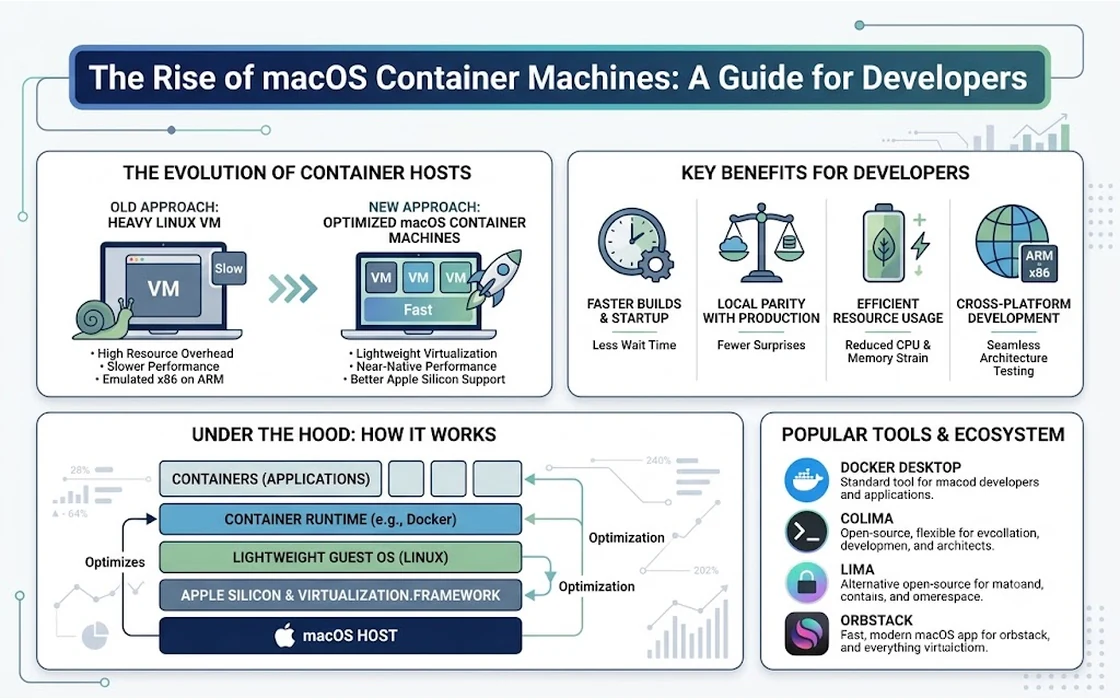
The concept of a “macOS container” is slightly different from what we typically mean when discussing Linux containers. In Linux, containers share the host’s kernel, allowing them to be incredibly lightweight. Because Apple does not allow the macOS kernel (XNU) to be shared in the same way, macOS “containers” are often highly optimized virtual machines that behave like containers. Thanks to Apple’s Virtualization framework and new tools from the community, these machines are now faster and more integrated than ever before, paving the way for a more agile development experience.
Understanding the Architecture of macOS Containers
To appreciate the value of macOS container machines, we must first understand why they were difficult to create in the past. Traditional virtualization required emulating hardware, which was resource-intensive and slow. Apple’s transition to Silicon (M1, M2, and M3 chips) changed the game. These chips include specialized hardware acceleration for virtualization, which Apple exposed through the Virtualization.framework.
This framework allows developers to create high-performance virtual machines that run at near-native speeds. When we talk about macOS container machines today, we are usually referring to OCI-compatible (Open Container Initiative) images that wrap a macOS guest OS. These images can be versioned, shared, and deployed just like a Docker image. This means a developer in Mumbai can build a specific environment, push it to a registry, and their colleague in Delhi can pull that exact same environment, ensuring that “it works on my machine” translates to “it works on every machine.”
The distinction between a standard VM and a container machine lies in the orchestration and lifecycle. A container machine is designed to be ephemeral. You start it, run a task—such as a test suite or a build process—and then discard it. This is a massive departure from the old way of maintaining a “golden” macOS VM that slowly accumulates configuration drift and “cruft” over time.
Why Indian Developers Need macOS Containerization
The Indian tech landscape is unique in its scale and diversity. We have a mix of massive multinational corporations, agile startups, and a vast pool of independent freelancers. For each of these groups, macOS containerization offers distinct advantages.
Maximizing Expensive Hardware Resources
Mac hardware is a significant investment. A base model MacBook Pro can cost upwards of Rs. 1,60,000, and high-spec versions for professional development can easily cross Rs. 3,00,000. For a startup in India, providing every developer with high-end hardware is a capital-intensive task. macOS container machines allow teams to get more out of their existing hardware by enabling “headless” macOS instances to run on a single powerful Mac Studio or Mac Pro, serving multiple developers or CI/CD tasks simultaneously.
Solving the “Dependency Hell”
Indian developers often work across multiple projects for global clients. One project might require Xcode 14 on macOS Ventura, while another requires Xcode 15 on macOS Sonoma. Manually switching between these versions on a single machine is a nightmare. With container machines, you can have separate, isolated environments for every project. You simply switch the container image, and your environment is perfectly configured with the correct SDKs, tools, and libraries.
Enhancing Remote Collaboration
With the rise of hybrid work in Indian IT hubs, collaboration has become more asynchronous. When a bug is found in a CI/CD pipeline, reproducing it locally can be difficult if the local environment differs from the build server. Container machines provide environment parity. By using the same container image for both local development and the remote CI/CD server, developers can guarantee that the environment is identical, drastically reducing the time spent on debugging environmental issues.
Top Tools and Technologies in the Space
The ecosystem for macOS containerization is growing rapidly. Several tools have emerged as leaders, each offering different approaches to the problem.
1. Tart
Tart is an open-source tool specifically designed for macOS and Linux virtualization on Apple Silicon. It uses Apple’s Virtualization.framework to run macOS guests. What makes Tart stand out is its integration with OCI registries. You can push and pull macOS VM images just like you would with Docker. This makes it a primary choice for teams looking to build “container-like” workflows for macOS.
2. OrbStack
For developers who find Docker Desktop too resource-heavy on macOS, OrbStack has become a popular alternative. While it primarily focuses on running Linux containers and machines with extreme efficiency, it also provides robust support for managing macOS environments. Its speed and low memory footprint make it ideal for Indian developers working on machines with limited RAM.
3. Nix and nix-darwin
While not a “container” tool in the traditional sense, Nix is often used alongside container machines to define the environment state. Using nix-darwin, developers can write a declarative configuration for their macOS environment. When combined with a container machine, Nix ensures that every instance of that machine is identical down to the last configuration file.
Impact on CI/CD Pipelines
Perhaps the most significant impact of macOS container machines is in the realm of Continuous Integration and Continuous Deployment (CI/CD). Traditionally, running macOS builds in the cloud (like GitHub Actions or Bitrise) has been expensive—often 5x to 10x the cost of Linux builders.
For an Indian company looking to optimize its “burn rate,” these costs add up quickly. By utilizing macOS container machines, companies can:
- Self-host macOS Runners: Use local Mac minis or Mac Studios to run containerized build agents. This provides the speed of local hardware with the cleanliness of cloud-based ephemeral environments.
- Parallelize Builds: Spin up multiple small macOS containers on a single large host to run tests in parallel, significantly reducing the time it takes to get feedback on a Pull Request.
- Versioned Infrastructure: Treat your build environment as code. If you need to upgrade Xcode, you update the Dockerfile-like configuration, build a new image, and roll it out across your entire team.
Security and Compliance Considerations
In the banking and finance sectors of India (FinTech), security is paramount. When developers work on apps that handle sensitive financial data or UPI transactions, the isolation provided by container machines is a major security boon.
Isolation ensures that if one development environment is compromised, the “blast radius” is limited to that container. Furthermore, since these containers are ephemeral, they can be wiped and recreated frequently, preventing long-term persistence for any potential malware.
However, teams must also be aware of licensing. Apple’s End User License Agreement (EULA) generally requires macOS to be virtualized on Apple-branded hardware. This is why you won’t see legitimate macOS container services running on standard cloud providers like AWS (without Mac-specific instances) or Azure. Understanding these legal boundaries is crucial for Indian IT firms to remain compliant while innovating.
Implementing macOS Containers: A Conceptual Workflow
If you are an Indian developer or a tech lead looking to implement this, here is what a typical workflow looks like:
- Define the Base Image: Start with a clean installation of macOS. Use a tool like Tart to capture this as a base image.
- Layer Your Dependencies: Create a script (or use Nix) to install Xcode, Homebrew, and any specific languages like Flutter, React Native, or SwiftLint.
- Commit and Push: Save this customized state as a new version of your image and push it to a private OCI registry.
- Local Usage: Developers
pullthe image and run it using a simple CLI command. The container machine mounts the local project folder, so changes made in VS Code or Xcode on the host are immediately reflected in the container. - CI/CD Usage: The build server pulls the same image, runs the tests, and reports the results. If a test fails, the developer knows exactly what environment was used and can reproduce it instantly.
Challenges and Limitations
Despite the excitement, macOS container machines are not a silver bullet. There are still hurdles to overcome:
- GUI Performance: While the Virtualization.framework has improved, running a full GUI (like the macOS desktop) inside a container can still feel slightly laggy compared to the host. For CLI-based builds and tests, this isn’t an issue, but for UI testing, it requires careful configuration.
- Hardware Dependency: You still need Apple Silicon for the best experience. Teams still using Intel-based Macs will find the performance significantly worse, as they cannot benefit from the latest virtualization optimizations.
- Storage Space: macOS images are large. A base image can easily be 20GB to 40GB. For developers in regions with slower internet connectivity, pulling these images can be time-consuming, though local caching helps mitigate this.
Related reading
Conclusion
The rise of macOS container machines represents a fundamental shift in how we think about Apple’s operating system. By bringing the principles of “Infrastructure as Code” and ephemerality to macOS, we are entering a new era of developer productivity. For the Indian tech industry, this technology offers a way to balance the high cost of Apple hardware with the need for agile, scalable, and secure development workflows.
Whether you are a solo developer in Bengaluru or a DevOps engineer at a major firm in Gurgaon, understanding and adopting macOS containerization can provide a significant edge. It allows you to focus on what truly matters—writing great code—while the “machine” takes care of the environment. As the tools continue to mature, the wall around the garden is not necessarily coming down, but we are certainly building better, more efficient ways to work within it.
- Tags:
- Macos
- Containers
- Docker
- Virtualization
- Devops
- Software Development