
Kobo vs Adobe: Why Your Perfect ePub Files Are "Broken"
Discover why technically valid ePub files fail on Kobo e-readers and how Adobe's legacy software engine is holding back the future of digital reading in India.

- NV Trends
- 9 min read
Imagine you have just spent Rs. 19,999 on a brand-new Kobo Libra Colour. You’ve heard great things about its open ecosystem, its beautiful screen, and its support for the universal ePub format. You download a book you’ve purchased legally—perhaps a DRM-free title from an independent publisher—and you sideload it onto your device. You open it, expecting a seamless reading experience, only to find that the formatting is skewed, the page turns are sluggish, and the “time remaining in chapter” feature is missing.
Your first instinct is to blame the file. You check it on your computer; it looks perfect. You run it through an industry-standard validator; it passes with flying colors. The reality is frustratingly simple: your ePub is fine. Kobo disagrees. And the entity standing between you and a good reading experience is Adobe.
This clash between standards and software is currently one of the most discussed topics in the digital reading community. It highlights a massive bottleneck in the e-book industry: the reliance on aging, proprietary software engines to handle “open” standards. For the Indian reader, who often pays a premium for e-readers compared to global markets, this is more than just a technical quirk—it is a hurdle to true digital ownership.
The Illusion of the ePub Standard
The ePub format is often described as the “MP3 of books.” It is an open standard maintained by the W3C (World Wide Web Consortium), based on HTML and CSS—the same technologies that power the internet. In theory, an ePub file that follows the official specifications should look and behave the same on any device that claims to support it.
However, “support” is a loaded term in the world of e-readers. Unlike a web browser like Chrome or Firefox, which is updated every few weeks to support the latest web standards, the software inside your e-reader is often a “black box” that hasn’t seen a core engine update in years. When you load a modern ePub 3 file—which might use advanced CSS for beautiful typography or layout—into an older reading engine, things start to break.
The file is technically perfect, but the interpreter is outdated. This is where the frustration begins for authors and readers alike. You can have a file that is 100% compliant with the ePub standard, but if the device’s software doesn’t recognize those standards, the book is effectively “broken.”
The Adobe Tax: Why RMSDK is the Problem
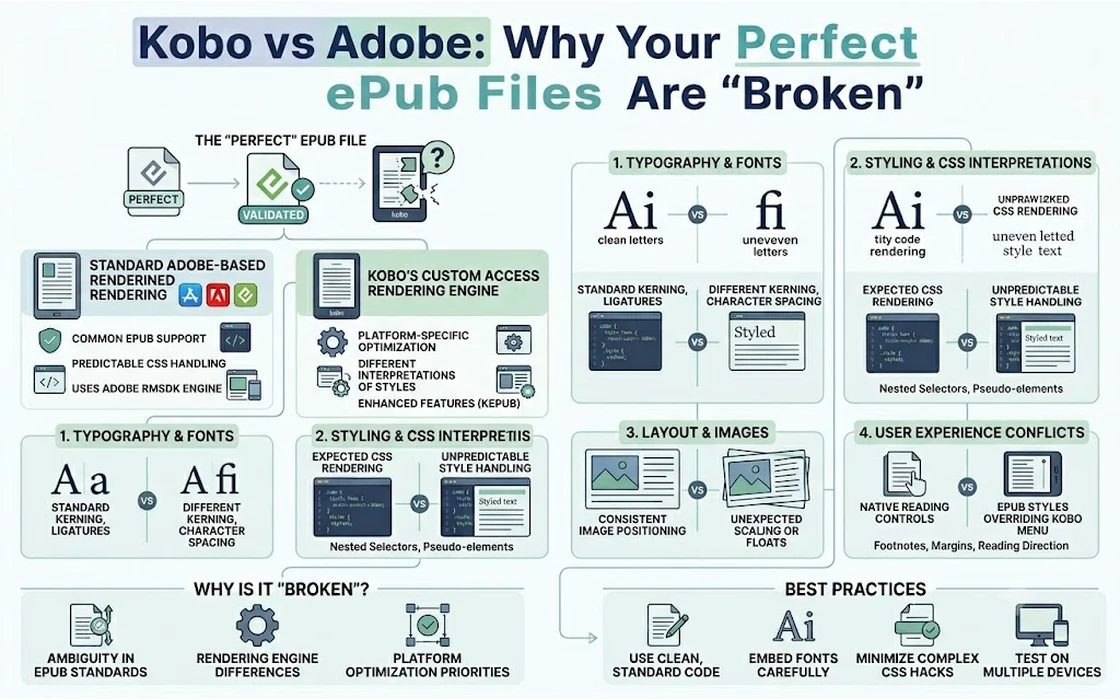
To understand why this happens, we have to look at the “hidden” player in the e-reader market: Adobe. While most people know Adobe for Photoshop or Acrobat, they also maintain a piece of software called the Adobe Reader Mobile SDK (RMSDK).
For over a decade, Adobe RMSDK has been the industry standard engine for rendering ePub files on almost every non-Kindle e-reader, including Kobo, PocketBook, and Sony (before they exited the market). It is also the backbone of Adobe Digital Editions (ADE), the software most people use to manage DRM (Digital Rights Management) on their computers.
The problem is that RMSDK is a legacy product. It was built during an era when e-books were much simpler. While it has been updated over the years, many e-reader manufacturers use older versions of the SDK to maintain stability or save on licensing costs. This creates a “lowest common denominator” effect. Authors are forced to dumb down their e-book formatting so that it doesn’t break on the aging Adobe engine, even if the ePub standard allows for much more.
When you sideload a standard ePub onto a Kobo, the device detects that it is a generic ePub and triggers the Adobe RMSDK to render it. This results in:
- Slower Page Turns: The engine is less efficient at processing the code.
- Worse Typography: Support for advanced fonts and spacing is hit-or-miss.
- Legacy Formatting: Certain modern CSS tricks simply won’t work.
The Kobo Solution (And the Problem it Creates)
Kobo is well aware that the Adobe engine is sub-optimal. To fix this, they developed their own proprietary version of the ePub format called Kepub (Kobo ePub).
When you buy a book directly from the Kobo Store, it is delivered to your device as a Kepub. Instead of using Adobe’s RMSDK, Kobo uses a much faster, more modern engine called ACCESS (NetFront). The difference is night and day. Kepubs feel “snappy,” allow you to zoom into images, show you detailed reading statistics, and provide pop-up footnotes.
However, this creates a “two-tier” system. If you buy from Kobo, you get the high-performance experience. If you “sideload” a standard ePub that you bought elsewhere or downloaded for free, you are relegated to the slower Adobe engine.
Kobo’s message is clear: our device supports your files, but it prefers ours. This is a subtle form of lock-in. While they aren’t as closed off as Amazon’s Kindle ecosystem, they have created a performance gap that punishes users for using truly open standards.
The Adobe Digital Editions Nightmare
The friction isn’t just on the device; it starts on your computer. If you have ever tried to transfer a library book or a DRM-protected purchase to your Kobo using Adobe Digital Editions, you have likely encountered the “DRM Error” or “Authorization Error.”
There is a well-documented bug where ADE 4.0 and 4.5 (the most recent versions) fail to properly handle certain attributes in ePub 3 files. When you transfer these files to a Kobo, the device thinks the DRM is invalid, even though you have a legal license. The community’s common advice? Downgrade to ADE 3.0, a version of the software released in 2013.
Think about that: in 2024, to make your modern e-reader work with “standard” files, you have to use a decade-old piece of software because the current version is too buggy to handle the standard it supposedly supports. It is a staggering failure of software maintenance that impacts thousands of readers.
The Impact on the Indian Market
In India, the e-reader market is growing but remains niche. Devices are expensive. A Kobo Clara BW costs around Rs. 12,999, while the Kindle Paperwhite sits near Rs. 14,999. For many Indian readers, this is a significant investment—nearly the price of a mid-range smartphone.
When an Indian consumer spends this much money, they expect a device that “just works.” They might be buying technical books for UPSC prep, regional language literature from independent publishers, or DRM-free classics. If these files—which they may have paid Rs. 500 to Rs. 1,000 for—don’t render correctly on their expensive e-reader, the frustration is doubled.
Furthermore, India has a thriving self-publishing scene. Authors using platforms like Kobo Writing Life or Draft2Digital want their books to look professional. If they follow the ePub 3 standard perfectly but their books look “broken” on a Kobo because of the Adobe engine, it hurts their brand and their sales. They shouldn’t need a degree in computer science to figure out that they need to “optimize for Kobo” specifically.
Why This Matters for Digital Ownership
The core of the “Blame Adobe” sentiment is about ownership. If you buy a physical book at a store in Mumbai, you can read it anywhere. If you buy a digital “standard” file, you should be able to read it on a “standard” device. By allowing proprietary engines and buggy middleman software to dictate the experience, the industry is undermining the very idea of an open standard.
How to Fix Your Experience: The Calibre Savior
If you are a Kobo owner and you are tired of your ePubs being “fine but broken,” there is a solution. It isn’t provided by Kobo or Adobe, but by the open-source community.
Calibre is a free, powerful e-book management tool that every e-reader owner should have. To fix the Kobo/Adobe issue, you can use a plugin called KoboTouchExtended.
Here is what it does:
- You keep your books in the standard, universal ePub format in your library.
- When you click “Send to Device,” the plugin converts the file to a Kepub on-the-fly.
- The file lands on your Kobo and triggers the fast, modern ACCESS engine instead of the slow Adobe engine.
By doing this, you get the best of both worlds: a universal library and a high-performance reading experience. Another tool, Kepubify, allows you to do this without even opening Calibre.
These workarounds are brilliant, but they shouldn’t be necessary. The fact that users have to “trick” their devices into using a better engine for a standard file format is proof that the ecosystem is currently flawed.
The Future of Digital Reading
Is there hope for a future without the “Adobe Tax”? Some e-reader manufacturers are starting to move away from RMSDK entirely. Newer brands like Boox or Bigme use Android-based systems that allow you to install various reading apps, including those with modern, frequently updated rendering engines.
However, for mainstream devices like Kobo, the change needs to come from the top. Kobo needs to either:
- Update their software so that the modern ACCESS engine handles all ePub files by default, not just those with a
.kepubextension. - Pressure Adobe to modernize the RMSDK and fix the long-standing bugs in Adobe Digital Editions.
Until then, we are stuck in a world where your file is perfect, but your device is being told to fail. It is a reminder that in the world of technology, “open” is only as good as the software that interprets it.
Conclusion
The “Your ePub Is Fine” debate is a perfect case study in how legacy software can hold back progress. Adobe’s dominance in the DRM and SDK space has created a stagnant environment where innovation is stifled by the need for backwards compatibility with a broken engine.
Kobo, while offering a fantastic hardware experience, is complicit in this by maintaining a two-tier system that favors its own store. For the reader in India and around the world, the message is clear: if you want the best experience, you have to take control of your own files.
Stop blaming your e-books. Stop blaming your “bad luck” with formatting. If your ePub is valid, the problem isn’t you—it’s the software chain. By using tools like Calibre and understanding the difference between ePub and Kepub, you can bypass the “Adobe Tax” and finally enjoy the reading experience you actually paid for. Digital reading should be about the story, not the struggle with the software.
- Tags:
- Epub
- Kobo
- Adobe
- Ebooks
- Technology
- Calibre
- Digital Reading