
Kage: Shadow Any Website Into a Single Binary for Offline
Learn how Kage clones entire websites into single, JavaScript-free binaries for secure and high-speed offline browsing in India.

- NV Trends
- 10 min read
In an era where 5G connectivity is rapidly spreading across India, from the bustling tech hubs of Bengaluru to the remote villages of Himachal Pradesh, the concept of “offline browsing” might seem like a relic of the past. However, anyone who has tried to reference a complex technical tutorial while on a long-distance train or attempted to study a research paper in a basement library knows that the mobile web is still far from infallible. The internet is transient; websites change, links break, and sometimes, the data connection simply refuses to cooperate.
For researchers, students, and developers, the ability to preserve a snapshot of the web is not just a luxury—it is a necessity for productivity and knowledge management. Traditionally, this meant saving messy folders full of HTML files and images or using browser extensions that often struggled with dynamic content. Enter Kage (影), a revolutionary open-source tool recently featured on Hacker News that takes a bold new approach: it “shadows” an entire website and packages it into a single, self-contained binary file that you can carry in your pocket and run anywhere.
In this deep dive, we will explore why Kage is a game-changer for the Indian tech community, how it works under the hood, and why its unique “single binary” philosophy is the future of digital archiving.
The Problem: Why Traditional Web Saving Fails
If you have ever tried the classic “Right Click > Save As” method on a modern website, you know the frustration that follows. You usually end up with a single HTML file and a cluttered folder containing hundreds of tiny assets—CSS, images, and tracking scripts. More often than not, when you open that file offline, the layout is broken, the fonts are missing, and the interactive elements are completely dead.
Modern websites are no longer just static documents; they are complex applications powered by heavy JavaScript. This creates three major hurdles for offline viewing:
- Dynamic Content: Most content is fetched via APIs after the page loads. A standard “Save As” doesn’t capture this post-load data.
- Tracking and Bloat: A typical news site or blog in 2024 can easily load 5MB of scripts just for advertisements and user tracking. When you save the page, you are saving all that “digital noise” too.
- Fragility: Moving a saved webpage to another computer often breaks internal links. If you want to share a saved tutorial with a friend, you have to zip the entire folder and hope their browser interprets the relative paths correctly.
For an Indian student preparing for exams or a developer working on a project in a low-connectivity zone, these technical failures represent a loss of access to vital information. We need a solution that is robust, portable, and, most importantly, simple to use.
What is Kage? The “Shadowing” Concept
The name Kage comes from the Japanese word for “shadow” (影). The tool’s philosophy is to create a perfect, lightweight shadow of a website that follows you wherever you go, regardless of your internet status. Created by developer tamnd, Kage is a CLI tool written in Go that fundamentally changes the archival process.
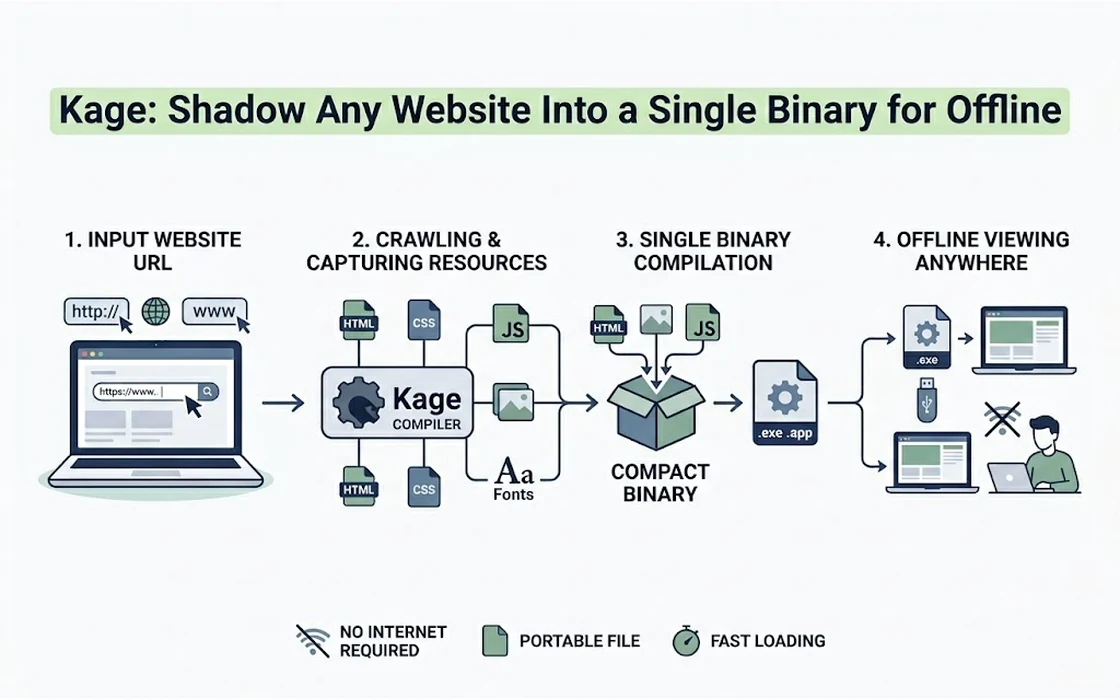
Instead of just copying files, Kage “clones” the site by rendering it through a headless browser. It then performs a series of optimizations to make the content fast and secure. The most impressive feature, however, is its ability to “pack” the entire site—including all its subpages, images, and styles—into a single executable binary.
When you run this binary on your Windows, Linux, or Mac machine, it starts a tiny, temporary local web server and opens the site in your browser. No installation is required, no dependencies are needed, and the site loads instantly because every asset is bundled within that one file.
Key Features and Technical Mechanism
What sets Kage apart from older tools like HTTrack or browser extensions like SingleFile? It’s the way it handles the modern web’s complexities.
Headless Rendering and DOM Snapshotting
Kage doesn’t just download the HTML source code. It uses a headless Chrome instance to actually visit the URL. This means it waits for JavaScript to execute, for images to lazy-load, and for the final visual state of the page to stabilize. Once the page is fully rendered, Kage takes a “snapshot” of the DOM (Document Object Model). This ensures that what you see in the offline version is exactly what you saw on the live site.
The JavaScript-Free Advantage
One of the most brilliant architectural decisions in Kage is that it strips all JavaScript from the final clone. While this might sound counter-intuitive, it serves two critical purposes:
- Security: Offline files are often a vector for malicious scripts. By removing JS, Kage ensures that the binary you are running is safe and cannot track your activity or execute unauthorized code.
- Speed: Without megabytes of tracking scripts and ad-engine logic, the archived site loads significantly faster than the original live version. For Indian users on older hardware or budget laptops, this performance boost is massive.
Single Binary Packaging
Kage uses the power of the Go programming language to bundle the assets. A typical “Kage-packed” site results in a binary that is roughly 13 MiB (for the server overhead) plus the actual size of the website content. This single file can be shared via WhatsApp, sent over email, or stored on a USB drive without any risk of “breaking” the links between pages.
ZIM Format Support
For the true data hoarders and educators, Kage also supports the ZIM format. This is the standard used by the Kiwix project to provide offline access to Wikipedia and Stack Overflow. By exporting a site to ZIM, you can make it accessible to specialized offline readers used in schools and libraries across rural India.
Why Kage Matters for the Indian Context
India is a land of digital contrasts. While we have some of the cheapest mobile data in the world, the quality of that connection fluctuates wildly. Here is how Kage provides specific value to Indian users:
1. Education and Competitive Exams
Students preparing for UPSC, JEE, or NEET often rely on online resources, blogs, and documentation. However, studying online is fraught with distractions—YouTube notifications, social media pings, and tempting ads. By “shadowing” a set of study materials into a single Kage binary, a student can turn off their Wi-Fi entirely and study in a focused, offline environment. It’s like having a digital textbook that never needs a signal.
2. Saving Costs for Rural Users
While Rs. 250 for a monthly data pack might seem small in cities, it remains a significant expense for many. Kage allows users to “bulk download” valuable documentation or educational blogs when they have access to free public Wi-Fi (like at a railway station or a college campus) and then browse those sites at home without consuming their limited daily data quota.
3. Developer Documentation
For Indian software engineers, staying updated is a full-time job. Often, official documentation for new frameworks is slow to load or inaccessible during a commute. Being able to clone the entire documentation of a tool like React or Tailwind into a single binary means you can code on the Mumbai local or the Delhi Metro without needing a stable 4G/5G connection to check a syntax detail.
4. Preservation of Local News and Culture
Small, independent news portals in India often go offline due to lack of funding or technical issues. Researchers and journalists can use Kage to preserve these digital artifacts for posterity. If a local community blog in a regional language is about to shut down, Kage can “shadow” it into a permanent binary that lives on a hard drive forever.
How to Use Kage: A Step-by-Step Guide
Getting started with Kage is straightforward, though it requires a bit of familiarity with the command line.
Step 1: Installation
Kage is written in Go. If you have Go installed on your system, you can install Kage by running:
go install github.com/tamnd/kage/cmd/kage@latest
Step 2: Cloning a Website
To start shadowing a site, use the clone command. For example, if you want to save a tech blog:
kage clone https://example-tech-blog.com
Kage will then launch a headless browser, crawl the links, and download the assets into a local directory. You can control the depth of the crawl to ensure you don’t accidentally try to download the entire internet!
Step 3: Previewing
Before you pack it into a binary, you can see how it looks:
kage serve ./example-tech-blog.com
This will start a local server, usually at localhost:8080, allowing you to navigate the site exactly as if it were live.
Step 4: Packing into a Binary
This is where the magic happens. Run the following command:
kage pack ./example-tech-blog.com --format binary -o MyOfflineBlog.exe (on Windows)
Kage will bundle everything into MyOfflineBlog.exe. You can now move this file to any other computer, double-click it, and browse the site offline.
Kage vs. The Alternatives
How does Kage stack up against the tools we already know?
- HTTrack: The “grandfather” of website copiers. HTTrack is powerful but creates a mess of thousands of files and often struggles with modern CSS and JavaScript. Kage is much cleaner and more “modern-web” aware.
- Pocket / Instapaper: These are great for reading single articles, but they don’t capture entire websites or subpages. They also require you to be logged into their ecosystem. Kage is completely decentralized and local.
- SingleFile (Browser Extension): A fantastic tool for saving a single page as a single HTML file. However, SingleFile doesn’t handle multi-page sites well. If you want to click a “Next Page” link offline, SingleFile won’t help you, but Kage will.
- Kiwix: Kiwix is more of a “reader” than a “creator.” Kage complements Kiwix by allowing you to create your own ZIM files from any website you choose.
Technical Deep Dive: The Go Implementation
For the developers reading this, the efficiency of Kage comes from its choice of language. Go (Golang) is uniquely suited for this task because of its ability to produce “statically linked” binaries. This means that all the libraries required to run the local web server are included in the final file.
The binary created by Kage includes:
- A Static File Server: A lightweight HTTP server that routes requests to the embedded assets.
- Embedded Assets: The HTML, CSS, and images are stored as byte arrays within the binary (often using Go’s
embedpackage logic). - Cross-Platform Support: Because Go is a compiled language, Kage can easily generate binaries for different operating systems from a single source.
The removal of JavaScript also means that the “shadowed” site is significantly more “future-proof.” Web browsers change how they interpret JS every year, but basic HTML and CSS are incredibly stable. A Kage binary created today is likely to work perfectly 10 or 20 years from now.
Security Considerations
In an age of increasing cyber threats, running an unknown executable is usually a bad idea. However, because Kage is open-source, the community can audit exactly how it packages files. Furthermore, the fact that it strips JavaScript means that even if the original website had a hidden tracking script or a malicious popup, the “shadowed” version will be clean.
For Indian enterprises, this could be a way to share internal documentation securely. Instead of hosting a private wiki that is vulnerable to external attacks, you can distribute a “read-only” Kage binary to employees that works entirely within their local environment.
Conclusion
Kage represents a return to a more resilient, user-centric web. By treating websites as something that can be owned and preserved rather than just “rented” through a browser tab, it empowers users to build their own personal libraries of knowledge.
For the Indian reader, Kage is more than just a cool tech demo; it is a practical tool for overcoming the hurdles of inconsistent connectivity, rising data costs, and the general “rot” of the digital world. Whether you are a student in a rural town, a developer on a train, or a researcher wanting to save a piece of history, Kage offers a simple, elegant solution: a single binary that keeps the lights on, even when the internet goes dark.
As we move forward into an increasingly cloud-dependent world, tools like Kage remind us of the power of local-first software. In the “shadow” of the live web, we find a faster, safer, and more permanent way to learn and grow.
- Tags:
- Kage
- Offline Browsing
- Website Archiving
- Tech Tools
- Software Engineering
- Cybersecurity