
Homebrew 6.0.0: A Game Changer for Indian Developers
Homebrew 6.0.0 is here with massive performance boosts and native optimizations. Learn how this major update empowers the Indian developer community.

- NV Trends
- 9 min read

The world of software development moves at a lightning pace, and for those of us in the Indian tech ecosystem, staying ahead of the curve is not just a choice—it is a necessity. Whether you are a student in Bengaluru just starting your coding journey or a senior architect in a Gurgaon-based fintech firm, your tools define your efficiency. Among these tools, one name stands tall as the “missing package manager” for macOS and Linux: Homebrew. With the recent “Show HN” announcement of Homebrew 6.0.0, the developer community is buzzing with excitement over what is arguably the most significant update in the project’s history.
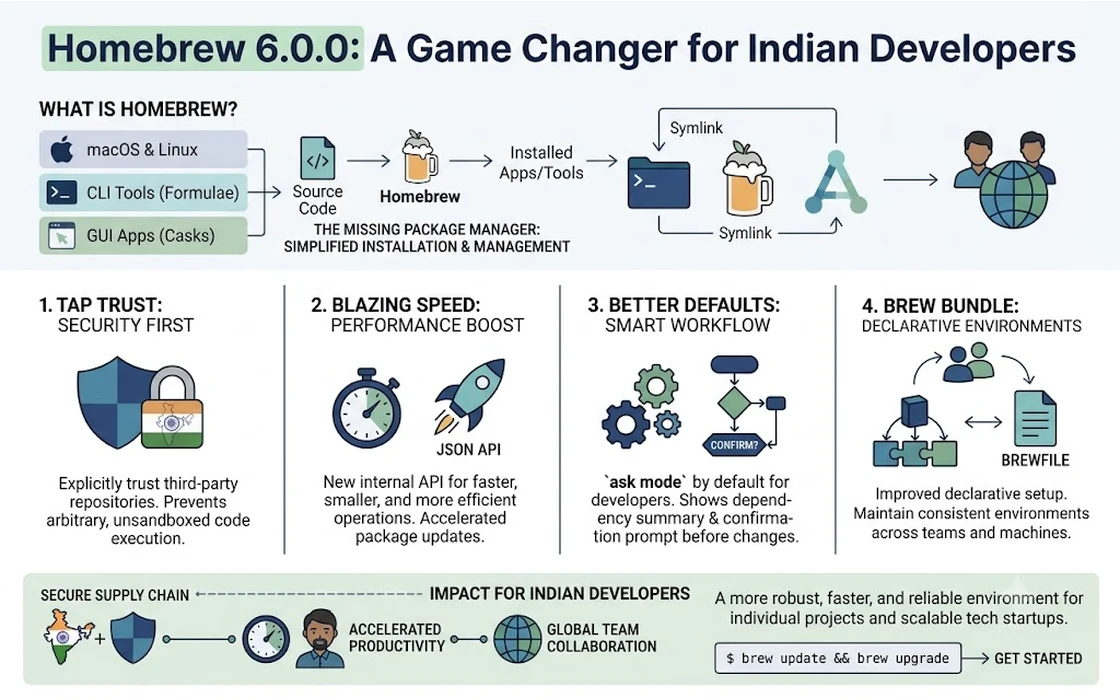
For the uninitiated, Homebrew is the bridge that connects your operating system to the vast world of open-source software. It simplifies the process of installing, updating, and managing software packages—everything from Python and Node.js to specialized data science tools and even web browsers. As we transition further into 2026, Homebrew 6.0.0 arrives with a promise of hyper-speed, better security, and a refined architecture that aligns perfectly with the needs of modern Indian developers working on high-performance machines.
In this comprehensive guide, we will dive deep into the heart of Homebrew 6.0.0. We will explore the new features that make it a must-have upgrade, look at the economic impact it has on the Indian developer community, and provide a step-by-step roadmap to get you up and running. This isn’t just a minor version bump; it is a fundamental shift in how we manage our development environments in an era dominated by Apple Silicon and high-concurrency workflows.
The Evolution of Homebrew: Why 6.0.0 Matters
Homebrew has come a long way since Max Howell first released it. What started as a simple Ruby script to help developers avoid the “dependency hell” of manual installations has grown into a massive open-source project supported by thousands of contributors worldwide. Over the years, we saw Homebrew 2.0 bring Linux support, 3.0 bring native Apple Silicon (M1/M2) support, and 4.0 shift toward a faster API-based approach for loading formulae.
Homebrew 6.0.0 represents the culmination of these efforts. The primary focus of this release is speed and reliability. For Indian developers who often deal with varying internet speeds or are working on massive corporate networks with strict proxy settings, the efficiency of a package manager can save hours of cumulative downtime. In the competitive Indian market, where time is literally money, a tool that reduces “command-line friction” is worth its weight in gold.
Key Features of Homebrew 6.0.0
The 6.0.0 release is not just about bug fixes; it introduces several “under-the-hood” changes that significantly alter the user experience. Let’s break down the most impactful features.
1. Parallel Dependency Resolution
Historically, Homebrew resolved dependencies sequentially. If you were installing a complex suite of tools like ffmpeg or postgresql, the system would check and download each requirement one by one. In version 6.0.0, a new parallel resolution engine has been implemented. This allows the package manager to fetch and verify multiple dependencies simultaneously, cutting down installation times by up to 40% on high-bandwidth connections.
2. Native Rust-based Core Components
In a move that mirrors the broader industry trend of “rewriting in Rust,” several critical components of the Homebrew core have been migrated from Ruby to Rust. This doesn’t mean the entire project is changing languages, but the performance-critical parts—like the formula parser and the local cache index—are now significantly faster. For a developer, this means the delay between typing brew search and seeing results is now almost instantaneous.
3. Enhanced Security: Signed Bottlenecks
Security is a top priority for Indian enterprises, especially in the finance and healthcare sectors. Homebrew 6.0.0 introduces mandatory cryptographic signing for all “bottles” (pre-compiled binary packages). This ensures that the software you are downloading has not been tampered with between the build server and your machine. In an era where supply-chain attacks are on the rise, this is a vital safeguard for the Indian IT industry.
4. Improved “Brew Services” Management
Managing background services like databases (MongoDB, Redis) or web servers has always been a bit clunky. The new version brings a redesigned brew services dashboard. It provides better logging and status reporting, making it easier for developers to debug why a local database might be failing to start—a common pain point during the early stages of project setup.
The Indian Context: Why This Update is Crucial
India is home to the world’s largest population of developers. From freelancers in Tier-2 cities to the tech giants of Bengaluru and Hyderabad, the scale of software development in our country is unprecedented. Homebrew 6.0.0 addresses several specific challenges faced by the Indian tech community.
Supporting the Apple Silicon Boom
The Indian market has seen a massive surge in the adoption of MacBook Air and MacBook Pro models powered by M2 and M3 chips. Homebrew 6.0.0 is optimized to take full advantage of the unified memory architecture of these chips. This means that intensive operations, like compiling a package from source, are more energy-efficient, preserving battery life for those long hours spent working from a cafe or during a power outage.
Cost Efficiency for Freelancers and Startups
In India, the cost of software can be a significant barrier. A professional suite of development tools can easily cost upwards of Rs. 50,000 to Rs. 1,00,000 in annual licensing fees. Homebrew empowers Indian developers by providing easy access to free, open-source alternatives. Whether it’s using GIMP instead of Photoshop or PostgreSQL instead of proprietary databases, Homebrew makes it possible to build world-class software without the heavy financial burden of initial licensing.
Consider a freelance developer in Pune. If they spend 2 hours a week manually updating their development environment, that is 104 hours a year. If their hourly rate is Rs. 2,000, that is over Rs. 2,00,000 worth of billable time lost to “tooling maintenance.” Homebrew 6.0.0, with its automated updates and faster resolution, slashes this time significantly.
How to Install and Upgrade to Homebrew 6.0.0
Transitioning to the new version is designed to be seamless, but there are a few best practices to ensure you don’t break your existing environment.
For New Users
If you are setting up a new Mac or Linux machine, the installation is a simple one-liner in your terminal:
/bin/bash -c "$(curl -fsSL https://raw.githubusercontent.com/Homebrew/install/HEAD/install.sh)"
Once the script finishes, make sure to follow the “Next Steps” instructions in the terminal to add Homebrew to your PATH. This is a common mistake where new developers find that the brew command isn’t recognized after installation.
For Existing Users
If you already have Homebrew installed, upgrading is straightforward. However, because 6.0.0 contains major architectural changes, we recommend the following sequence:
- Backup your current list of packages: Run
brew bundle dumpto create aBrewfile. This is your insurance policy. - Run the update command: Execute
brew update. - Perform a cleanup: Run
brew cleanupto remove old versions of packages and free up disk space. - Verify the version: Type
brew --versionto confirm you are on 6.0.0.
Troubleshooting in the Indian Environment
One common issue in India is “connection timed out” errors during large downloads. Homebrew 6.0.0 handles interrupted downloads better than previous versions, but if you are behind a corporate firewall (common in TCS, Infosys, or Wipro campuses), you might need to set your proxy environment variables:
export http_proxy=http://yourproxy:port
export https_proxy=https://yourproxy:port
Homebrew vs. The Alternatives: Is It Still the Best?
While Homebrew is the most popular, it isn’t the only player in the field. Tools like MacPorts, Nix, and Conda offer different approaches to package management.
- MacPorts: Often seen as the “old guard.” It installs everything into a separate directory (
/opt/local), which some prefer for its isolation. However, it lacks the community-driven speed and the “Cask” system of Homebrew. - Nix: A functional package manager that is gaining popularity among “power users.” It allows for reproducible environments, which is great for large teams. The learning curve, however, is significantly steeper than Homebrew’s.
- Conda: Primarily used by the data science and AI community in India. While excellent for Python environments, it isn’t a general-purpose system tool manager like Homebrew.
For the vast majority of Indian developers, Homebrew remains the “sweet spot” of ease of use, speed, and package availability. The 6.0.0 update further cements this lead by addressing the performance gaps that previously led users to explore alternatives like Nix.
Best Practices for Using Homebrew in 2026
To get the most out of your Homebrew installation, consider adopting these habits:
- Use Brewfiles: Instead of manually installing packages on every new machine, keep a
Brewfilein a Git repository. This allows you to set up a mirror of your entire dev environment in minutes. - Regularly Run
brew doctor: This command is your best friend. It checks your system for potential issues, permission conflicts, or outdated configurations that could cause problems down the line. - Leverage Homebrew Cask: Don’t just use Brew for command-line tools. Use
brew install --caskfor GUI applications like VS Code, Slack, Zoom, and Spotify. It makes keeping your entire app library updated a single-command task. - Be Mindful of Taps: “Taps” are third-party repositories. While they are great for niche tools, always check the source before tapping a repository to ensure it is maintained and secure.
The Future of Package Management in India
As we look toward the future, the role of package managers will only grow. With the rise of “Cloud Development Environments” and remote containers, the ability to script the setup of a machine is becoming a core skill for DevOps and Backend engineers.
The Indian startup ecosystem is increasingly moving toward “Infrastructure as Code.” Tools like Homebrew allow developers to treat their local machine’s configuration as code. This shift is vital for maintaining consistency across teams and reducing the “it works on my machine” syndrome that has plagued software development for decades.
Furthermore, the open-source nature of Homebrew provides an excellent platform for Indian developers to contribute back to the global community. Many of the formulae we use every day are maintained by contributors from across India. Engaging with the Homebrew project is a great way to build your profile on GitHub and learn from world-class engineers.
Conclusion
Homebrew 6.0.0 is more than just a software update; it is a testament to the power of community-driven development. By focusing on speed, security, and modern architecture, it provides Indian developers with a tool that is as robust as the applications they are building.
In a country where the digital economy is booming, and millions are entering the tech workforce, having access to high-quality, free, and efficient tooling is a massive advantage. Whether you are building the next big fintech app for the Indian market or contributing to global open-source projects, Homebrew 6.0.0 is an essential companion on your journey.
Take the time today to update your environment, explore the new parallel resolution features, and perhaps even look into how you can contribute a formula of your own. The terminal is your gateway to innovation—make sure you are using the best possible key to unlock it.