
Launching Browsers in <1s with Firecracker on AWS EC2
Learn how to use Firecracker MicroVMs on AWS EC2 to launch browsers in under a second for high-performance automation and cloud infrastructure savings.

- NV Trends
- 13 min read
In the rapidly expanding landscape of Indian Software-as-a-Service (SaaS) and cloud infrastructure, speed and isolation are the ultimate currencies. Imagine a Bangalore-based startup building a highly scalable web scraping service or an automated end-to-end testing platform. When a customer triggers a test suite involving dozens of concurrent browser sessions, they expect immediate feedback. Traditional containerization or virtual machine provisioning simply cannot keep up with the demand for sub-second execution without burning through massive amounts of capital.
Historically, running headless browsers at scale has been a precarious balancing act. You either pre-provision large fleets of Amazon EC2 instances running continuous browser sessions—which leads to wasted compute cycles and inflated AWS bills—or you spin up Docker containers on demand. While containers start reasonably fast, they share the host kernel, creating terrifying security vulnerabilities when executing untrusted third-party JavaScript or navigating potentially malicious websites. For true security, you need hardware-level virtualization; for performance, you need container-like speed.
This is where Firecracker, an open-source virtualization technology pioneered by Amazon Web Services, completely changes the paradigm. By combining the robust security of traditional virtual machines with the lightweight agility of containers, Firecracker enables engineering teams to launch fully isolated MicroVMs—complete with a running browser—in a fraction of a second. In this deep dive, we will explore the precise architecture, configuration steps, and optimization techniques required to run Firecracker VMs inside AWS EC2 to achieve sub-second browser startup times, delivering massive performance gains and cost efficiency.
The Browser Automation Bottleneck
Before we dive into the solution, we must understand why launching a browser on the cloud is inherently difficult. Browsers like Google Chrome or Mozilla Firefox are monstrously complex applications. They are essentially operating systems within an operating system, complete with their own networking stacks, rendering engines, memory managers, and sandboxing mechanisms.
When you attempt to run a browser in a standard cloud environment for automation purposes, you face a severe cold-start problem. Booting a standard Linux virtual machine on AWS EC2 typically takes anywhere from 30 seconds to over a minute. Even if you optimize your Amazon Machine Image (AMI), you are still bound by the overhead of a bloated operating system initializing countless unnecessary background services, system daemons, and logging utilities.
If you opt for Docker, the startup time drops to a few seconds, but the security risks skyrocket. Browser exploitation is a common attack vector. If a headless browser running inside a container is compromised by a malicious payload embedded in a webpage, the attacker can potentially escape the container and access the host system’s kernel. This compromises the entire node and every other tenant’s data residing on it. For platforms offering “Browser-as-a-Service” or remote execution, this is an unacceptable risk. You need strong multi-tenant isolation, but you cannot afford the 30-second penalty of a traditional VM.
Enter Firecracker: The MicroVM Revolution
Firecracker was developed by AWS specifically to power serverless compute services like AWS Lambda and AWS Fargate. It is a Virtual Machine Monitor (VMM) written heavily in Rust that utilizes the standard Linux Kernel-based Virtual Machine (KVM) infrastructure to create and manage MicroVMs.
A MicroVM is exactly what it sounds like: a stripped-down, hyper-optimized virtual machine. Firecracker radically departs from traditional hypervisors like QEMU. QEMU is designed to emulate a massive array of legacy hardware—floppy drives, old graphics cards, PCI bridges, and archaic network interfaces. Firecracker strips all of this away. It provides only the absolute bare minimum devices required for modern cloud computing: a network interface, a block storage device, a programmable interval timer, a keyboard controller (simply to stop the kernel from panicking), and a serial console.
What Makes Firecracker Different?
Because Firecracker does not emulate legacy hardware, its memory footprint is minuscule—often less than 5MB of overhead per MicroVM. More importantly, its startup time is staggering. A Firecracker MicroVM can boot a Linux kernel and launch user-space code in under 125 milliseconds.
By utilizing Firecracker, we achieve the holy grail of cloud execution: the strong, hardware-enforced isolation of a traditional virtual machine combined with the speed and density of a Docker container. We can pack thousands of these MicroVMs onto a single EC2 instance, entirely confident that a compromised browser in one MicroVM cannot access the memory, CPU cycles, or storage of another.
The Cloud Foundation: AWS EC2 for MicroVMs
To run Firecracker, you need a host machine that supports hardware virtualization extensions (Intel VT-x or AMD-V). In the context of AWS, this presents a unique architectural decision. You are essentially attempting to run a virtual machine (Firecracker) inside another virtual machine (EC2).
Bare Metal vs. Nested Virtualization
AWS offers two distinct paths for deploying Firecracker. The first, and most highly recommended for production workloads, is utilizing .metal EC2 instances. These bare-metal instances (such as m5.metal or c5n.metal) give you direct, unmediated access to the underlying physical hardware, entirely bypassing the AWS Nitro hypervisor. This direct access allows Firecracker to leverage KVM directly, resulting in maximum performance, lowest latency, and highest VM density.
The second path is nested virtualization. Not all cloud providers support this, but AWS allows certain EC2 instance types to pass virtualization instructions through to the guest operating system. While this allows you to run Firecracker on cheaper, non-metal instances, it introduces a significant performance penalty. For achieving the strict “sub-second” browser launch goal, relying on nested virtualization introduces latency layers that can easily consume precious hundreds of milliseconds. Therefore, provisioning a bare-metal instance in the ap-south-1 (Mumbai) or ap-south-2 (Hyderabad) region is the optimal starting point for an Indian startup.
Architecting the Sub-Second Boot Time
Simply installing the Firecracker binary is not enough to achieve a one-second browser launch. The hypervisor is incredibly fast, but if you load a standard, bloated Linux distribution into it, the boot process will still take several seconds. Achieving extreme speed requires ruthless optimization of both the guest kernel and the root filesystem.
The Minimalist Linux Kernel
When configuring Firecracker via its API socket, you must supply an uncompressed Linux kernel binary (typically a vmlinux file). You cannot use the standard kernel provided by Ubuntu, Debian, or Amazon Linux. Standard kernels are compiled with thousands of drivers for hardware that Firecracker simply does not possess.
To optimize for speed, engineering teams must compile a custom Linux kernel. This involves configuring the kernel build process to strip out support for USB, audio devices, wireless networking, Bluetooth, and countless other unnecessary subsystems. You only compile support for KVM, VirtIO (the virtualization standard Firecracker uses for disk and network I/O), and the specific filesystem you intend to use. A heavily optimized, minimal kernel can initialize and hand off control in less than 50 milliseconds.
Optimizing the Root Filesystem
The root filesystem is the virtual drive from which the MicroVM boots. To minimize startup time, this filesystem must be as physically small as possible. Instead of a full Linux distribution, engineers typically use Alpine Linux or a custom rootfs built from scratch utilizing busybox.
For our browser automation use case, the rootfs must contain the necessary shared libraries to run Chromium or Firefox, but absolutely nothing more. There is no systemd, no cron jobs, and no background logging daemons. We replace the traditional init system with a custom shell script or a tiny Go binary. The moment the kernel finishes booting, it hands control directly to this script, which immediately launches the browser headless process.
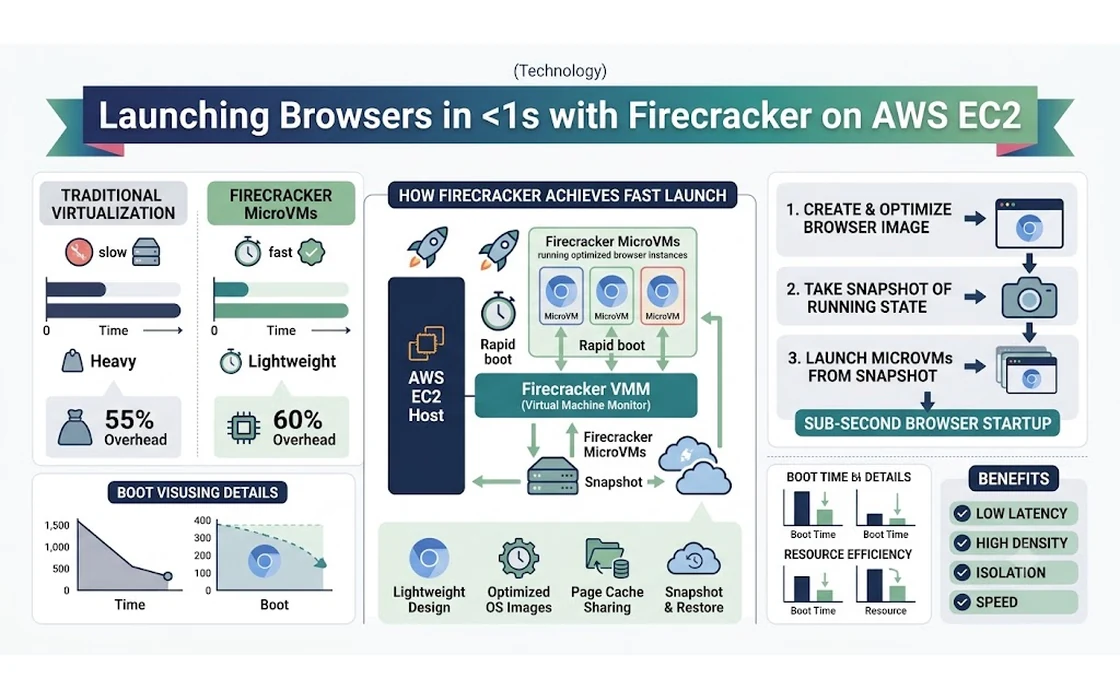
The Snapshotting Secret: How to Start in Less Than 1s
Even with a custom kernel and a minimal filesystem, cold-booting Linux and subsequently launching a complex application like Chromium from scratch will struggle to consistently break the one-second barrier. Chromium takes significant time to parse its binaries, initialize its complex sandboxing architecture, and allocate internal memory structures.
The true secret to achieving sub-second browser availability is MicroVM Snapshotting.
Memory Mapping and Snapshot Restore
Firecracker supports creating a full snapshot of a running MicroVM. Instead of booting from scratch every time a user requests a browser session, you perform the intensive boot process exactly once during a preparation phase.
You launch a MicroVM, boot the kernel, and start the headless browser. Once the browser is fully loaded, idling, and listening for automation commands (via the Chrome DevTools Protocol), you instruct the Firecracker API to pause the VM. Firecracker then writes the entire state of the VM’s memory to a file on the host machine and saves the exact CPU state.
When a new browser session is requested by your application, Firecracker does not boot the kernel. Instead, it creates a new MicroVM and restores the saved snapshot. The host operating system utilizes memory-mapped files (mmap) to map the snapshot file directly into the new MicroVM’s memory space.
Because of how the Linux kernel handles memory mapping, the data is loaded lazily. This means data is pulled into physical RAM only when the MicroVM actually attempts to access it. This completely eliminates the startup time of both the operating system and the browser. The MicroVM wakes up exactly where it was paused, fully loaded, in single-digit milliseconds. This architectural magic is how you shatter the one-second barrier.
Launching the Browser
Running a browser inside a MicroVM requires specific configurations to ensure stability and performance, as the environment is highly constrained compared to a standard developer laptop.
Why Chromium?
Chromium is the preferred browser for headless cloud execution due to its robust, industry-standard support for the Chrome DevTools Protocol (CDP), which popular automation frameworks like Puppeteer, Playwright, and Selenium rely on to drive the browser.
When launching Chromium inside the custom init script of our Firecracker MicroVM, we must pass specific command-line flags to optimize it for a virtualized, headless environment. Flags such as --headless, --disable-gpu (since we lack hardware graphics acceleration), and --disable-dev-shm-usage (to prevent memory crashes on constrained temporary filesystems) are critical.
Managing Memory and Sandboxing
Crucially, because Firecracker provides strict hardware-level isolation via KVM, we can safely pass the --no-sandbox flag to Chromium. The browser’s internal software sandbox is entirely redundant in this architecture and only adds unnecessary processing overhead. Disabling it significantly reduces the memory footprint and CPU cycles required by Chromium, making the MicroVM significantly lighter and faster.
However, memory management remains a critical concern. Browser automation tasks, especially those involving heavy, JavaScript-laden single-page applications (SPAs), can rapidly consume hundreds of megabytes of RAM. When configuring the Firecracker API for a new session, you must allocate sufficient memory (typically 512MB to 1GB per MicroVM) to prevent the guest kernel’s Out-Of-Memory (OOM) killer from abruptly terminating the browser process mid-execution.
Networking: Connecting the MicroVM
A headless browser is functionally useless without an internet connection. Networking in Firecracker requires careful orchestration on the EC2 host, as Firecracker intentionally lacks built-in complex networking stacks.
TAP Devices and Bridge Networking
Firecracker does not provide a NAT (Network Address Translation) layer out of the box. Instead, it relies on the host OS to route traffic. For every MicroVM you launch, you must create a TAP (Terminal Access Point) device on the EC2 host.
The MicroVM’s internal network interface connects directly to this TAP device. You then configure a network bridge on the EC2 host and attach all the TAP devices to it. Utilizing iptables, you configure IP masquerading (NAT) so that traffic flowing from the internal MicroVMs is translated to the EC2 instance’s primary IP address, allowing the browser to communicate with the public internet.
Because we are creating MicroVMs dynamically and rapidly in response to user requests, managing IP addresses and TAP devices becomes a complex orchestration challenge. High-performance engineering teams often build custom daemons in Go or Rust to handle IP Address Management (IPAM) and network provisioning in milliseconds before instructing Firecracker to restore a snapshot.
The Financial Perspective: Costs in India
For Indian technology companies, the decision to migrate to a Firecracker-based architecture is largely driven by unit economics and ruthless cloud billing optimization.
Evaluating the AWS Infrastructure
Let us consider a theoretical deployment in the AWS ap-south-1 (Mumbai) region. An m5.metal instance, which provides a massive 96 vCPUs and 384 GB of RAM, costs approximately Rs. 350 to Rs. 400 per hour (based on standard on-demand pricing).
If a company is currently relying on standard EC2 instances or bulky Fargate containers for browser automation, they might only be able to securely run 20 to 30 concurrent browser sessions per server before hitting memory limits, CPU contention, or facing unacceptable container start times. The cost per browser session becomes astronomically high.
Operational Savings
With Firecracker, thanks to the incredibly low overhead and the ability to overprovision CPU resources safely (since browser tasks are often I/O bound, spending most of their time waiting for network responses), that same m5.metal instance can comfortably host 500 to 1,000 concurrent MicroVMs.
By utilizing snapshotting, the compute resources are only actively utilized when a browser task is actually executing. You do not pay for idle operating systems waiting for work. For an Indian startup processing tens of thousands of web scraping jobs, PDF generations, or automated UI tests per day, moving from a containerized EC2 fleet to a dense, Firecracker-backed bare-metal instance can reduce cloud compute expenditure by 60% to 80%. When scaled across a fiscal year, this translates to savings of several lakhs, or even crores, of Rupees, directly impacting profitability.
Real-World Applications for Indian Startups
The ability to launch a fully isolated, secure browser in less than a second unlocks immense potential for various sectors in the Indian tech ecosystem:
- Software Testing SaaS: Companies offering automated cross-browser testing can provide their clients with instant test execution. Developers no longer have to wait in queues for CI/CD environments to provision.
- Financial Data Aggregation: Fintech startups requiring secure, fast scraping of public financial portals or stock market data can launch thousands of isolated browsers to retrieve data simultaneously without risking IP bans or cross-contamination of user sessions.
- Robotic Process Automation (RPA): Enterprises building RPA solutions can utilize MicroVMs to execute complex web workflows on behalf of users in highly secure, ephemeral environments that destroy themselves immediately after the task is completed, ensuring zero data leakage.
- Synthetic Monitoring: IT infrastructure companies can simulate user logins and complex transactions from various geographic locations instantly, providing real-time uptime and performance metrics without false positives caused by slow infrastructure.
Challenges and Considerations
While the benefits are profound, adopting Firecracker is not without significant engineering challenges.
Firecracker is a deeply technical, low-level tool. It does not possess a friendly graphical user interface or a high-level orchestrator like Kubernetes (though experimental tools like Ignite are attempting to bridge this gap). Building a scalable platform on Firecracker requires a team with a deep understanding of Linux networking, kernel compilation, and API-driven infrastructure orchestration.
Furthermore, storage performance can quickly become a severe bottleneck. When hundreds of MicroVMs boot simultaneously from memory-mapped snapshot files, the underlying EBS (Elastic Block Store) volume or NVMe drive experiences immense read pressure. Utilizing high-performance, directly attached NVMe storage on the bare-metal instance is absolutely critical to preventing disk I/O from throttling the sub-second boot times.
Conclusion
The evolution of cloud infrastructure is a continuous pursuit of greater compute density, tighter security, and faster execution. Running headless browsers at scale has historically forced engineering teams to compromise on at least one of those pillars, accepting either high costs, slow performance, or unacceptable security risks.
By leveraging AWS Firecracker on EC2 bare-metal instances, we no longer have to compromise. The combination of custom, minimal Linux kernels, tightly controlled root filesystems, and the sheer magic of memory-mapped snapshot restoration allows us to provision fully isolated computing environments in milliseconds.
For Indian tech enterprises and SaaS platforms dealing with massive automation workloads, the transition to MicroVMs represents a massive competitive advantage. It requires an upfront investment in complex system engineering, but the rewards—a near-instantaneous user experience, rock-solid security guarantees, and dramatic reductions in AWS infrastructure costs—make it one of the most compelling architectural shifts in modern cloud computing. The era of waiting for servers to boot is over; the sub-second cloud is officially here.
- Tags:
- Firecracker
- Aws Ec2
- Microvms
- Browser Automation
- Cloud Computing
- DevOps